
24/7 Customer Support

Free returns

Same-day & Next-day Delivery

Quality Guaranteed

Unlock Your Welcome Offers: FREE Delivery | Up to 80% OFF | Free 30-day JoyPlus trial
Download the APP
As our devices evolve, so do their ports. The transition from the familiar USB-A to the newer, more versatile USB-C has left many of us juggling adapters and different cables to move files between a new laptop, an older desktop, a tablet and a phone. A dual-interface flash drive seems like the perfect solution, but the market is filled with options that often fail to deliver on their promises.
Before you make a purchase, it's important to be aware of a few common pitfalls. Many buyers are disappointed by drives that look good on paper but fail in practice. Here are the key issues to watch for:
To ensure you get a reliable and efficient drive, focus on these non-negotiable specifications. Understanding them will help you select a product that performs as expected.
You will often see drives labelled as USB 3.2 Gen 1. This can be confusing, but in simple terms, it refers to a transfer speed of up to 5 Gigabits per second (Gbps). This standard is functionally identical to what was previously called USB 3.1 Gen 1 and before that, USB 3.0. The key takeaway is that a drive with this specification is built for modern, fast data transfers. A genuine high-speed thumb drive should feature this standard on at least one of its connectors to handle large files efficiently.
Do not be swayed by a single, high-speed number. Always look for both the maximum read speed and the maximum write speed. For a 128GB dual USB C flash drive intended for moving large files like 4K video, high-resolution photos or project backups, a high write speed is just as important as a high read speed. A good balance ensures smooth performance in both directions, whether you're loading files onto your laptop or saving them from your phone.
The physical design is crucial for a device that will be plugged, unplugged and carried around. A metal swivel USB drive often provides a good balance of durability and convenience. An aluminium alloy body, for instance, is more resilient than plastic and can help dissipate heat more effectively during intensive use. The swivel mechanism should feel sturdy and click securely into place to protect the USB-A and USB-C flash drive connectors when not in use, eliminating the need for a separate cap that can easily be lost.
Instead of a one-size-fits-all approach, we've matched a few practical solutions to different user needs, helping you find the right tool for your specific workflow.

Why This Fits Their Persona: This is an ideal all-in-one solution for those who need to quickly move large files between a phone, tablet and laptop. Its high speeds are perfect for offloading video footage or transferring project files on the go, without needing any adapters.
It specifies both high read (up to 500MB/s) and write (approx. 400MB/s) speeds, avoiding the slow-write trap. The aluminium alloy body provides durability and helps manage heat.
True USB 3.2 Gen 1 performance in a compact, durable metal swivel USB drive. Seamless plug-and-play compatibility across Windows, macOS and Android.
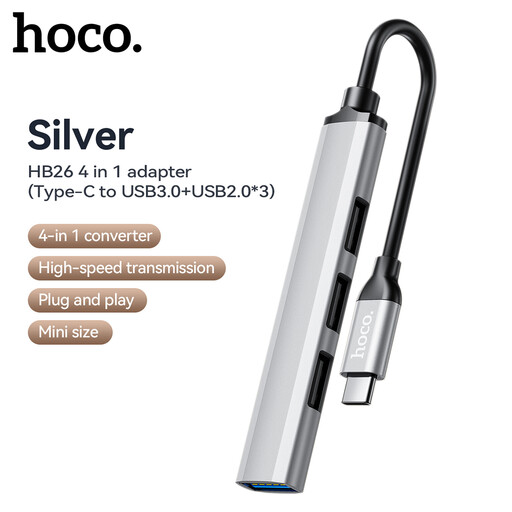
Why This Fits Their Persona: For students who already own several standard USB-A flash drives, this adapter is a highly cost-effective way to connect them to a new USB-C laptop for submitting assignments or accessing lecture notes, without needing to buy a new drive.
This isn't a drive, so it sidesteps the pitfalls of cheap, unreliable storage. It's a simple, functional bridge that extends the usefulness of existing, trusted hardware.
Provides one USB 3.0 and three USB 2.0 ports from a single USB-C connection. It's a pragmatic way to keep using older peripherals with a new machine.
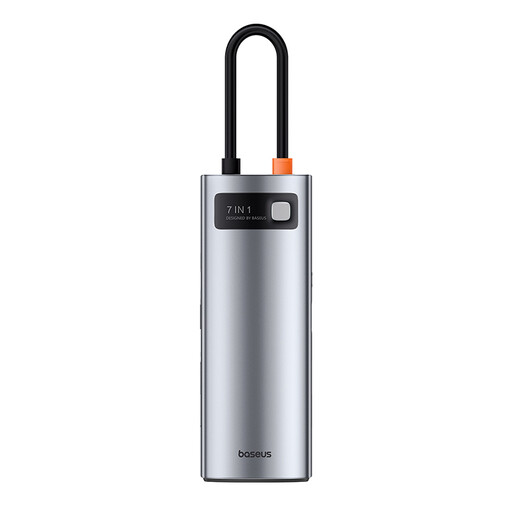
Why This Fits Their Persona: For those with a fixed workstation built around a modern laptop, this hub is a complete connectivity solution. It not only lets you use multiple USB-A drives but also adds an HDMI port for an external monitor, SD/TF card readers and power delivery.
This is a workstation-grade accessory, not a simple drive. Its metal alloy casing is specifically designed for heat dissipation during high-load tasks like 4K video output and 100W charging.
Transforms a single USB-C port into a 7-port powerhouse, including 4K@60Hz HDMI, 5Gbps USB 3.0 ports and 100W Power Delivery passthrough charging.
We have compiled a complete, real-time list of products that fully satisfy these strict selection criteria and UK safety regulations.
Most modern Android phones with a USB-C port support "On-The-Go" (OTG) functionality. This means you can simply plug the USB-C end of the flash drive for phone and laptop directly into your phone. Your phone's file manager app should then recognise it as external storage, allowing you to copy, move and delete files just as you would on a computer. No special apps are usually required.
While you can edit smaller projects directly from a high-speed drive, it is generally recommended to copy the video files to your computer's internal SSD for the smoothest editing experience. A USB 3.2 memory stick with high read/write speeds is excellent for quickly transferring the raw footage to your machine and for exporting the final project for delivery.
A well-made metal USB drive will not damage your port. The connectors are built to universal standards. The metal casing is for durability and heat dissipation. While the drive may feel warm to the touch after a large transfer, this is normal and indicates it is moving heat away from the internal electronics. Always ensure you insert and remove the drive straight to avoid putting unnecessary stress on the port.