Who is this setup for?
The right laptop depends on what must work at the home desk and how often the computer leaves it.
Home-desk workers who travel occasionally
If you write documents, handle email and calls, and keep several browser tabs open, a portable laptop can be your one computer. Check its connection to your existing monitor and peripherals rather than choosing a larger built-in screen solely for desk use.
Refurbished business-laptop buyers
An older business model may fit the job, but units sold under the same model name can differ. Compare the exact processor, memory, storage, installed operating system, battery information, condition grade and warranty for the unit offered.
Buyers who want a serviceable laptop
If keeping the computer in use matters to you, look for repair information and replaceable parts for the exact model and generation. A repairability finding for one laptop does not apply to every model in its brand’s range.
What should you check first?
Start with the software you need away from home, then check the desk connection. Compare portability, the exact configuration and upkeep only after those requirements are clear.
| Priority |
What to check |
Your needs |
| Operating system |
Check that required applications run on the installed system. For an older Windows laptop, confirm Windows 11 eligibility on the exact unit, including Microsoft’s processor, TPM 2.0, UEFI and Secure Boot requirements. Microsoft says standard Windows 10 support ended on 14 October 2025. |
I need the same work applications when I leave my desk. If they require Windows, a Chromebook is not a substitute until I have checked compatible versions or alternatives. |
| Desk connections |
Match the laptop’s video output to your monitor’s resolution and refresh requirement. If using a dock, check the exact laptop, dock, display connections and charging requirements together; a USB-C socket alone does not establish the combination. Lenovo’s dock documentation describes display support by device and dock model. |
At home, I want my monitor, keyboard and mouse ready to use without discovering that the laptop cannot drive the display or charge through my chosen dock. |
| Portability |
Compare screen size and stated carrying weight with how often you move the laptop. Decide whether a separate home monitor can provide the larger workspace you need at the desk. |
Most of my work happens at home, but I still need to take the computer away for documents, communication and browsing. |
| Exact configuration |
Check processor, memory, storage, display, keyboard layout and installed operating system for the unit being sold. Dell Refurbished UK notes that available Latitude 5420 configurations vary. |
With many tabs and documents open, I want to know which configuration I am ordering, especially if I choose a refurbished machine. |
| Battery and upkeep |
For a refurbished unit, request any available battery-health information rather than treating its cosmetic grade as a capacity measurement. Check warranty terms and model-specific repair information, including whether the chosen memory or storage can be changed. |
I may work away from a socket and want to understand what condition the battery is in and what can be serviced later. |
Relevant laptop brands and models
These model references help frame the checks; features and serviceability still need to be confirmed for the configuration you choose.
Lenovo
ThinkPad E-series models are relevant if you want a portable business laptop for work at home and away.
- Lenovo’s UK ThinkPad E14 Gen 7 listing describes a 14-inch 1920 × 1200 display, Windows 11 Home, SODIMM memory and a 65W USB-C power supply for its cited configuration.
- Check the exact configuration and its monitor or dock support. Separately, iFixit gives the older ThinkPad E14 Gen 6 a model-specific repairability score of 9/10; that score does not describe the Gen 7 or the wider ThinkPad range.
Dell
Dell’s current Pro range and older refurbished Latitude models illustrate two ways to obtain a 14-inch business laptop.
- Dell UK shows Dell Pro 14 configurations with Windows 11 Pro, 16GB memory, a 512GB SSD and a 1920 × 1200 display. Dell Refurbished UK lists Latitude 5420 units with configurations including 16GB memory and a 256GB SSD.
- Those specifications are configuration-specific. Confirm the offered unit rather than assuming every Dell Pro 14 or Latitude 5420 has the same components.
HP
The EliteBook 640 G11 is a reference point for comparing current commercial Windows laptop configurations.
- HP’s EliteBook 640 G11 documentation lists Windows 11 editions and multiple Intel Core Ultra processor options.
- HP says components vary with custom configuration. Check the actual unit’s memory, screen, ports, charger and warranty rather than relying on family-level documentation.
Joybuy laptop options
These options cover portable Windows laptops, a dual-screen Windows design and a Chromebook for browser-based work, plus a larger-screen Windows laptop for more time at the desk. Check required software and your monitor connection before choosing among them; a Chromebook will not run traditional Windows desktop applications.
 No image available
ASUS Vivobook 14 X1407QA-LY003W, Snapdragon X, 16GB RAM, 512GB SSD
This 14-inch model is an option if you want a laptop to carry away from a home desk. Its listed variant has Snapdragon X, 16GB RAM and a 512GB SSD; check that your required applications, monitor and dock work with this exact model.
View on Joybuy
 No image available
HP OmniBook Ultra Flip 14-fh0006na 2-in-1, 16GB RAM, 1TB SSD
The 2-in-1 format offers a different way to use a portable computer alongside a home desk. This variant is named with Windows 11 Home, 16GB RAM and a 1TB SSD. Confirm its exact screen resolution before ordering, as the supplied display descriptions conflict, and check the intended monitor and dock combination.
View on Joybuy
 No image available
ASUS Zenbook DUO UX8406CA-QL135W, dual OLED touchscreens, 16GB RAM, 1TB SSD
The dual-screen format may interest you if you work with documents and calls on separate screens while away from your desk. The named variant has an Intel Core Ultra 7 255H, 16GB RAM and a 1TB SSD. Confirm the exact panel resolution, which differs across its supplied descriptions, and check how it will connect to your home monitor.
View on Joybuy
 No image available
Acer Chromebook Plus 514 CB514-5H, Core 5 120U, 8GB RAM, 512GB SSD
This 14-inch Chromebook is an option for documents, email and browsing when the applications you need work on ChromeOS. The named variant has a 1920 × 1200 screen, 8GB RAM and a 512GB SSD. Confirm the exact model’s remaining ChromeOS update period and compatibility with your external display before replacing a Windows desktop.
View on Joybuy
 No image available
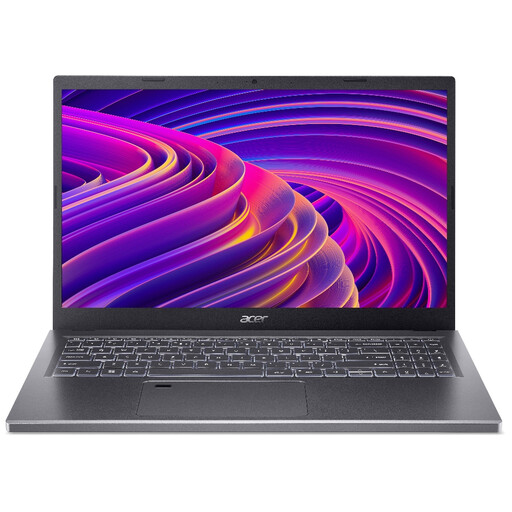
Acer Aspire 5 A515-48M, 15.6-inch Full HD, 16GB RAM, 512GB SSD
The 15.6-inch screen is worth considering if you use the built-in display at home and carry the laptop only occasionally. This named variant has 16GB RAM and a 512GB SSD. Confirm the supplied processor configuration and the connection needed for your monitor; do not assume its USB-C port provides video output.
View on Joybuy
Common questions
Can a refurbished Windows 10 laptop be my main computer?
Check whether the exact unit can run Windows 11 before relying on it for ongoing work. Microsoft says standard Windows 10 support ended on 14 October 2025; its Consumer Extended Security Updates route is time-limited, with protection available for eligible devices until 12 October 2027. An installed Windows 10 system alone does not establish Windows 11 eligibility.
Will one USB-C cable connect my monitor and peripherals and charge the laptop?
Only if the exact laptop and dock support your intended combination. Check the laptop’s display-output capability, the dock’s host compatibility, your monitor requirements and the charging power needed. The presence of a USB-C port or multiple video sockets on a dock does not settle those checks.
What matters most in a refurbished business-laptop listing?
Confirm the offered unit’s processor, memory, storage, display, keyboard layout, operating system, condition, battery information and warranty. Dell Refurbished UK says Latitude 5420 units and specifications vary, so the model name alone does not identify the configuration you will receive.
Does a trader’s warranty replace my rights if a refurbished laptop is faulty?
No. Citizens Advice says a warranty or guarantee adds to legal rights rather than replacing them. It says rights relating to a fault can last up to six years, or five years in Scotland; those periods are not a blanket change-of-mind return window. Keep your proof of purchase and the warranty terms if a fault arises.


