
24/7 Customer Support

Free returns

Same-day & Next-day Delivery

Quality Guaranteed

Unlock Your Welcome Offers: FREE Delivery | Up to 80% OFF | Free 30-day JoyPlus trial
Download the APP
A laptop bag needs to do more than look smart on a product page. For students carrying a computer between lectures, commuters travelling through unpredictable British weather and professionals moving between offices, the right design should protect the device while keeping chargers, keys and documents easy to reach.
However, laptop bags are often marketed with vague claims such as “maximum protection” or “waterproof” without explaining what those features mean in everyday use. Before buying a 15.6-inch laptop bag, check the points below to avoid choosing a case that is too tight, poorly organised or uncomfortable to carry.
A laptop described as 15.6 inches is measured diagonally across the screen. It does not tell you the computer’s full width, depth or thickness. Gaming laptops and models with wide bezels may need more room than slim office notebooks.
Always compare your laptop’s measurements with the bag’s internal dimensions. A little clearance is useful, but too much movement can allow the laptop to slide inside the case.
A splashproof laptop bag may help protect against light rain, accidental splashes or damp surfaces. It is not necessarily designed for prolonged exposure to heavy rain or immersion.
Look for a coated outer fabric, covered zip area and sensible precautions such as keeping the bag closed during wet weather. Avoid relying on marketing language alone unless a specific water-resistance rating is provided.
A laptop sleeve with several pockets is only practical if the compartments fit the items you carry. Very narrow pockets may not accommodate a bulky power adapter, while loose open sections can allow cables to tangle.
For regular commuting, consider a laptop shoulder bag or laptop carrying case with separate areas for the charger, mouse, USB cables, pens and travel documents.
The internal compartment should be large enough for your device without leaving excessive space. For example, the Inateck 15.6-inch model has internal dimensions of 38.5 x 26.5 x 3 cm, while its external dimensions are 41 x 29 x 6 cm.
A padded laptop sleeve should also protect more than the centre of the computer. Useful design details include:
A phrase such as “360° protection” should be treated as a description of the construction, not a guarantee against every type of impact. Even a protective laptop bag should be handled carefully and kept away from heavy objects.
A laptop bag with shoulder strap is convenient when you need both hands free on a train platform or while cycling at low speed. Check whether the strap is adjustable, detachable and fitted with a shoulder pad.
A reinforced handle is useful for short journeys, while a laptop bag with luggage strap can sit over the telescopic handle of a suitcase. This helps reduce the need to carry two separate bags through stations or airports.
Consider what you carry every day rather than choosing pockets based on quantity alone. Magnetic front pockets can provide quick access to cards, keys or a charging cable. Elastic loops are useful for keeping pens, cables and smaller accessories in place.
If you often carry paperwork, check whether the bag leaves room for documents without pressing them against the laptop. Keeping the computer in a dedicated compartment is preferable to placing it loose beside a charger.
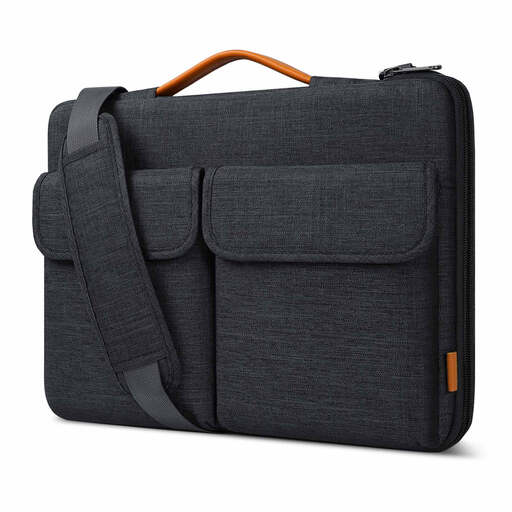
Why This Fits Their Persona: A practical option for students and new commuters who need one case for daily travel, with space for a laptop and small accessories.
It lists internal measurements, splashproof outer material and a protective strip along the zip rather than relying only on general protection wording.
Flannel-lined interior, two front magnetic pockets, handle and detachable shoulder strap.
Why This Fits Their Persona: Suitable for business professionals who value a restrained appearance and flexible carrying methods for office and travel use.
Its luggage rail and adjustable strap address the inconvenience of carrying a laptop separately through airports and railway stations.
Classic grey styling, soft PU handle, detachable padded shoulder strap and luggage strap.
Why This Fits Their Persona: Frequent travellers and commuters can use the handle, shoulder strap or luggage rail according to the journey.
The case combines a protective interior with a zip-edge strip and splashproof exterior, helping address everyday scuffs and light rain.
Organiser pockets include elastic bands for cables and pens, while the external rail helps attach the bag to luggage.
Before ordering a 15-inch laptop case, measure the laptop itself, including any raised feet, large hinges or protective shell. The Inateck listing identifies compatibility with many 15.6-inch Dell Inspiron, Lenovo Legion Y520, HP Pavilion and Acer Aspire or Nitro 5 models. Compatibility can vary between generations, so compare measurements rather than relying solely on the brand name.
If your laptop is smaller, a dedicated 14-inch notebook sleeve may provide a closer fit. For example, the VoxorAI computer bag has stated dimensions of 35 x 25.3 x 0.5 cm and is designed for 14-inch notebooks. It should not be selected for a typical 15.6-inch laptop without checking the dimensions first.
For documents, a separate A4 sleeve can help keep reports and paperwork tidy, but a stationery document pocket is not a substitute for a padded laptop compartment.
We have compiled a complete, real-time list of products that fully satisfy these strict selection criteria and UK safety regulations.
No. Screen size is only one measurement. Compare the laptop’s width, depth and thickness with the sleeve’s internal dimensions. Gaming laptops may require additional room because of larger cooling systems and chassis designs.
Lifespan depends on daily use, loading weight, zip quality and exposure to rain or abrasion. Empty unnecessary items from the bag, avoid overfilling the organiser pockets and inspect the strap attachments regularly. Replace the bag if padding becomes compressed, stitching opens or the zip no longer closes securely.
A shoulder bag is usually heavier than a basic sleeve because it includes handles, straps, padding and storage compartments. Check the listed product weight where available, then consider the weight of your charger and accessories. For short walks, a handle may be comfortable; for longer commutes, a padded adjustable strap can distribute the load more evenly.