
24/7 Customer Support

Free returns

Same-day & Next-day Delivery

Quality Guaranteed

Unlock Your Welcome Offers: FREE Delivery | Up to 80% OFF | Free 30-day JoyPlus trial
Download the APP
Navigating the laptop market can feel overwhelming. With countless models and specifications, finding a device that balances performance, portability and price is a common challenge for students, remote professionals and home office users across the UK. A 15 inch Core i5 laptop often represents the sweet spot for performance and screen size, but which one is right for you?
This guide is designed to cut through the marketing clutter. As a Joybuy Product Recommendation Officer, my role is to provide clear, practical information to help you make an informed choice. We will explore key features to look for and highlight a few standout options that deliver on their specifications for productivity, study and entertainment.
Before diving into specific models, let’s cover a few essential considerations. Understanding these will help you identify the features that matter most for your daily tasks.
The Intel Core i5 processor is a capable choice for a wide range of activities, from writing essays and managing spreadsheets to streaming media and light photo editing. When selecting a laptop for students UK or a reliable business notebook, look at the supporting components. 16GB of RAM is becoming the standard for smooth multitasking, allowing you to run multiple applications without slowdowns. For storage, a Solid State Drive (SSD) of at least 512GB ensures your Windows 11 laptop boots quickly and applications load in seconds.
You will be looking at your laptop screen for hours, so its quality is paramount. A Full HD (1920 x 1080) resolution on a 15-inch display provides sharp, clear visuals. Features like anti-glare coatings, often found on an Acer Aspire laptop, can reduce eye strain during long sessions.
Equally important are the connection ports. A good selection of USB-A, USB-C and HDMI ports allows you to connect external drives, mice and displays, transforming your laptop into a versatile portable workstation setup.
For many, a single laptop screen isn't enough. A second screen for laptop use can dramatically improve productivity by giving you more space to manage windows and applications. A modern 4K portable monitor offers a simple, plug-and-play solution, connecting via a single USB-C or HDMI cable to provide a stunning, high-resolution extension to your workspace, whether at home or on the go.
Based on current specifications and user needs, here are our recommendations for reliable and high-performing computing solutions.
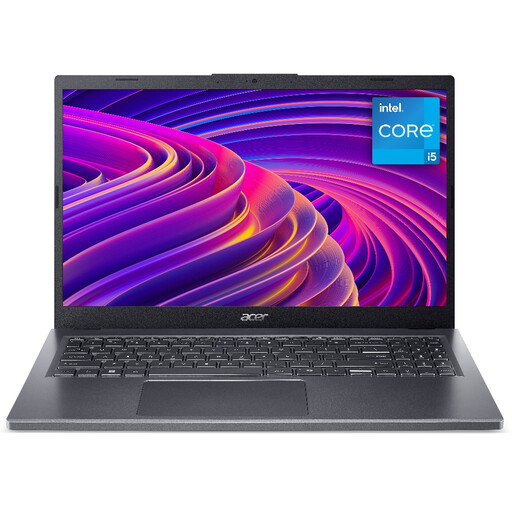
Why It Stands Out: This model is a powerful all-rounder. It pairs the efficient Intel Core i5-13420H processor with a generous 16GB of LPDDR5 system memory. This combination ensures that demanding applications and heavy multitasking are handled with ease, making it an excellent choice for users who need consistently smooth performance.
Pros:
Who is it for? This laptop is well-suited for remote professionals, university students in technical or creative fields and anyone who frequently juggles multiple browser tabs, documents and applications.

Why It Stands Out: The Aspire Go offers fantastic flexibility and value. It features the same powerful Intel Core i5-13420H processor found in more expensive models but starts with 8GB of DDR4 RAM. Crucially, this memory is expandable up to 32GB, providing a clear upgrade path as your needs grow. Its comprehensive port selection, including an RJ-45 Ethernet port, makes it a practical choice for office and home use.
Pros:
Who is it for? This is a great option for budget-conscious students, home office users and small businesses looking for a capable business notebook that can be upgraded over time.

Why It Stands Out: For those looking to create the ultimate portable workstation setup, this monitor is a game-changer. Its expansive 18.4-inch screen provides significantly more workspace than a standard laptop display, while the 3840 x 2160 4K QLED panel delivers exceptionally sharp and vibrant visuals. It’s an ideal companion for any high-performance laptop.
Pros:
Who is it for? This monitor is aimed at content creators, programmers, financial analysts and any professional or student who needs maximum screen space and resolution from a second screen for laptop use.
Beyond your main screen, the right accessories can make a significant difference in your productivity. For those who work with detailed diagrams, give presentations or annotate digital documents, precision is key.
If you're looking for tools that offer fine control and visibility for highlighting information on screen, you might find our selection of [LED pens] useful for your workflow.
Yes, a modern Intel Core i5 processor, particularly an H-series chip like the i5-13420H, provides excellent multi-core performance that is more than sufficient for mainstream productivity, studying and entertainment needs on a Windows 11 laptop. It strikes a great balance between power and energy efficiency.
For general studies involving web browsing, word processing and streaming, 8GB of RAM is adequate. However, for students in more demanding fields like computer science, engineering or graphic design, or for those who are heavy multitaskers, 16GB of RAM is recommended to ensure a consistently smooth and responsive experience.
Most modern 15 inch Core i5 laptop models can connect to a 4K portable monitor. To do so, the laptop must have a video-out capable port, such as an HDMI 2.0/2.1 port or a USB-C port that supports DisplayPort Alternate Mode. It is always advisable to check the laptop's technical specifications to confirm compatibility before purchasing.