
24/7 Customer Support

Free returns

Same-day & Next-day Delivery

Quality Guaranteed

Unlock Your Welcome Offers: FREE Delivery | Up to 80% OFF | Free 30-day JoyPlus trial
Download the APP
A 15-inch laptop can be a useful middle ground: more comfortable than a compact model for spreadsheets and split-screen work, yet easier to carry than a large desktop replacement. However, comparing 15.6-inch laptops by processor name or advertised battery figures alone can lead to an unsuitable purchase.
The most common pitfalls are:
The following checks help narrow the choice before you buy.
For Windows 11 laptops, 8GB RAM is suitable for browsing, documents, online learning and basic video calls. If you regularly use many browser tabs, spreadsheets, creative applications or development tools, 16GB RAM offers more working headroom. Some models provide 24GB, which can be useful for heavier multitasking.
Storage affects both capacity and responsiveness. A 512GB SSD is a practical target for documents, applications, photos and downloaded media. A 256GB SSD may suit lighter users, while 128GB storage can become restrictive once Windows updates and applications are installed. Check whether storage is replaceable and whether the laptop includes a second drive bay.
Intel Core i5, AMD Ryzen 5 and comparable modern processors are generally suitable for laptops for work, study and everyday entertainment. Performance also depends on the processor’s power class, cooling system and memory configuration.
Integrated graphics are appropriate for office software, streaming and light creative work. Those looking for gaming laptops, 3D applications or GPU-accelerated editing should consider a dedicated graphics processor. The Lenovo LOQ Essential listed below includes a GeForce RTX 5050 laptop GPU, but its larger 2.30kg chassis and dedicated power adapter make it less convenient for daily commuting.
A 15.6-inch Full HD resolution of 1920 × 1080 provides usable space for documents and video. Anti-glare coatings can help in bright rooms, although brightness still matters when working near windows. IPS-class panels generally offer more consistent viewing angles than basic TN panels.
For commuting between a home office, university or workplace, compare the listed weight rather than relying on phrases such as “ultra-portable”. The models below range from approximately 1.58kg to 2.30kg. Also check for the ports you actually need, such as HDMI, USB-C, Ethernet, a card reader or a headphone connection.
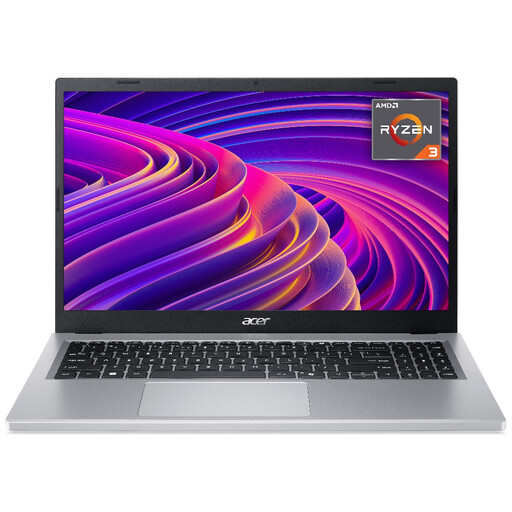
Why This Fits Their Persona: A sensible option for students, families and first-time laptop buyers handling web browsing, online learning, documents and streaming. Its listed weight is approximately 1.6kg, making it manageable for travel between home and campus.
It provides 8GB LPDDR5 memory and a 256GB NVMe SSD rather than relying only on processor branding. Battery life is listed as up to 10 hours, so treat this as a usage-dependent estimate.
Full HD display, Wi-Fi 6, USB-C, HDMI 2.1 and an integrated microSD reader.
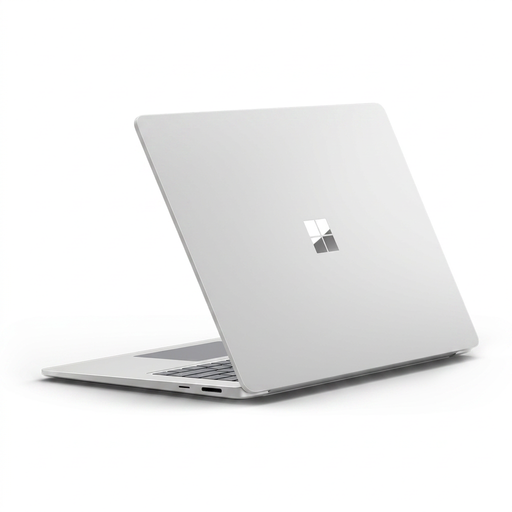
Why This Fits Their Persona: Suitable for professionals and creatives who value a high-resolution touchscreen, premium-style construction and a lighter 1.66kg design for work away from a desk.
Its specification clearly lists 16GB LPDDR5x memory and a 15-inch 2496 × 1664 touchscreen. Buyers should still confirm software compatibility because this Copilot+ PC uses an ARM-based Snapdragon processor.
3:2 PixelSense display, Windows Hello facial recognition, Wi-Fi 7 and two USB4 ports.

Why This Fits Their Persona: Designed for gamers and users running demanding creative or graphics applications. It is more suitable for desk-based use than frequent commuting because the listed weight is 2.30kg.
It uses a dedicated GeForce RTX 5050 laptop GPU with 8GB GDDR7 memory rather than integrated graphics. Actual frame rates depend on the game, resolution and settings.
16GB DDR5 RAM, 1TB PCIe 4.0 SSD, 144Hz Full HD display and 100% sRGB coverage.

Why This Fits Their Persona: A strong match for home workers, business users and families storing larger document, photo and media libraries.
The configuration pairs 24GB DDR5 memory with a 1TB SSD, reducing the likelihood of quickly running out of working memory or storage.
15.6-inch anti-glare IPS display, six listed USB-A/USB-C ports and a 1.70kg chassis.
We have compiled a complete, real-time list of products that fully satisfy these strict selection criteria and UK safety regulations.
Yes, provided the weight, charger size and battery estimate suit your routine. Models around 1.6–1.8kg are generally easier to carry, while a 15.6-inch screen gives more space for lecture notes, research and split-screen documents.
8GB RAM is adequate for everyday office tasks and browsing. Choose 16GB RAM if you use large spreadsheets, many browser tabs, programming tools, creative applications or frequent video meetings.
Running cost depends on power draw, usage hours and your electricity tariff. Office laptops with integrated graphics usually consume less power than gaming laptops with dedicated GPUs. Using balanced or energy-saving modes, lowering screen brightness and shutting down rather than leaving the laptop idle can reduce consumption.