
24/7 Customer Support

Free returns

Same-day & Next-day Delivery

Quality Guaranteed

Unlock Your Welcome Offers: FREE Delivery | Up to 80% OFF | Free 30-day JoyPlus trial
Download the APP
Navigating the world of premium laptops can feel like a minefield of marketing jargon and confusing specifications. When you are considering a significant purchase like the new 15-inch MacBook Air M5, it is easy to fall into common traps that lead to buyer's remorse. Many UK consumers end up paying for features they will never use or settling for a device that does not quite fit their daily life. Before you decide, let's cut through the clutter and look at the pitfalls to avoid.
To make an informed choice, focus on the parameters that genuinely impact your day-to-day experience. Here are the three non-negotiables for a modern, lightweight laptop.
The conversation starts with the processor. The new Apple M5 chip laptop series continues Apple's focus on power efficiency. This is not just about battery life; it is about delivering consistent performance without overheating. This efficiency is what allows for a completely fanless Apple laptop design. The result is a silent machine that can handle demanding tasks like editing high-resolution photos, compiling code or running dozens of browser tabs without making a sound or becoming uncomfortably hot for most typical workflows. The M5 chip integrates the CPU, GPU and memory, which allows for remarkably fast data access and smooth multitasking.
In 2026, 16GB of unified memory is the practical standard for a seamless experience. It allows you to switch between applications, from video calls to complex spreadsheets, without frustrating lag. Paired with a 512GB Solid-State Drive (SSD), a MacBook Air 16GB 512GB configuration provides ample, high-speed storage for your applications, documents and media, ensuring the system boots up instantly and files open in a flash. Anything less may feel restrictive within a year or two of use.
The main appeal of this model is that it is a 15-inch lightweight laptop. The larger Liquid Retina display provides a significant advantage for productivity, allowing you to comfortably use two applications side-by-side. It is also more immersive for watching films or editing photos. Crucially, this is achieved in a chassis that remains exceptionally thin and portable, finally breaking the old compromise between screen size and weight. This makes it a top choice for students and professionals in 2026 who need both a large workspace and the freedom to move.
Instead of a single "one-size-fits-all" recommendation, it is more helpful to match a device to your specific needs.
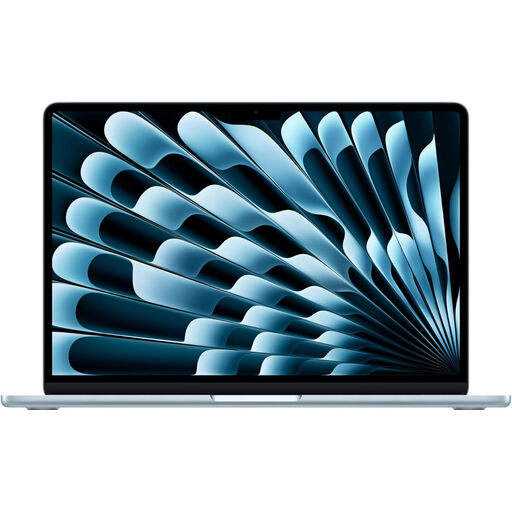
Why This Fits Their Persona: This user juggles research, writing, spreadsheets and presentations. The expansive 15-inch screen is a game-changer for productivity, while its light weight means it is no burden to carry between lectures, the library or client meetings in the city. The stylish Sky Blue MacBook Air finish also adds a touch of personality.
It directly solves the size vs. weight compromise and avoids the "Pro" trap by providing more than enough power for demanding productivity without the cost and battery drain of a top-tier MacBook Pro.
A large, vibrant 15-inch display in a silent, fanless design that weighs under 1.5kg. Excellent battery life for a full day of work or study.
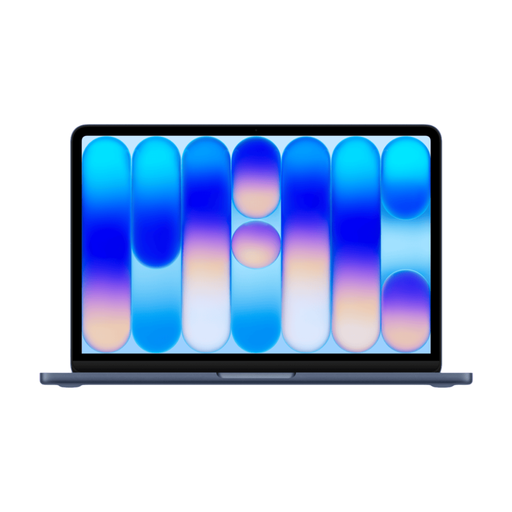
Why This Fits Their Persona: This user prioritises portability above all. They are often working on a train, in a coffee shop or moving between locations. Their tasks are focused on web browsing, email and document creation. The MacBook Neo's compact 13-inch frame is ideal for tight spaces.
It avoids overspending on a larger screen or more power than necessary for core tasks. It is a purpose-built machine for maximum efficiency and portability, delivering exactly what the commuter needs.
Extremely lightweight and compact design. The A18 Pro chip is optimised for exceptional battery life during everyday tasks like browsing and video streaming.
Why This Fits Their Persona: This user is a hobbyist photographer, aspiring YouTuber or graphic design enthusiast. The 15-inch MacBook Air's large, colour-accurate screen is an excellent canvas for editing photos in Adobe Lightroom or assembling video clips in Final Cut Pro. The M5's 10-core GPU provides the necessary muscle for these creative tasks.
It offers a near-pro creative experience without the significant price jump. It hits the sweet spot for users who need more than a basic laptop for their hobbies but do not require a top-of-the-line workstation.
A spacious Liquid Retina display with P3 wide colour for accurate editing. The M5 chip's capable GPU and media engine accelerate creative workflows.
We have compiled a complete, real-time list of products that fully satisfy these strict selection criteria and UK safety regulations.
1. Is the fanless design of the MacBook Air M5 a problem for performance? For the vast majority of tasks, including 4K video playback, complex document editing and even moderate photo editing, the fanless design is a benefit, offering completely silent operation. The M5 chip is so efficient that it can maintain peak performance without active cooling. Only during very long, sustained, high-intensity workloads (like exporting a feature-length film) might a fan-equipped "Pro" model show an advantage.
2. Is 16GB of memory enough for a professional laptop in 2026? Yes, for most professionals and students, 16GB of Apple's unified memory is ample. Because it is integrated directly with the M5 chip, it is faster and more efficient than traditional RAM. This amount is sufficient for heavy multitasking across office applications, web browsers with numerous tabs and creative software. Users with extremely specialised needs, such as professional 8K video editors, may consider higher configurations.
3. How does the Sky Blue MacBook Air finish hold up over time? Apple uses an anodisation process for its aluminium finishes, which is designed for durability. The Sky Blue colour is bonded to the metal, making it resistant to chipping or peeling with normal use. Like any laptop, it can be susceptible to scratches from sharp objects. Using a protective sleeve during transport is always a good practice to maintain its appearance.