Who each option suits

Everyday home-and-travel users

You mainly browse, stream, shop, message, make video calls and handle occasional light documents, and want a device that is straightforward to carry between rooms or away from home. Ofcom reported that UK adults aged 16+ spent an average of 4 hours 30 minutes online daily across personal smartphones, tablets and computers in May 2025.

Tablet-first users adding a keyboard or stylus

You prefer touch apps for media, notes, email or light creative work, but should confirm that the exact tablet supports the keyboard, trackpad, pen, storage media and display arrangement your routine requires.

Households replacing an ageing Windows computer

You need familiar desktop-style folder management, local-file handling, peripherals or software that may be awkward or unavailable in tablet apps. Microsoft describes File Explorer as a tool for finding, organising, moving and managing files and folders on a PC and in the cloud.

What to check before choosing

Tablet with accessories

Choose it when: Your routine is mainly touch-first, browser-based or app-based, and a keyboard or pen supports the tasks you actually repeat.

Watch for: Storage, display and peripheral use can depend on the model, connector, app and accessory combination.

Conventional laptop

Choose it when: You regularly work with local folders, desktop applications, external drives or a varied set of peripherals.

Trade-off: A clamshell laptop does not offer the same tablet-style touch and pen use as a convertible device.

Windows 2-in-1

Choose it when: You want tablet-style interaction or pen use while retaining Windows desktop software and file management.

Check first: Keyboard compatibility differs between Surface generations and should be confirmed for the exact model.

Priority What to check Your needs and relevant context
Portability and everyday use Compare the screen size and weight of the configuration you will carry. Include any detachable keyboard or cover in the overall setup. I want browsing, streaming, messages and calls to remain comfortable whether I am at home or travelling. Ofcom reported that 95% of the UK population aged 16+ had internet access at home in 2025; this measures home internet access, not a preference for tablets or laptops.
Typing and navigation Check the exact keyboard generation, trackpad and pen compatibility. Try the input method needed for longer documents and precise pointer tasks. For repeated messages, documents or detailed navigation, I need more than an on-screen keyboard. A compatible physical keyboard and trackpad can be important parts of a tablet setup.
Files and accessories List the drives, card readers, displays and apps you use. Check connectors, adapters, storage formats, power requirements and app support for a tablet. I regularly move folders or connect removable storage, so I need a workflow that handles those tasks without workarounds. Windows File Explorer is designed for organising and managing files and folders on a PC and in the cloud.
Support and updates Check the exact device model, current operating-system version, firmware policy and warranty terms. Treat operating-system servicing, driver updates and hardware service as separate policies. I want a clear route for keeping the device current. Microsoft says Windows 11 Home and Pro annual feature updates begin a 24-month support lifecycle, while eligible Surface devices released from 1 January 2021 receive driver and firmware updates for at least six years from release.

Buying pitfalls to avoid

  • Assuming USB-C guarantees laptop-style external-drive use

    On iPad, external storage is accessed through Files and supported apps. The connector or adapter, storage format and power needs of the drive can all affect whether a transfer works.

    Test the exact drive, card reader, file type and app you rely on during the return period. Charging through USB-C is separate from file-transfer and peripheral compatibility.

    You may need a compatible adapter, card reader, powered USB hub or separately powered drive.

  • Treating detachable keyboards as interchangeable

    Keyboard compatibility can vary by tablet generation. Microsoft, Apple and Samsung all describe keyboard accessories for specific device families rather than as universal tablet parts.

    Confirm the complete tablet model and the accessory compatibility statement before paying, including any keyboard, trackpad, pen and case needed for your setup.

    An incompatible keyboard, pen or cover may need replacing.

  • Comparing support promises without separating what they cover

    Windows servicing is tied to Windows versions, while Surface driver and firmware support follows a separate policy. Apple’s obsolete-product definition concerns hardware service after distribution ends rather than a guaranteed iPadOS update period.

    Record the exact model, operating-system version, manufacturer firmware-policy date and warranty terms before purchase. Do not infer a fixed software-support end date from a hardware-service policy.

  • Replacing an old device without planning reuse or recycling

    UK WEEE rules are intended to increase recovery, reuse and recycling of electrical equipment and reduce disposal to landfill.

    Check the retailer’s trade-in or take-back terms and your local authority’s collection route before disposing of the old device.

Relevant brand routes

Apple

iPad Air is a tablet route for people who prioritise touch-first media, communication, note-taking and lightweight creative work, and who are prepared to build a compatible keyboard-and-pen setup where needed.

  • Apple states that current UK iPad Air models support Magic Keyboard and Apple Pencil Pro.
  • External storage use depends on the iPad model, connector or adapter, supported file-system format and, for some drives, external power.

Samsung

Galaxy Tab is an Android tablet route for users who want a tablet first but may sometimes need a desktop-style interface on an external display through Samsung DeX.

  • Samsung describes DeX as offering a desktop-style experience on a supported setup with an external display or PC.
  • The supported tablet, monitor connection, keyboard and mouse arrangement should be checked for the intended setup; some accessories may be purchased separately.

Microsoft

Surface Pro is a Windows 2-in-1 route for buyers who want pen-capable tablet use but need Windows desktop software and file management when using a keyboard or docked setup.

  • Microsoft says compatible Surface keyboards and Type Covers can turn Surface devices into laptop-style setups.
  • Keyboard compatibility differs by Surface generation. For devices released from 1 January 2021, Microsoft provides at least six years of driver and firmware updates, separate from Windows version servicing.

Joybuy product options

Joybuy laptop and 2-in-1 options for everyday browsing, communication, light documents and familiar Windows file workflows.

HP OmniBook X Flip 16-as0004na 2-in-1 laptop

HP OmniBook X Flip 16-as0004na 2-in-1

A Windows 2-in-1 for buyers replacing an ageing computer while retaining touch-based use. Stated specifications include a 16-inch touchscreen, Intel Core Ultra 5 226V, 16GB RAM, 512GB SSD and Windows 11 Home. Check that its size, ports and rotation-sensor behaviour suit your travel and peripheral setup.

Joybuy

ASUS Vivobook 14 X1407QA-LY003W laptop

ASUS Vivobook 14 X1407QA-LY003W

A conventional Windows laptop for browsing, calls, light documents and desktop-style file handling. It is stated to have a 14-inch WUXGA anti-glare display, Snapdragon X processor, 16GB RAM, 512GB NVMe storage, USB4 Type-C, HDMI 2.1 and a 1.49kg weight. Confirm that required desktop apps and peripherals work with this Snapdragon-based configuration.

Joybuy

Lenovo IdeaPad Slim 3 83K7009MUK laptop

Lenovo IdeaPad Slim 3 83K7009MUK

A Windows laptop for frequent folders, files and longer documents. The listing states a 15.3-inch WUXGA display, AMD Ryzen 5 7535HS, 24GB DDR5 RAM, 512GB PCIe SSD, Windows 11 Home, Wi-Fi 6 and a numeric keypad. Check whether the 15.3-inch size and its peripheral connections suit your usual bag and workspace.

Joybuy

ASUS Vivobook 15 X1504VA laptop

ASUS Vivobook 15 X1504VA

A clamshell Windows option for browsing, media, routine files and several home accessories. Stated specifications include a 15.6-inch Full HD IPS anti-glare display, Intel Core 5 120U, 24GB DDR5 RAM, 1TB SSD, HDMI and multiple USB ports. It does not provide tablet-mode touch or pen input, and the listed battery figure is standby time rather than typical work use.

Joybuy
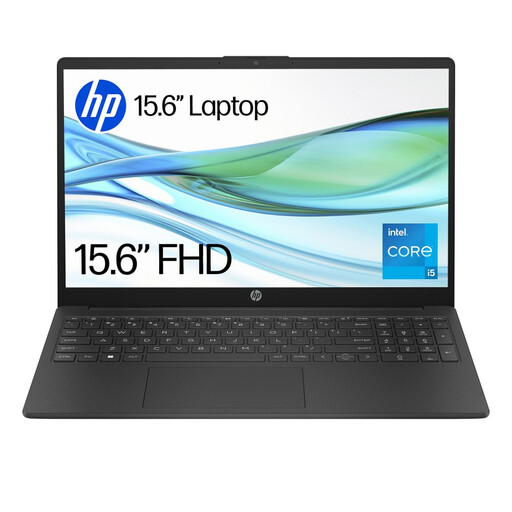
HP 15-fd0064na laptop

HP 15-fd0064na

A Windows laptop for routine browsing, video calls and light office work around home or while travelling. The listing states a 15.6-inch Full HD display, Intel Core i5-1334U, 8GB RAM, 256GB NVMe SSD, Wi-Fi 6 and an HD camera with privacy door. Check that the available storage and memory suit your existing files and usual workload.

Joybuy

Frequently asked questions

When is a tablet with a keyboard a realistic laptop replacement?

It can be realistic when your recurring tasks are browser- and app-based, your documents work in the tablet apps you use, and you have tested the exact keyboard, trackpad, storage and video-call setup. It is less suitable if you regularly manage many local folders, use desktop-only software or attach varied peripherals; in those cases, retain a laptop or consider a Windows 2-in-1.

Can an iPad use USB drives and SD cards?

Yes, through the Files app and other supported apps, but the setup is conditional. Apple says you may need a compatible connector or adapter, the storage must use a supported format with a single data partition, and external hard drives often need their own power source or a powered hub.

Will any Surface keyboard fit any Surface Pro?

No. Microsoft states that Surface Pro 12-inch Keyboards are compatible with Surface Pro 12-inch models, Surface Pro Keyboards with Surface Pro 8 and later, and Surface Pro Type Covers with Surface Pro 7+ and earlier. Confirm the exact tablet generation and keyboard before buying.

How long will a Windows 11 laptop remain supported?

For Windows 11 Home and Pro, Microsoft says each annual feature update starts a 24-month support lifecycle. Support therefore depends on keeping the device on a supported Windows version, rather than simply on the age of the laptop; Surface driver and firmware servicing follows a separate policy.

What should I do with an old laptop or tablet in the UK?

UK WEEE Regulations support the recovery, reuse and recycling of electrical equipment. Check the collection, trade-in or take-back arrangement offered by your retailer or local authority before disposal, as those consumer services can vary.