
24/7 Customer Support

Free returns

Same-day & Next-day Delivery

Quality Guaranteed

Unlock Your Welcome Offers: FREE Delivery | Up to 80% OFF | Free 30-day JoyPlus trial
Download the APP
The shift to hybrid and remote work has transformed our desk setups. A second screen is no longer a luxury but a necessity for productivity. While traditional monitors are fixed, a 24 inch portable monitor promises the best of both worlds: a large, desktop-like display that you can easily move or store. However, the market is filled with options that can be misleading.
Many buyers find themselves with a screen that is either too cumbersome to be truly portable, has confusing connectivity or is too wobbly to be practical. This guide, from your Joybuy Product Recommendation Officer, will help you navigate the common pitfalls and identify the key features that matter for a flexible workspace in the UK.
Before you invest, be aware of these common issues that can turn a promising purchase into a frustrating experience.
A screen's size is only part of the story. Many models advertised as portable are surprisingly heavy or bulky. More importantly, they often require a separate power brick and multiple cables, completely undermining the convenience of a portable setup. A truly portable monitor should be lightweight and ideally operate via a single cable.
The promise of a single USB C portable monitor is appealing, but not all USB-C ports are created equal. Some only transmit power, while others only handle video. Without support for both DisplayPort Alternate Mode (DP Alt Mode) for video and Power Delivery (PD) for charging your laptop, you will find yourself juggling extra adapters and power cables—exactly what you wanted to avoid.
A large portable monitor needs a solid foundation. Many models come with a flimsy, foldable cover that doubles as a stand. While this works for smaller 15-inch screens, it often provides poor stability and limited viewing angles for a 24-inch display. For a reliable second screen for hot desking, a wobbly stand is a significant drawback.
To ensure you get a monitor that genuinely enhances your productivity, focus on these non-negotiable features.
For the ultimate plug-and-play experience, look for a monitor with a full-function USB-C port. This means it must support both DP Alt Mode to receive the video signal and Power Delivery (PD) of at least 45W to power the display and charge your laptop simultaneously. This single-cable solution is the gold standard for a clutter-free monitor for hybrid work. An additional HDMI port is also a valuable feature for connecting to older laptops, desktops or games consoles.
A portable monitor with stand should offer more than just a basic kickstand. For larger screens, look for versatile mounting options that adapt to different environments.
While a 24-inch screen offers ample space for multitasking, its weight and thickness are critical. A monitor weighing over 3 kg becomes difficult to transport regularly. Look for a slim profile (under 10 mm thick) and a weight of around 2.8 kg or less to ensure it remains practical for moving between your home office and workplace.
Based on these practical criteria, here are some recommendations matched to different user needs.
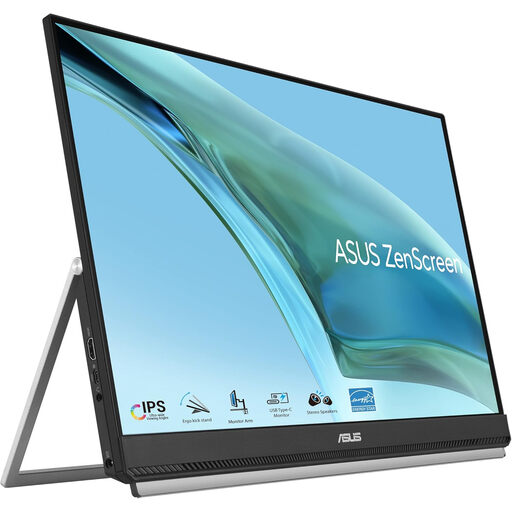
Why This Fits Their Persona: This monitor is designed for professionals who need a full-sized second screen that is genuinely adaptable. Its large 23.8-inch display provides desktop-level productivity, while its light weight (2.8 kg) and multiple mounting options make it perfect for moving between a home office and a hot-desking environment.
It solves the stability and connectivity problems with its included C-clamp arm, partition hook and a full-function USB-C port that provides 60W power delivery, enabling a true single-cable setup.
Unmatched versatility with multiple included mounts (kickstand, handle, C-clamp and partition hook). The frameless IPS panel is ideal for comfortable, wide-angle viewing.
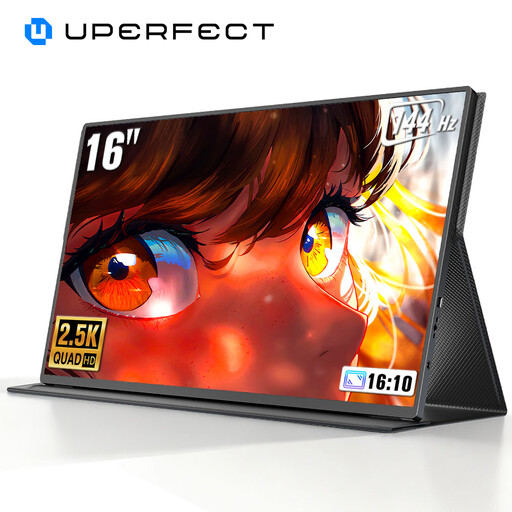
Why This Fits Their Persona: For gamers, video editors or anyone needing exceptionally smooth motion and sharp detail on the go. This monitor prioritises performance with its 2K resolution and high 144Hz refresh rate, features not commonly found in portable displays.
While most portable monitors compromise on specs, this model delivers high-end features. It avoids the trap of being just a basic screen by offering tangible performance benefits for demanding tasks like gaming and creative work.
The combination of 2560 x 1600 (2K) resolution and a 144Hz refresh rate provides superior clarity and smoothness. It is also VESA compatible for flexible mounting.
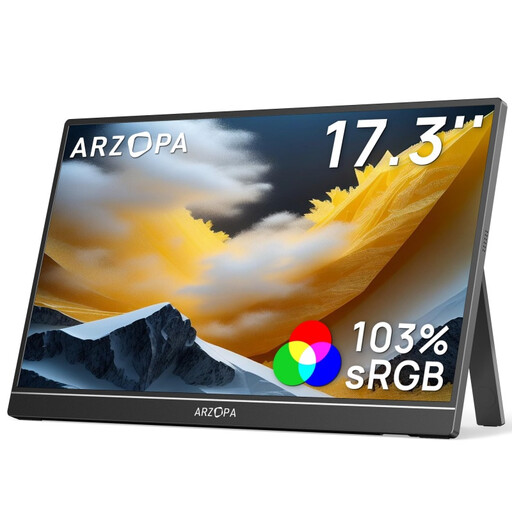
Why This Fits Their Persona: This is an excellent choice for users who want a significantly larger screen than a standard 15-inch model without the premium price of a 24-inch display. The 17.3-inch size offers a great boost in screen real estate for multitasking, making it a practical upgrade for students and professionals on a budget.
It provides both USB-C and Mini HDMI ports, ensuring broad compatibility and avoiding the connectivity trap of single-port models. Its integrated kickstand offers better stability than a simple cover-stand.
Offers a large 17.3-inch Full HD IPS screen at an accessible price point. The 103% sRGB colour gamut provides vibrant visuals for both work and entertainment.
We have compiled a complete, real-time list of products that fully satisfy these strict selection criteria and UK safety regulations.
Not necessarily. Your laptop's USB-C port must support DisplayPort Alternate Mode (DP Alt Mode) to send a video signal. For a single-cable setup, it also needs to output enough power to run the monitor. Always check your laptop's specifications or look for a Thunderbolt 3/4 or USB4 port, as these typically support both features. If not, you can still use the monitor with an HDMI cable and a separate power source.
Stability depends entirely on the stand. A basic folio cover stand may be insufficient for a 24-inch screen, especially on a small or crowded hot desk. For maximum stability, a model with an integrated, adjustable kickstand or, even better, a C-clamp arm that attaches directly to the desk is a much more reliable option.
This depends on your needs. If you primarily work from two locations (e.g., home and office) and want a consistent, productive setup in both, a 24-inch model is very practical. It offers a true desktop experience that smaller screens can't match. However, if you are a frequent traveller who works from cafes or trains, a lighter 16 or 17-inch model might be a more suitable choice.