In competitive gaming, the slimmest of margins can define the outcome of a match. A split-second delay, a moment of motion blur or a stuttering frame can be the difference between a clutch victory and a frustrating defeat. If you're looking to gain a tangible advantage, upgrading to a 240Hz gaming monitor is one of the most impactful changes you can make to your setup.
The jump to a high refresh rate monitor delivers a level of smoothness and clarity that allows you to track targets more precisely and react faster. However, the market is filled with options, each with different resolutions, panel types and features. As your Joybuy Product Recommendation Officer, my role is to help you navigate these choices. This guide will break down what to look for and highlight some excellent options to suit different needs and budgets.
Key Considerations for Your Next 240Hz Gaming Monitor
Before diving into specific models, it's useful to understand the core features that will influence your gaming experience. Focusing on these three areas will help you make a more informed decision.
1. Resolution and Performance: Finding the Right Balance
The combination of resolution and refresh rate determines how much demand is placed on your graphics card (GPU).
- 1080p (FHD): The standard for competitive play. This resolution is less demanding, making it easier for mid-range to high-end PCs to achieve the 240 frames per second (FPS) needed to match the monitor's refresh rate. It prioritises speed above all else.
- 1440p (QHD): Often considered the sweet spot for modern gaming. A 1440p 240Hz monitor offers a significant step up in visual detail and sharpness over 1080p, creating a more immersive experience without requiring the absolute most powerful GPU on the market.
- 4K (UHD): The pinnacle of visual fidelity. A 4K 240Hz monitor delivers breathtakingly sharp and detailed images. However, consistently running games at 240 FPS in 4K requires a top-tier, enthusiast-grade PC.
2. Panel Technology: The Heart of the Display
The type of panel used in a monitor dictates its colour accuracy, contrast and response time.
- OLED: An OLED 240Hz monitor offers unparalleled performance. Because each pixel illuminates itself, you get perfect black levels, infinite contrast and near-instantaneous response times (often under 0.1ms). This results in exceptional motion clarity and vibrant colours.
- Mini-LED: This technology uses thousands of tiny LEDs as a backlight, creating many more dimming zones than traditional displays. This results in much better contrast, deeper blacks and brighter highlights, closing the gap with OLED performance.
- IPS: For years, IPS panels have been praised for their superior colour accuracy and wide viewing angles. Modern fast-IPS panels have achieved incredibly low response times, making them a popular choice for a 1ms 240Hz monitor that balances speed with excellent visuals.
3. Adaptive Sync: Eliminating Screen Tearing
Adaptive Sync technology synchronises your monitor's refresh rate with your GPU's frame rate output. This eliminates screen tearing and stuttering for a perfectly smooth picture. The two main types are NVIDIA's G-Sync and AMD's FreeSync. Many modern displays are G-Sync Compatible, meaning they are certified by NVIDIA to work seamlessly with their GPUs, even if they are primarily FreeSync monitors.
Our Top Recommendations for 240Hz Gaming Monitors in 2026
Here are our recommendations, selected to cover a range of priorities from ultimate visual quality to pure esports performance.
Philips Evnia 32M2N8900 32-inch 4K UHD OLED
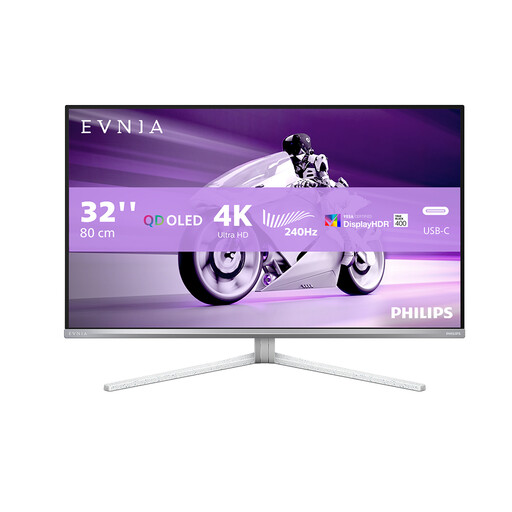
- Why It Stands Out: This monitor represents the peak of current display technology. It combines a stunning 32-inch 4K UHD resolution with the flawless motion clarity of an OLED panel. The 0.03ms response time is virtually instantaneous, eliminating any trace of ghosting or motion blur.
- Pros:
- Stunning 4K OLED panel with perfect blacks and vibrant colours.
- Ultra-smooth 240Hz refresh rate for fluid gameplay.
- Exceptional motion clarity with a 0.03ms response time.
- Excellent connectivity with 2x HDMI 2.1, DP 1.4 and a USB-C port.
- Supports both FreeSync Premium Pro and is G-Sync Compatible.
- Who is it for? The enthusiast gamer or content creator with a high-end PC who refuses to compromise. It's for those who want breathtaking visuals for story-driven games and top-tier performance for competitive titles.
KOORUI 27" QHD 240Hz Mini-LED
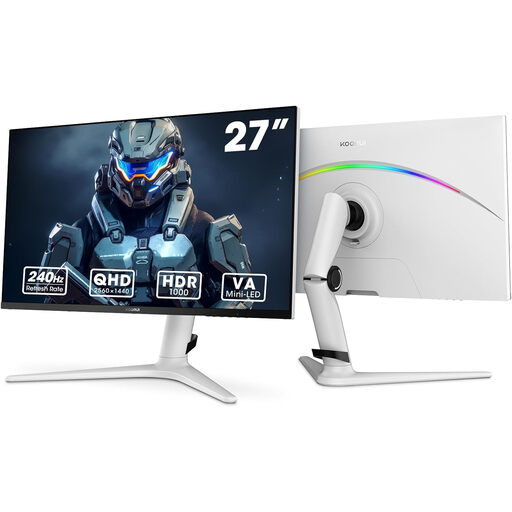
- Why It Stands Out: The KOORUI GN10 leverages Mini-LED technology to deliver outstanding contrast and brightness that surpasses traditional LCDs. At 27 inches and with a QHD resolution, it hits the sweet spot for detail and performance, making it a versatile choice for all types of gaming.
- Pros:
- 27-inch 1440p (QHD) resolution provides excellent clarity.
- Mini-LED panel with HDR1000 for impressive contrast and bright highlights.
- Fast 1ms GTG response time and 240Hz refresh rate.
- Rich colour reproduction with 95% DCI-P3 coverage.
- Includes eye-comfort features like a blue light filter.
- Who is it for? The all-around gamer who plays a mix of fast-paced multiplayer and visually rich single-player games. It offers a significant upgrade in image quality and performance without demanding a flagship-tier PC.
Dahua 24.5" FHD 240Hz Esports Monitor
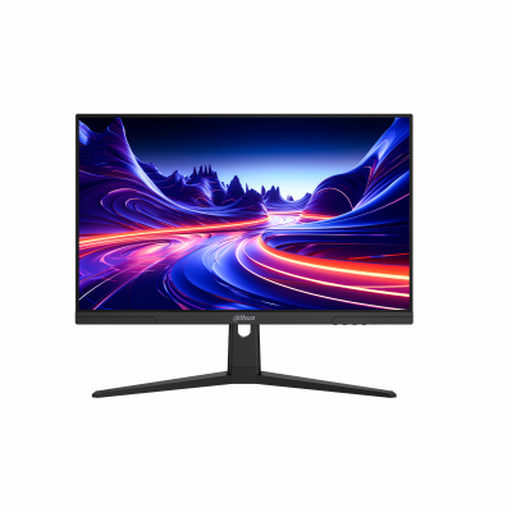
- Why It Stands Out: This monitor is a pure performance machine, built for one purpose: competitive gaming. It strips away extra frills to focus on what matters most for an esports monitor—speed. The combination of a 24.5-inch screen, 1080p resolution and an ultra-fast response time is the formula used by professionals.
- Pros:
- Elite 240Hz refresh rate for maximum fluidity.
- Extremely low 0.5ms response time on an IPS panel.
- 1920x1080 (FHD) resolution makes it easy to achieve high frame rates.
- The compact 24.5-inch size helps maintain focus on the entire screen.
- Features Adaptive Sync for tear-free gameplay.
- Who is it for? The dedicated competitive player who prioritises reaction time and performance in FPS, racing or fighting games. If your goal is to climb the ranks, this monitor is built to help you do it.
Connecting Your Setup and Exploring More Options
A high-performance monitor is a cornerstone of any great gaming rig, but it's just one piece of the puzzle. To get the full 240Hz experience, you must use a high-bandwidth cable like the DisplayPort or HDMI 2.1 connections featured on these models.
Sometimes, you may need to connect other devices like a laptop, a streaming box or a previous-generation console that uses a different port. Ensuring you have the right adapters on hand is key to a versatile and hassle-free setup. If you need to bridge a connection, you can browse our selection of [HDMI adapters] to find the right fit for your equipment.
Frequently Asked Questions about 240Hz Monitors
Is a 240Hz monitor worth it for gaming? For fast-paced games like first-person shooters, battle royales and racers, the answer is a definitive yes. The improved smoothness and reduced input lag provide a clear competitive advantage and a more responsive feel. For slower, story-driven games, the benefit is less critical but still noticeable.
Do I need a powerful PC to run a 240Hz monitor? Yes. To fully benefit from a 240Hz refresh rate, your PC's GPU and CPU must be able to consistently generate 240 FPS at your monitor's native resolution. A 4K 240Hz monitor will require a top-of-the-line system, while a 1080p 240Hz model is more forgiving and can be driven by a wider range of mid-to-high-end hardware.
What is the difference between a 1ms and 0.03ms response time? Both are exceptionally fast and effectively eliminate motion blur for most users. A 1ms 240Hz monitor uses a highly optimised IPS or VA panel, which is excellent for competitive play. The 0.03ms figure is characteristic of OLED technology, where pixels can change state almost instantly. While technically faster, the real-world difference is subtle, but both represent the highest tier of motion performance available today.


