
24/7 Customer Support

Free returns

Same-day & Next-day Delivery

Quality Guaranteed

Unlock Your Welcome Offers: FREE Delivery | Up to 80% OFF | Free 30-day JoyPlus trial
Download the APP
A 256GB USB flash drive can be a convenient way to carry coursework, work documents, photos, videos and backups. However, capacity alone does not tell you whether a drive will suit your devices or cope with your file-transfer habits.
Marketing descriptions often highlight a headline read speed while leaving out connector limitations, write performance or security details. A drive may also have the right capacity but the wrong port for your laptop or phone. Before buying, check these common pitfalls and compare the specifications that affect everyday use.
Read speed describes how quickly files can be opened or copied from the drive. Write speed affects how quickly you can save photos, videos and backup folders to it. Some listings promote a high read figure while providing little information about writing.
For occasional documents, this may not matter much. Photographers, students moving large project folders and content creators handling video files should look for both figures. Also remember that stated speeds are generally maximum or declared results. Your computer, phone, file size, operating system and file system can all reduce real-world transfer rates.
A traditional USB Type-A flash drive works with many PCs, desktops, TVs and older laptops. It will not connect directly to a phone or tablet that only has USB-C. Conversely, a USB-C flash drive may require an adaptor for an older computer.
A dual USB-A and USB-C flash drive can be more flexible for people moving files between a laptop and a modern Android phone, tablet or USB-C iPhone. Before ordering, inspect the ports on every device you plan to use. USB-C describes the connector shape, not necessarily the transfer standard or speed.
Metal housings, swivel covers and capless designs can help protect connectors from everyday knocks and dust. They do not make a flash drive indestructible. Water resistance also varies considerably: a specification such as waterproofing to 1 metre should not be assumed for every model.
Similarly, password protection is not automatically the same as hardware encryption. If you need an encrypted USB drive, check whether the product specifically lists AES encryption, fingerprint access, PIN entry or dedicated security software. Keep a second copy of important files because portable storage can be lost, damaged or corrupted.
USB 3.0, USB 3.1 and USB 3.2 Gen 1 commonly refer to a 5Gbps-class connection, although product naming can be confusing. A USB 2.0 host port will limit a faster drive, while the slowest component in the connection determines the result.
A high-speed USB thumb drive is useful for large media libraries, but compare the quoted read and write figures. For example, the Samsung MUF-256BE specifications list up to 300MB/s read and 30MB/s write, whereas the SanDisk Ultra 256GB lists declared read and write speeds of up to 100MB/s. These figures indicate different usage profiles rather than a guarantee of identical results on every device.
A drive sold as 256GB will show somewhat less available space after formatting and system overhead. For general compatibility, exFAT is often practical for large files and use across current Windows and macOS systems. FAT32 has wider legacy support but imposes a 4GB limit on individual files.
Check whether the drive arrives ready to use and whether your phone, tablet, games console or smart TV supports external storage. Some mobile devices also require USB OTG support or a compatible file-management app.
For everyday portable data storage, a protective body and covered or capless connector can reduce handling problems. For confidential documents, look for clearly stated features such as AES-256 encryption, fingerprint authentication or PIN protection.
A drive with password software may require the relevant application or a compatible operating system. Do not assume that a security feature protects every file automatically; read the product instructions and check how the private area is created.

Why This Fits Their Persona: A straightforward USB-A option for students, home users and office workers using PCs or laptops with familiar USB ports.
The listing states USB 3.0 connectivity and backwards compatibility with USB 2.0, helping buyers identify the required port before purchase.
256GB capacity, metal casing and included SecureAccess software with 128-bit AES file encryption.
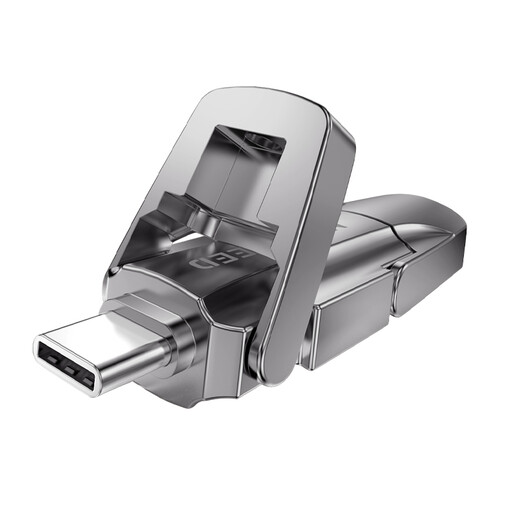
Why This Fits Their Persona: Suits content creators and mobile users who want one drive for USB-A laptops and USB-C phones or tablets.
Its listing identifies both USB-A and Type-C connectors. Buyers should still confirm that their host device supports the stated interface and advertised speeds.
The product description lists up to 1090MB/s read and 1030MB/s write, plus a zinc alloy flip-cover housing.
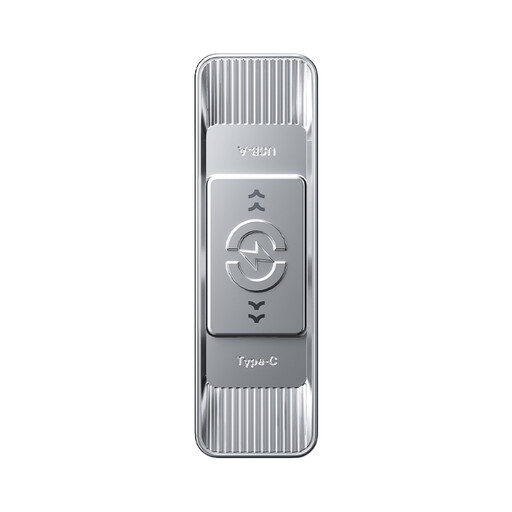
Why This Fits Their Persona: Designed for people transferring large files between computers, smartphones, tablets and gaming devices.
The dual-interface design reduces the need for separate adaptors, while compatibility with older USB versions is stated in the listing.
The specification lists 3D NAND flash, up to 570MB/s read and 520MB/s write, and a zinc alloy body.

Why This Fits Their Persona: A practical match for professionals carrying confidential work files, provided they are comfortable setting up biometric access.
Unlike a listing that only mentions a password, this model specifies AES-256 encryption and fingerprint authentication. Set-up and recovery procedures should be checked before use.
The listing states up to 550MB/s read, 500MB/s write and support for USB-A and Type-C connections.
We have compiled a complete, real-time list of products that fully satisfy these strict selection criteria and UK safety regulations.
For many users, yes. It can hold a sizeable collection of documents, photos and compressed video, although the exact amount depends on file resolution and format. Large 4K footage fills storage considerably faster, so check your typical file sizes before buying.
Only if the phone supports the relevant USB connection and external storage or OTG. A USB-C model can connect directly to compatible USB-C phones, while a USB-A model may need an appropriate adaptor. Mobile apps may also be required for automatic backups or file management.
There is no universal lifespan. Frequent writing, heat, physical damage and unsafe removal can affect reliability. Use the drive for portable transfers, replace it if errors appear, and maintain a separate copy of valuable files rather than relying on one memory stick.