
24/7 Customer Support

Free returns

Same-day & Next-day Delivery

Quality Guaranteed

Unlock Your Welcome Offers: FREE Delivery | Up to 80% OFF | Free 30-day JoyPlus trial
Download the APP
A quality monitor is the centrepiece of any modern desk setup, whether for gaming, creative work or daily productivity. The search for a new display often leads to the 27 inch QHD monitor, a popular choice that balances sharp detail with a comfortable screen size. But with so many specifications to consider—from refresh rates to panel types—choosing the right one can feel overwhelming.
This guide is designed to help you navigate the key features of 1440p monitors. We will break down the technical jargon into practical advice and highlight a few noteworthy models to help you find a screen that fits your needs and budget.
Before looking at specific models, understanding a few core concepts will help you make a more informed decision.
Quad HD (QHD), also known as 1440p (2560 x 1440 pixels), offers a significant step up in clarity from standard Full HD (1080p). On a 27-inch screen, this resolution provides a high pixel density, resulting in sharper text and more detailed images without requiring the powerful (and often expensive) graphics hardware needed to run a 4K display smoothly. This makes it an ideal middle ground for both work and play.
The panel is the heart of the monitor, and the technology it uses affects everything from colour to viewing angles.
Many of us spend hours in front of our screens, making comfort a crucial factor. An ergonomic computer screen with an adjustable stand allows you to set the height, tilt and swivel for a posture-friendly setup. Additionally, look for a monitor with low blue light technology and flicker-free backlights. These features are designed to reduce eye strain during long sessions, whether you're deep into a spreadsheet or a gaming marathon.
Here are a few monitors that stand out for their features and performance, catering to different user needs.
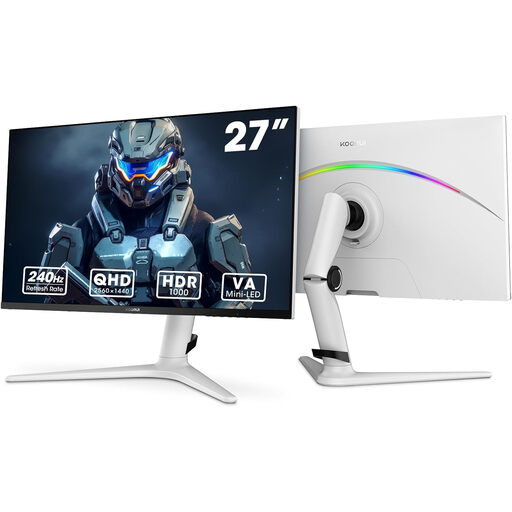
Why It Stands Out: This KOORUI model is built for high-performance gaming. The combination of a 240Hz high refresh rate and a 1ms response time on a QHD screen ensures exceptionally smooth and responsive gameplay. Its Mini-LED backlight technology provides outstanding contrast, rivalling that of more expensive displays.
Pros:
Who is it for? This is an excellent 1440p gaming monitor for competitive gamers and enthusiasts who demand fluid motion and deep contrast. Its strong colour performance also makes it suitable for media consumption and general use.
View Details for the KOORUI 27" Gaming Monitor
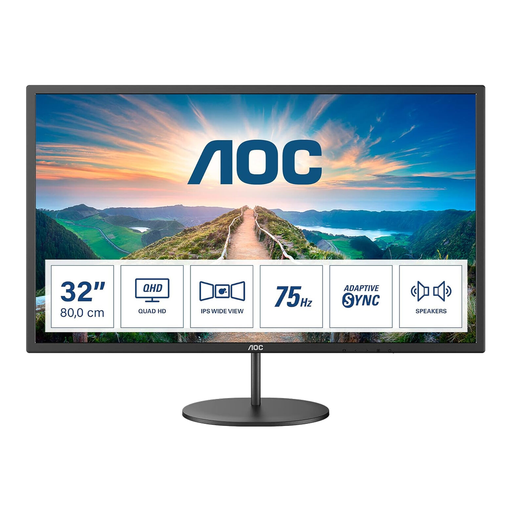
Why It Stands Out: While the focus of this guide is on 27-inch models, the AOC Q32V4 is a compelling option for those who want the same QHD clarity on a larger canvas. The 31.5-inch IPS panel provides ample screen real estate for multitasking, making it a productivity powerhouse.
Pros:
Who is it for? Professionals who need to manage multiple applications side-by-side, or users who want a more cinematic feel for movies and casual gaming. It's a great choice for a primary 27 inch monitor for work alternative.
View Details for the AOC Q32V4 31.5" Monitor
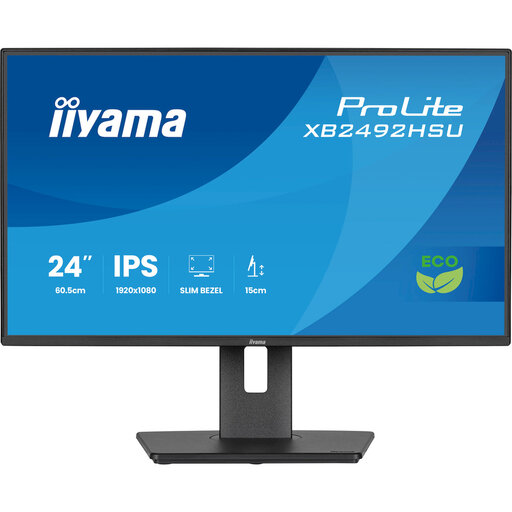
Why It Stands Out: This iiyama ProLite is a noteworthy consideration for those prioritising workplace ergonomics and comfort above all else. While it is a 24-inch Full HD model, its fully adjustable stand is a standout feature, offering 150mm height adjustment, tilt, swivel and pivot to a vertical orientation.
Pros:
Who is it for? Remote workers and office professionals who spend their entire day at a desk. Its focus on ergonomic flexibility and certified eye comfort makes it a practical choice for productivity-focused environments.
View Details for the iiyama ProLite XB2492HSU Monitor
A great monitor is a fantastic start, but creating a truly comfortable and productive desk setup involves more than just the screen. Proper lighting is essential for reducing eye strain and maintaining focus throughout the day.
If you're looking to enhance your workspace, consider exploring our selection of LED office lights to find a solution that complements your new display.
1. Is a 27 inch QHD monitor good for gaming? Yes, a 27-inch QHD monitor is widely considered a great choice for gaming. It offers a noticeable improvement in visual detail over 1080p without being as demanding on your graphics card as 4K. This allows for a good balance of high-quality visuals and high frame rates, especially when paired with a high refresh rate monitor.
2. What is the difference between QHD and 4K on a 27-inch screen? 4K (3840 x 2160) has four times the pixels of Full HD, while QHD (2560 x 1440) has about 1.77 times. On a 27-inch screen, 4K will look slightly sharper, but the difference can be subtle to some users. The main trade-off is performance; running games at 4K requires significantly more powerful and expensive hardware than running them at QHD.
3. Can I use a 27 inch QHD monitor for office work? Absolutely. A 27 inch monitor for work is an excellent tool for productivity. The QHD resolution provides more screen space for viewing documents, spreadsheets and applications side-by-side compared to a 1080p monitor of the same size. Text appears crisper, and images are more detailed, which can help reduce eye strain over a long workday.