Designers short on desk space
If your monitor and stand must leave room for a keyboard and mouse, start with physical dimensions. LG UK lists a 29-inch, 2560 × 1080 ultrawide; BenQ UK lists its wider PD3420Q at 825.8 mm across with the stand.


Choose a 29-inch 2560 × 1080 ultrawide if desk space is the deciding constraint and two adjacent work areas are enough. A 34-inch 3440 × 1440 model gives you more room for a browser preview and design panels, but only makes sense if its stand and your viewing position fit; USB-C docking and colour documentation are worth prioritising when your laptop setup or review work calls for them.
If your monitor and stand must leave room for a keyboard and mouse, start with physical dimensions. LG UK lists a 29-inch, 2560 × 1080 ultrawide; BenQ UK lists its wider PD3420Q at 825.8 mm across with the stand.
If you want fewer connections across a small desk, compare USB-C video and charging requirements with your laptop. LG UK and Dell UK list up to 90W power delivery on their named 34-inch models; LG UK and Samsung Business UK also describe KVM functions for switching between computers on selected models.
If you assess colours and imagery as well as layouts, look for model-specific colour-space figures and calibration documentation. BenQ UK lists 100% sRGB, 100% Rec.709, 98% P3 and a factory calibration report for the PD3420Q.
Check whether the screen and stand fit your desk and viewing position before deciding how much workspace, colour documentation or connectivity you need.
| Concern | What to check | Who this matters to |
|---|---|---|
| Desk fit and placement | Measure usable width and depth against the exact with-stand dimensions. If using an arm, check its compatibility with the monitor and desk. | I need space for my keyboard and mouse without placing the screen too close. Around 34% of consumers would put desk fit first. |
| Design workspace | Compare 2560 × 1080 with 3440 × 1440 for your preferred window layout, and check that your computer can output the chosen resolution. | Keeping a browser preview beside my design tools matters more to me than a compact screen; roughly 27% of consumers would make workspace their primary concern. |
| Colour review | Look for stated sRGB coverage and, if your work requires it, model-specific calibration documentation. | When reviewing brand colours and images, I want documented display characteristics to inform my choice. About 26% of consumers would prioritise colour review. |
| Laptop connections | Check USB-C video support and power requirements; consider KVM only if you switch between computers. | I want fewer cables across the desk, or one keyboard and mouse for two computers. Connectivity would come first for around 13% of consumers. |
Two monitors with the same diagonal can fit a desk differently. BenQ UK lists the PD3420Q at 825.8 mm wide and 244.3 mm deep with its stand; the Health and Safety Executive advises placing a screen directly in front of you, with its top near eye level and about an arm's length away.
Measure the available surface and compare the selected monitor's with-stand dimensions. Do not assume that moving it closer will solve a poor fit.
LG UK and Dell UK list up to 90W USB-C power delivery on their named 34-inch models, while BenQ UK lists 65W for the PD3420Q. Those figures alone do not establish whether your laptop can send video and receive enough power through one cable.
Check your laptop's USB-C video output and charging requirements against the exact monitor and cable specifications.
Published colour-space coverage describes a named monitor, not how a landing page will appear with every browser, display and colour-management setting.
Use stated sRGB coverage and calibration documentation to narrow your choice, then review important pages on the devices and browsers relevant to your project.
Weight and screen depth also affect arm suitability. Ergotron notes that a display deeper than 15 cm can affect the capacity of its HX arm, particularly when assessing curved screens.
Check the monitor's weight without its stand, VESA mounting pattern and depth against the chosen arm, pivot and desk clamp.
A deeper or heavier display may call for a different arm or pivot.
LG UK lists both compact and 34-inch ultrawides relevant to this desk-size decision.
Dell UK lists the P3425WE as a 34.1-inch 3440 × 1440 IPS USB-C hub monitor for laptop-centred setups.
BenQ UK positions the flat PD3420Q around documented colour characteristics for creative work.
Samsung Business UK lists the curved 34-inch S65UC for multi-source desktop use.
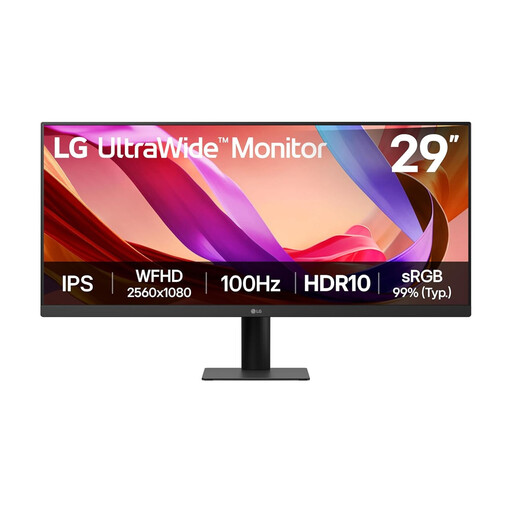
This 29-inch option suits shoppers who want an ultrawide for adjacent design and browser windows while keeping desk width in mind. Check its stand dimensions against your own workspace before choosing it.
 No image available
Consider this compact ultrawide if two adjacent windows meet your landing-page design needs. Its listed 2560 × 1080 resolution and 21:9 IPS panel provide the stated workspace format; the product name also lists 100Hz, HDMI and DisplayPort.
Confirm the stand's width and depth against your desk, and check the listing's energy information before buying.
Choose a 29-inch 2560 × 1080 model if desk space is the deciding constraint and two adjacent windows suffice. Consider 34 inches and 3440 × 1440 for more working room only after checking the exact stand footprint and viewing position; the Health and Safety Executive advises keeping a screen directly in front of you and about an arm's length away.
Only if your laptop's port supports the required video output and the monitor's power delivery meets its charging needs. LG UK and Dell UK list up to 90W on the named 34-inch models discussed here, while BenQ UK lists 65W for the PD3420Q; check the cable specification too.
No. Samsung Business UK lists a curved S65UC with KVM and multi-source viewing, which may suit a two-computer setup. If you prefer to assess straight layout lines on a flat screen, compare it with a flat model such as the BenQ PD3420Q rather than treating curvature as a design requirement.