
24/7 Customer Support

Free returns

Same-day & Next-day Delivery

Quality Guaranteed

Unlock Your Welcome Offers: FREE Delivery | Up to 80% OFF | Free 30-day JoyPlus trial
Download the APP
A 3-in-1 wireless charging stand can make a UK home office, bedside table or student desk noticeably tidier. Instead of searching for separate cables for your phone, wireless earbuds and smartwatch, one compact unit can keep all three devices in one place.
However, not every phone earbuds watch charger offers the same compatibility or convenience. Marketing often focuses on the highest possible wattage, while overlooking alignment, power-supply requirements and the practical space needed for different devices. Use this guide to compare the important details before choosing a multi-device charging station.
A charger advertised as 33W or higher may divide that power between several outputs. The actual phone output could be 15W, while earbuds and a watch receive lower dedicated outputs. This is normal, but buyers should check the individual figures rather than relying only on the headline number.
Also remember that a wireless charger can only deliver the speed supported by the phone, case, power adapter and charging protocol. A suitable USB-C power adapter may be required for simultaneous charging.
A magnetic wireless charger needs compatible magnets or a suitable magnetic ring for reliable alignment. Some Qi-enabled Android phones support wireless charging but do not have a built-in magnetic connection. A magnetic attachment may therefore be needed, and thick or metal cases can interfere with charging.
Qi compatibility is also not the same as smartwatch compatibility. Apple Watch models generally use a dedicated watch charging interface, while other smartwatches may require their own cable or charging puck.
A desktop wireless charger can look compact in product photographs but still take up valuable bedside or desk space. Check whether the phone area accommodates your case, whether the viewing angle suits notifications or video calls and whether the stand folds for storage.
A foldable wireless charger can be useful for commuting and travel, but a lighter design may not feel as stable as a weighted desktop base. Consider where the charger will be used most often before selecting a style.
Look for stated support for Qi wireless charging and verify that your phone is compatible. If the product specifies magnetic alignment, check whether that refers to a particular magnetic standard or simply a magnet-assisted position.
For earbuds, the charging case must usually support wireless charging. A TWS earbuds charger cannot charge a case that only accepts wired input. Place the case centrally on the marked charging area and remove thick protective covers if charging is inconsistent.
Compare the separate outputs for the phone, earbuds and watch. For example, the Hoco CQ3 lists phone output options up to 15W, 5W for earphones and 2.5W for the watch, while the REMAX RP-W96 lists 15W for the phone, 5W for earbuds and 3W for the smartwatch.
These figures are useful for comparison, but they do not guarantee a particular charging time. Actual performance depends on the device and power source. If a product requires a PD or QC charger, factor the cost of a compatible adapter into your budget.
A stable base, non-slip contact points and a clear charging layout help prevent misalignment. Products should be kept dry, ventilated and away from metal objects placed directly on the charging surface.
Check the supplied instructions and safety information. For example, the ACEFAST E20 lists CE, RoHS, FCC, EAC and UL62368 certifications, while its instructions recommend correct device placement and a dry, ventilated area. A UK plug power adapter may still need to be purchased separately if it is not included, so check the product listing carefully.
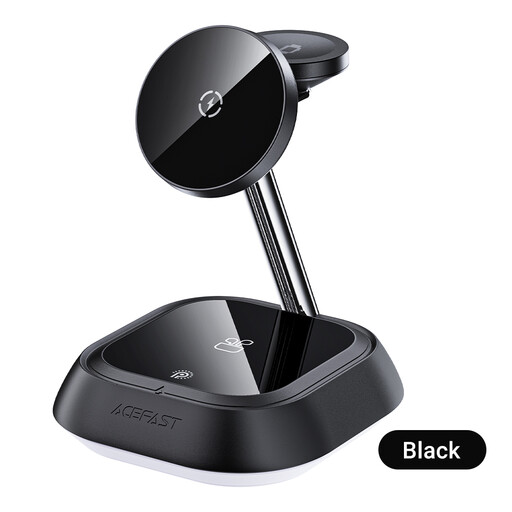
Why This Fits Their Persona: It provides dedicated areas for a compatible phone, TWS earbuds case and Apple Watch, making it a straightforward choice for users setting up their first cable-reducing charging station at home or in a home office.
The instructions clearly identify the three charging positions and advise using a USB-C adapter with sufficient power for simultaneous charging.
Dedicated phone, TWS and watch areas; upright stand format for a more organised desk or bedside table.
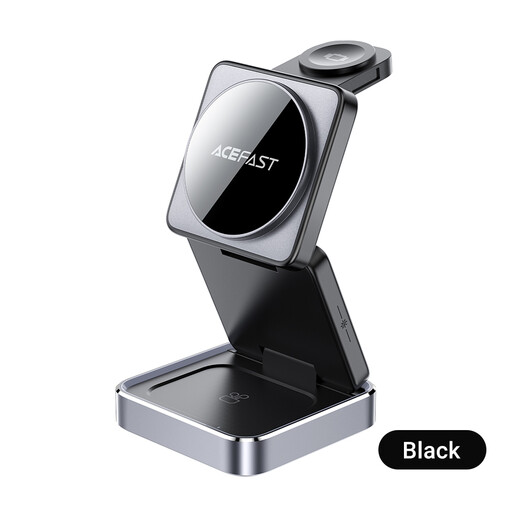
Why This Fits Their Persona: The anodised aluminium construction, foldable design and adjustable ambient lighting suit buyers who want a more considered desktop or travel setup.
Its foldable construction addresses portability, while the usage guidance highlights correct placement and ventilation rather than relying only on charging claims.
Foldable design; anodised aluminium body; listed CE, RoHS, FCC, EAC and UL62368 certifications.
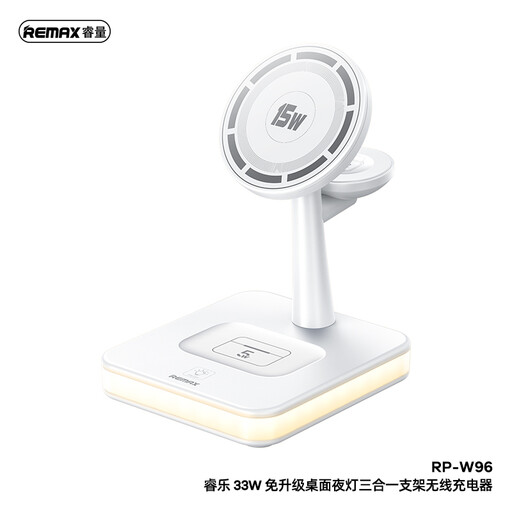
Why This Fits Their Persona: This suits professionals, frequent travellers and users who want three-device charging plus an additional wired output for a USB-powered accessory.
The product specification separates its 15W phone, 5W earbuds and 3W watch outputs, making the power distribution clearer than a single total-wattage figure.
33W total output; additional 10W USB-A port; adjustable brightness light strips; 1-metre cable.
Place the stand on a dry, ventilated and stable surface. Connect it to a suitable power adapter, then position the phone centrally over the charging coil. Place the earbuds case on its marked pad and align the smartwatch with its dedicated charging section.
If charging starts and stops, remove bulky cases, check for metal accessories and reposition the device. Avoid covering the charger or placing objects such as keys and coins on its wireless charging areas.
We have compiled a complete, real-time list of products that fully satisfy these strict selection criteria and UK safety regulations.
It can be, provided the phone supports Qi wireless charging. Magnetic alignment may require a compatible magnetic case or ring, particularly on phones without built-in magnets. Always check the phone and charger specifications before ordering.
It uses electricity only when connected and drawing power. Running cost depends on charging frequency, device battery capacity, charger efficiency and your UK electricity tariff. Unplugging the station when it will not be used for an extended period can reduce standby consumption.
Lifespan depends on build quality, heat exposure, cable condition and daily use. Keep the unit dry, avoid bending the cable sharply and allow ventilation around the charger. If the casing becomes damaged, the unit overheats or an unusual smell appears, stop using it and follow the seller’s safety guidance.