
24/7 Customer Support

Free returns

Same-day & Next-day Delivery

Quality Guaranteed

Unlock Your Welcome Offers: FREE Delivery | Up to 80% OFF | Free 30-day JoyPlus trial
Download the APP
A 3-in-1 wireless charging station can make a UK bedroom, home office or student desk noticeably tidier. One stand may charge a phone, smartwatch and wireless earbuds at the same time, reducing the number of cables around a plug socket.
However, product listings often make multi-device charging sound simpler than it is. The main differences are usually hidden in compatibility, power requirements and physical design. Checking these details before buying can help you avoid a charger that looks convenient but performs poorly in daily use.
A product may advertise a high total figure, but that does not necessarily mean every device receives that amount. A charging station might distribute power between a phone, earbuds and watch, with each area using a different output.
For example, a phone charging area may support up to 15W, while earbuds and watches commonly use lower outputs. Look for the individual output for each charging area, not only the headline total wattage. Also check whether the required USB-C power adapter is included.
A magnetic wireless charger generally works most conveniently with phones and cases that support compatible magnetic alignment. Some Android phones and older iPhone models may need a compatible case or magnetic ring for reliable positioning.
Without proper alignment, charging may start and stop, become slower or fail altogether. A conventional wireless charger stand with a defined charging pad can be more flexible if household members use different phones.
A desktop charging station designed for a bedside table is not automatically suitable for travel or a motorcycle. Consider the base, folding mechanism, cable length and exposure to movement or moisture.
Motorcycle users should also check mounting stability and weather precautions. No indoor wireless charger should be immersed in water or used in damp conditions unless the product specifically states otherwise.
Confirm that the station can charge all intended devices at once. Some models require a USB-C fast charger, PD charger or QC-compatible adapter to achieve their stated output. A low-powered adapter may cause slow charging when all three areas are occupied.
For a separate adapter, a compact GaN charger can be practical. Gallium nitride chargers are often smaller than conventional designs with similar output ratings. For instance, a 30W model may suit a phone and smaller USB device, while a dual-port 40W charger can divide power between two USB-C connections.
Check each charging zone individually:
A 3-in-1 unit is most useful when all three areas match the devices you actually own, rather than simply having three charging surfaces.
Look for clear instructions, ventilation guidance and protection against conditions such as over-current, over-voltage, short circuits and excessive temperature. The LDNIO stand, for example, lists these protective functions, while the ACEFAST E20 lists CE, RoHS, FCC, EAC and UL62368 certifications.
Use a charger on a stable, dry surface and keep metal objects away from wireless charging areas. Avoid covering mains adapters or charging stations during operation. If a charger becomes unusually hot, emits smoke or makes an abnormal sound, unplug it and stop using it.
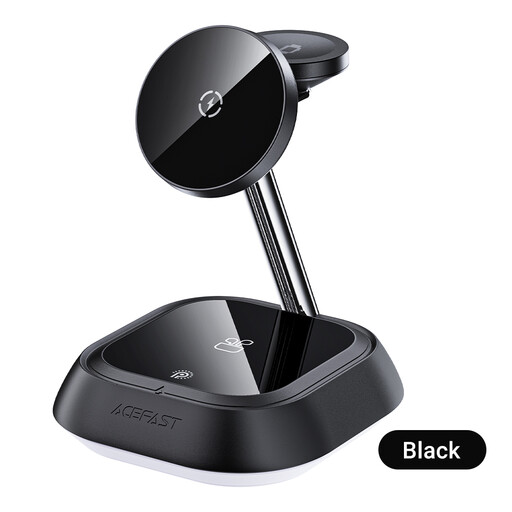
Why This Fits Their Persona: It provides dedicated areas for a phone, TWS earbuds and a watch in one upright format, making it suitable for a first desktop or bedside charging setup.
Its instructions specify separate phone, TWS and watch positions, helping buyers understand how the three-device layout is intended to work. A suitable USB-C power adapter is required.
Dedicated charging zones and an upright stand help keep devices organised and visible.
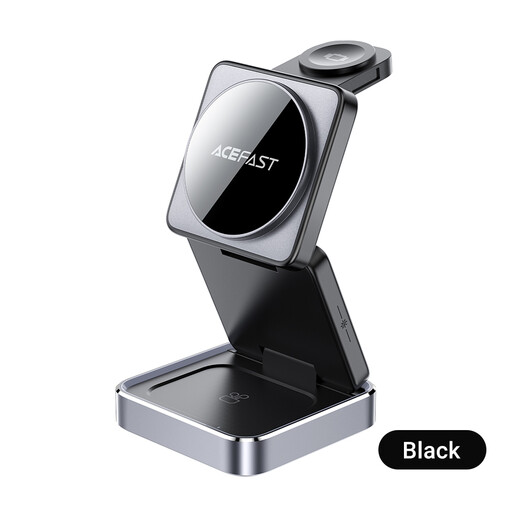
Why This Fits Their Persona: Its anodised aluminium construction, foldable design and adjustable ambient lighting suit users who want a more considered home-office or bedside setup.
The foldable construction addresses portability, while the listed certifications provide clearer product compliance information than a vague safety statement.
Charges a smartphone, smartwatch and headphones simultaneously; folds for storage and travel.
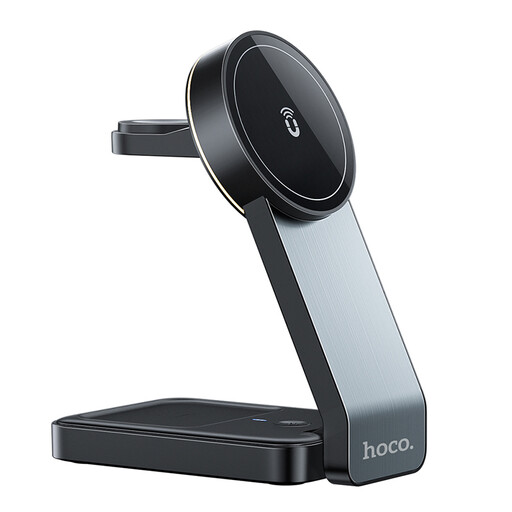
Why This Fits Their Persona: Motorcycle riders and users needing magnetic positioning can consider its foldable design, ambient light sensor and stated phone, earbuds and watch outputs.
The specification states that a PD/QC charger is required and gives separate outputs, reducing uncertainty about the power setup. It should still be protected from rain and damp conditions.
Phone output is listed at up to 15W, with 5W for earphones and 2.5W for compatible watches; the unit weighs 222g.
A wireless station may need a mains adapter, particularly when three devices charge together. A compact USB-C fast charger can be a sensible addition:
Do not assume a 100W charger makes a phone charge at 100W. The connected device, cable and charging protocol determine the power actually received.
We have compiled a complete, real-time list of products that fully satisfy these strict selection criteria and UK safety regulations.
Many are designed for simultaneous charging, but the speed depends on the adapter, device compatibility and power distribution. Check the individual outputs and use the recommended USB-C PD or QC adapter where required.
The cost depends on charging frequency, electricity tariffs and the devices connected. Wireless charging can involve some energy loss compared with a direct cable connection, so unplugging the station when it is not needed may reduce unnecessary standby consumption.
There is no universal lifespan. Keep it dry, avoid excessive heat, use certified cables and do not bend or damage the charging cable. A foldable model should be opened and closed carefully, while any charger showing heat damage or unusual behaviour should be disconnected and replaced.