
24/7 Customer Support

Free returns

Same-day & Next-day Delivery

Quality Guaranteed

Unlock Your Welcome Offers: FREE Delivery | Up to 80% OFF | Free 30-day JoyPlus trial
Download the APP
Navigating the world of gaming monitors can feel like a minefield of technical jargon and ambitious marketing claims. You know you want the immersive experience of a 32 inch 165Hz curved gaming monitor, but how do you ensure you are getting a display that delivers on its promises without overpaying? As your Joybuy Product Recommendation Officer, my role is to help you sidestep common purchasing mistakes.
Many buyers find themselves disappointed by a few recurring issues. Let's look at the most common pitfalls to avoid.
To make a confident choice, focus on these non-negotiable parameters. They are the true foundation of a high-performance display for gaming and productivity.
For a 32-inch screen, resolution is paramount. While 1080p (Full HD) is adequate for smaller screens, it appears pixelated and blurry on a large 32-inch display. Conversely, 4K (2160p) is incredibly sharp but demands a very powerful and expensive graphics card to run games at a high refresh rate.
This is why 2K QHD (2560 x 1440) is the ideal resolution for a 32 inch QHD monitor. It offers a significant leap in clarity and detail over 1080p without the punishing performance cost of 4K, creating the perfect balance for both high-fidelity gaming and crisp text in a PC monitor for home office setting.
The 165Hz refresh rate is the star of the show. It means the screen can display up to 165 frames per second, resulting in exceptionally smooth, fluid motion. This is a game-changer in fast-paced titles, giving you a clearer picture and a potential competitive edge.
However, a high refresh rate is only half the story. An adaptive sync monitor is essential. Technologies like AMD FreeSync or NVIDIA G-Sync synchronise the monitor's refresh rate with your graphics card's frame output. This eliminates screen tearing and stuttering, ensuring your gameplay is not just fast, but also flawlessly smooth. This is a crucial feature for both PC and modern monitor for console gaming setups.
Always check the available ports. To achieve 1440p resolution at 165Hz, you will almost certainly need to use a DisplayPort connection. While HDMI is versatile, some versions may limit your refresh rate. Multiple ports (e.g., DisplayPort and HDMI) provide flexibility for connecting a PC and a console simultaneously.
Furthermore, consider the stand and mounting options. A stand with tilt, swivel and height adjustment is vital for ergonomics. For the ultimate clean and flexible setup, confirm the display is a VESA mount monitor. A standard 100x100mm VESA pattern allows you to attach it to a monitor arm, freeing up desk space and positioning the screen at the perfect eye level.
Instead of a generic list, we have matched products to specific user needs. This helps you find a solution that genuinely fits your lifestyle.
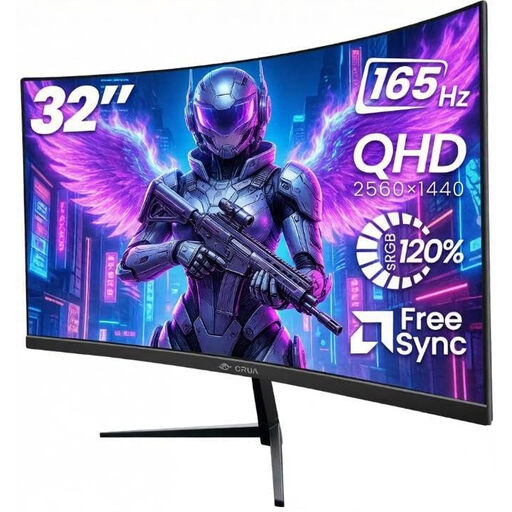
Why This Fits Their Persona: This user wants a single monitor that excels at everything: immersive gaming, content creation and daily productivity. The combination of a large 32-inch screen, a 1500R curve, QHD resolution, and a 165Hz refresh rate hits all the right notes for a powerful, do-it-all setup.
It directly addresses the panel performance pitfall by including AMD FreeSync technology. This helps mitigate the potential for ghosting on its VA panel by smoothing out the frame delivery, providing a clear and stable image in fast-moving scenes.
Features a 100% sRGB colour gamut for accurate and vibrant visuals, making it suitable for creative work. The frameless gaming monitor design and VESA mount compatibility offer excellent setup flexibility.
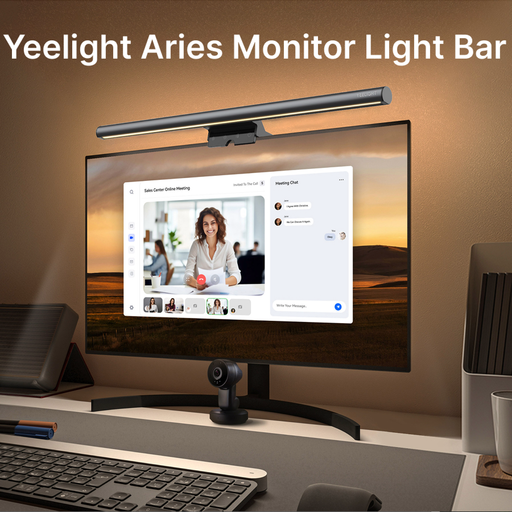
Why This Fits Their Persona: This user spends long hours at their desk and prioritises comfort and eye health. A monitor bar light is an essential accessory that complements any high-performance display by providing focused, glare-free illumination for the workspace, reducing eye strain during late-night work or gaming sessions.
It tackles a hidden pitfall: poor ambient lighting. Many focus only on the monitor's built-in low blue light modes, but the contrast between a bright screen and a dark room is a primary cause of eye fatigue. This light solves that problem directly.
Features an anti-glare design that prevents reflections on the monitor screen. The adjustable colour temperature (2700K–6500K) allows you to match the light to your environment or task, from warm reading light to cool focus light.

Why This Fits Their Persona: This user understands that a great setup is about more than just the tech. It's about the overall environment. A portable humidifier helps combat the dry air common in centrally heated UK homes, improving comfort during long sessions and reducing issues like dry eyes and skin irritation.
It addresses the overlooked environmental factors that impact user experience. While you focus on screen specs, the air quality in your room can be a major source of discomfort. This small device offers a practical solution to that problem.
Its quiet operation and auto shut-off feature ensure it works without being a distraction. The compact, USB-powered design makes it easy to place on any desk without adding clutter and the ambient LED light adds a touch of atmosphere.
While you perfect your visual setup, don't forget your lighting. We have compiled a complete, real-time list of products that fully satisfy these strict selection criteria and UK safety regulations.
For many, a 32-inch monitor is the sweet spot for immersive gaming, especially with a curve that wraps the image around your field of view. However, it depends on your desk depth. You should be able to sit at least 80-100cm away to see the whole screen comfortably without excessive head movement. For competitive FPS games where seeing the entire screen at a glance is critical, some players may prefer a smaller 27-inch display.
Absolutely. A high refresh rate monitor makes all motion on screen smoother, including scrolling through documents, moving your cursor and dragging windows. The QHD resolution on a 32-inch screen also provides ample space for multitasking with multiple windows open side-by-side, making it an excellent PC monitor for home office use.
To take full advantage of 165Hz at QHD resolution in modern, graphically intensive games, you will need a mid-range to high-end graphics card. A card like an NVIDIA GeForce RTX 4060 / 3070 or an AMD Radeon RX 7700 XT / 6700 XT or newer would be a suitable starting point. For less demanding games or if you are willing to lower some in-game settings, a less powerful card may suffice. Always check the recommended specifications for the games you play most often.