
24/7 Customer Support

Free returns

Same-day & Next-day Delivery

Quality Guaranteed

Unlock Your Welcome Offers: FREE Delivery | Up to 80% OFF | Free 30-day JoyPlus trial
Download the APP
Navigating the world of PC gaming displays can feel like a minefield of technical jargon and ambitious marketing claims. When you are ready to upgrade to a 34 inch ultrawide gaming monitor, the promise of immersive, panoramic gameplay is tempting. However, many buyers find themselves disappointed when their new screen doesn't live up to the hype. As your Joybuy Product Recommendation Officer, my role is to help you sidestep common purchasing mistakes and focus on the features that truly matter.
Before you commit, let's look at a few frequent pitfalls that can lead to buyer's remorse:
To ensure your investment pays off with genuinely enhanced gameplay, focus on these non-negotiable parameters.
For a 34-inch screen, the sweet spot for resolution is UWQHD, or Ultra-Wide Quad HD (3440x1440 pixels). This 21:9 aspect ratio provides a significant advantage over standard 16:9 monitors, expanding your field of view in many modern games. This means you can spot enemies in your periphery more easily and become more absorbed in sprawling open-world environments. The pixel density is also ideal, delivering sharp, clear images without requiring an exceptionally powerful graphics card to run smoothly. A curved gaming monitor further enhances this effect, wrapping the image around your vision for a more natural and immersive feel.
For competitive and fast-paced gaming, smoothness is paramount. Look for a monitor with a native refresh rate of at least 144Hz, with a 180Hz monitor offering an even more fluid experience. This specification dictates how many times per second the image on the screen is updated. A higher number results in less motion blur and a more responsive feel.
Equally important is adaptive sync technology. AMD FreeSync Premium is a key feature that synchronises the monitor's refresh rate with your graphics card's frame output. This eliminates screen tearing and stuttering, ensuring the action remains perfectly smooth even when the frame rate fluctuates.
Never underestimate the importance of physical adjustability. A quality monitor with an adjustable stand should offer height, tilt and swivel adjustments. This allows you to position the screen perfectly at eye level, reducing physical strain and improving focus. Furthermore, look for built-in low blue light technologies that reduce eye fatigue during marathon gaming sessions without distorting the on-screen colours.
Based on the criteria above, we've matched a product to a specific user profile to help guide your decision.
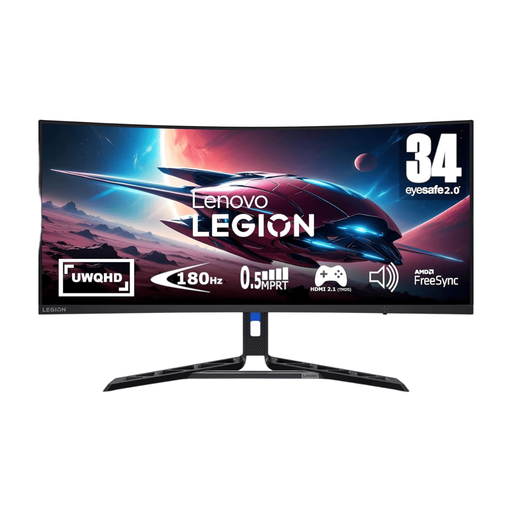
Why This Fits Their Persona: This user wants a no-compromise ultrawide experience for both competitive shooters and cinematic AAA titles. They value smooth performance and vibrant visuals that pull them into the game and they appreciate thoughtful design that supports long hours of play.
This Lenovo Legion monitor features a native 180Hz refresh rate for stable, fluid motion. It has genuine HDR 400 certification for impactful visuals and includes a fully adjustable stand with lift, tilt and swivel functions for superior ergonomics.
The combination of a UWQHD resolution, a fast 0.5ms response time and AMD FreeSync Premium delivers exceptionally smooth and tear-free gameplay. Its 99% sRGB and 90% DCI-P3 colour coverage ensures games look vibrant and true-to-life.
We have compiled a complete, real-time list of products that fully satisfy these strict selection criteria and UK safety regulations.
To take full advantage of a UWQHD monitor with a high refresh rate, you will need a capable graphics card. For playing modern, graphically intensive games at high settings while aiming for frame rates close to 180 FPS, you should consider a higher-tier GPU from recent generations. For less demanding esports titles or if you are willing to lower some graphical settings, a mid-range card may suffice. Always check benchmarks for the specific games you play.
For most gamers, a 34-inch ultrawide display is an ideal size for immersive gaming without being overwhelming. The 21:9 aspect ratio provides an expansive view that is particularly beneficial in racing, strategy and open-world games. The key is to ensure you have enough desk depth (around 60-80 cm) to sit at a comfortable viewing distance, allowing you to take in the whole screen without excessive head movement.
A quality gaming monitor from a reputable brand should provide reliable performance for many years. The lifespan is typically determined by the backlight, which is rated for tens of thousands of hours of use. With average daily use, you can reasonably expect a monitor to last for 5 to 8 years or more before you might notice any degradation in brightness or colour performance. Physical durability and adherence to quality standards are good indicators of a long-lasting product.