
24/7 Customer Support

Free returns

Same-day & Next-day Delivery

Quality Guaranteed

Unlock Your Welcome Offers: FREE Delivery | Up to 80% OFF | Free 30-day JoyPlus trial
Download the APP
A cluttered desk with two mismatched monitors, a tangle of power and display cables and that distracting bezel running right down the middle of your view. For many UK professionals and creators, this is the daily reality of a productive workspace. But what if you could reclaim your desk space, streamline your connections and gain an immersive, seamless view?
This is the promise of a 34 inch ultrawide monitor with USB-C. It’s more than just a screen; it’s a significant upgrade to your workflow. As the Joybuy Product Recommendation Officer, my role is to help you navigate the options. This guide will walk you through the key features to consider and present a few carefully selected models to help you find the right fit for your needs.
Upgrading your display is a significant investment. Here are a few practical points to consider to ensure you get a monitor that truly enhances your productivity and comfort.
For a 34-inch screen, resolution is key. While 4K sounds impressive, a WQHD monitor (3440x1440) is often the more practical choice. This resolution provides a sharp, detailed picture with plenty of screen real estate for multitasking, without forcing you to use display scaling, which can sometimes cause issues with older applications. It’s the ideal balance of clarity and usability for an ultrawide curved monitor for productivity.
The single most transformative feature for a modern desk setup is USB-C connectivity. A monitor with this port can deliver video, data and power to your laptop through a single cable. Look for a monitor with 65W power delivery or higher, as this is sufficient to charge most professional laptops (like a MacBook Pro or Dell XPS) while you work. This one-cable solution is the ultimate dual monitor replacement feature, eliminating clutter and simplifying your workspace.
You’ll be looking at your monitor for hours each day, so comfort is non-negotiable. A height adjustable ultrawide monitor is essential for maintaining good posture and reducing neck strain. The ability to tilt and swivel the screen allows you to position it perfectly for your eye level and seating position, which is crucial for long-term comfort and focus.
Based on features that deliver genuine productivity gains and a streamlined user experience, here are our recommendations.
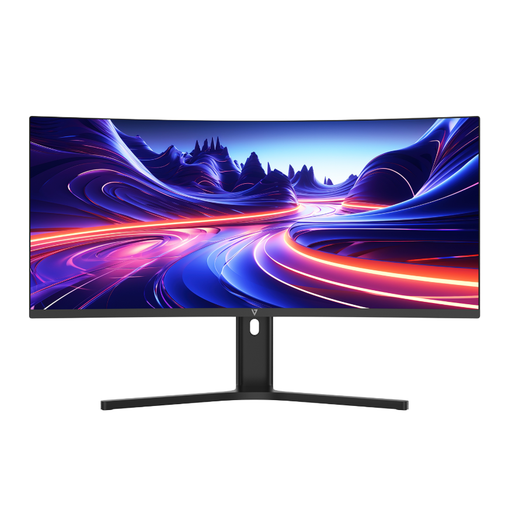
Why It Stands Out: The V7 L340WQ-HAS is a purpose-built productivity machine. It combines all the essential features for a modern professional: a spacious 34-inch curved screen, a sharp 3440x1440 WQHD resolution and the all-important single-cable solution via USB-C with 65W Power Delivery. The 1500R curve provides an immersive field of view, making it easier to see content at the edges of the screen without turning your head.
Pros:
Who is it for? This monitor is ideal for professionals, data analysts and content creators who are serious about replacing their dual-monitor setup with a single, powerful and clutter-free display.
View Details for the V7 L340WQ-HAS
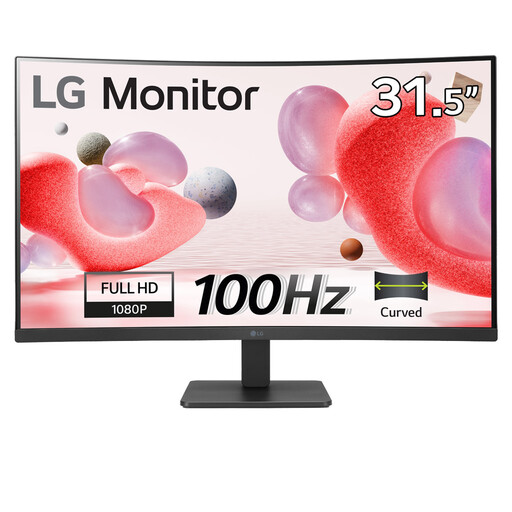
Why It Stands Out: While not an ultrawide, the LG 32MR50C-B offers a large, immersive curved screen at an accessible price point. Its 32-inch VA panel provides excellent contrast and the 1500R curvature creates a comfortable viewing experience for both work and entertainment. The 100Hz refresh rate also delivers smoother motion than standard 60Hz monitors.
Pros:
Who is it for? This is a strong option for users who want a large, curved display for general productivity and media consumption but do not require the 21:9 ultrawide aspect ratio or USB-C connectivity.
View Details for the LG 32MR50C-B
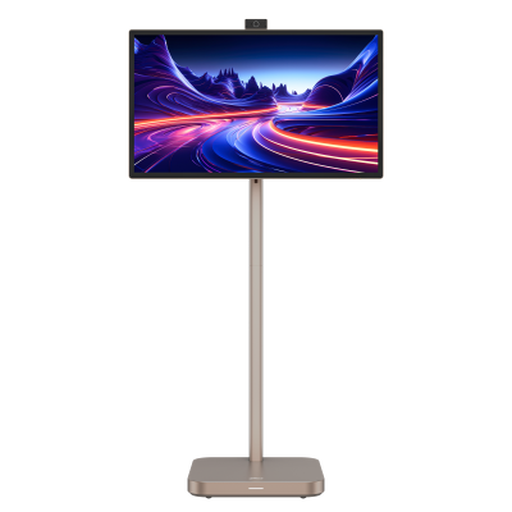
Why It Stands Out: The Dahua 4K Explorer is in a category of its own. It’s a 31.5-inch 4K UHD monitor with a built-in battery and Android 11 OS, making it a completely portable smart display. This unique combination makes it suitable for presentations on the go, collaborative work in flexible office spaces or as a high-resolution entertainment hub.
Pros:
Who is it for? This monitor is designed for professionals who need a high-quality, portable display for presentations or for anyone seeking a versatile smart screen for both work and entertainment that isn't tied to a desk.
View Details for the Dahua 4K Explorer
If these models don't quite fit your specific requirements, there is a wide world of displays to explore. From different sizes to specialised features for gaming or graphic design, you can find a monitor that suits your needs.
Explore our full range of screen panels to find your perfect match.
1. Is a 34-inch ultrawide monitor good for work? Absolutely. The 21:9 aspect ratio is exceptionally well-suited for productivity. It allows you to have multiple documents, spreadsheets or applications open side-by-side without the need to constantly switch between windows. This is particularly beneficial for tasks like video editing, coding and financial analysis.
2. Can a 34-inch ultrawide monitor replace two monitors? Yes, for many users, it's an ideal dual monitor replacement. A 34-inch ultrawide offers a similar horizontal screen area to two 24-inch monitors placed together, but without the disruptive bezel in the centre. This creates a more seamless and immersive workspace.
3. What is the difference between WQHD and 4K on an ultrawide monitor? WQHD (3440x1440) is the standard high-resolution format for 34-inch ultrawide monitors. It provides excellent sharpness and detail. A "4K Ultrawide" (often 5120x2160 or "5K2K") offers even higher pixel density but requires a more powerful graphics card to run smoothly and may necessitate display scaling to keep text readable, which can be a drawback for some users. For most professional work, WQHD is the practical and effective choice.