
24/7 Customer Support

Free returns

Same-day & Next-day Delivery

Quality Guaranteed

Unlock Your Welcome Offers: FREE Delivery | Up to 80% OFF | Free 30-day JoyPlus trial
Download the APP
A 360mm AIO CPU cooler can be a practical choice for a powerful gaming PC, workstation or content-creation build. Its large radiator provides more surface area than smaller liquid coolers, while three fans can help move heat away from the processor during demanding workloads.
However, a larger radiator does not automatically make every model suitable for your system. Pump design, fan specifications, socket support, software compatibility and case clearance all affect the ownership experience. The following guide explains the main buying pitfalls and highlights suitable options for different UK PC builders.
A 360mm radiator is designed for three 120mm fans, but the complete assembly also has radiator thickness, fan depth and hose routing to consider. Some mid-tower cases only support a 360mm radiator at the front, while others allow top mounting but leave limited space around the motherboard heatsinks.
Before purchasing, check:
A specification labelled “360mm” usually refers to radiator length, not the total space required inside the case.
An ARGB AIO cooler, pump display or customisable pump display can add visual appeal, but these features do not determine thermal performance. A screen may also require an internal USB 2.0 header and supporting software. If your motherboard has limited headers, you may need a hub or controller.
Prioritise the cooling hardware first: radiator construction, fan speed range, airflow, static pressure, pump arrangement and mounting hardware. Then assess whether the lighting and display features suit your build.
A cooler must include the correct mounting hardware for your processor platform. The products featured here support combinations of Intel LGA 1851 CPU cooler, Intel LGA 1700 CPU cooler, AMD AM5 CPU cooler and AMD AM4 CPU cooler mounting, but the included bracket and installation instructions should still be checked before fitting.
An AIO water cooler is factory-filled and sealed. Do not open or refill it. Switch off and unplug the computer before installation, secure all connections carefully, and do not use the unit if damage or leakage is visible.
Three 120mm fans can provide a useful balance between heat dissipation and case compatibility, particularly for high-load processors. Where listed, fan speed, airflow and static pressure offer more useful comparison points than vague terms such as “extreme cooling”.
For example, the LE100 range lists 2500RPM PWM fans, 81.8CFM airflow and 3.2mmAq pressure. PWM control allows the motherboard to adjust fan speed according to temperature, which can help reduce unnecessary noise during light use.
A quiet liquid CPU cooler depends on the pump, fans, radiator airflow and the fan curve configured in the motherboard software. A model described as quiet should not be treated as silent under every workload. Check whether the fans use PWM control and whether the pump and lighting connections are clearly identified.
For a quieter UK home-office or bedroom setup, configure a gradual fan curve rather than running all three fans at maximum speed continuously.
Confirm the exact CPU socket, case radiator position and available headers before ordering. Modern Intel and AMD desktop platforms commonly require different mounting arrangements, so broad support for LGA 1851, LGA 1700, AM5 and AM4 can simplify upgrades.
Also check the power and connection requirements for:
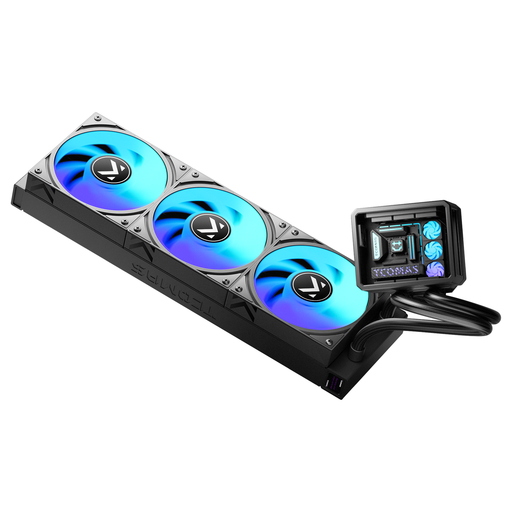
Why This Fits Their Persona: A straightforward option for a first liquid-cooled build, with a large pump head, thickened radiator, ARGB fans and support for current Intel and AMD sockets.
It presents the core 360mm format without relying on a display as its main feature, making the cooling layout easier to prioritise.
Thickened radiator design; ARGB fans; Intel LGA 1851/1700 and AMD AM5/AM4 support.
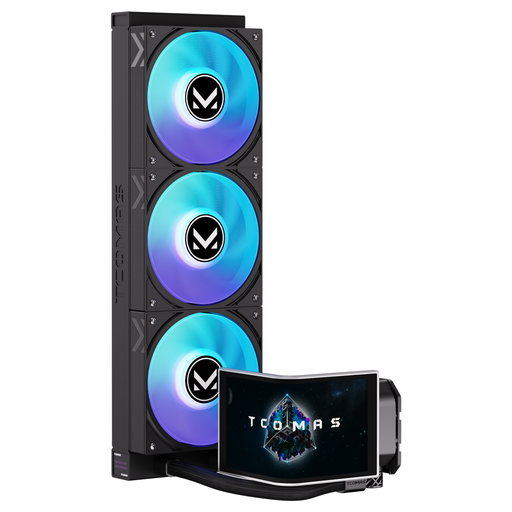
Why This Fits Their Persona: Suitable for builders who want the cooler to become a visible centrepiece, with a 6.67-inch curved AMOLED display and customisable visual effects.
The display is clearly specified, so buyers can assess its size and customisation feature rather than relying on an unspecified “smart” screen claim.
6.67-inch curved AMOLED display; customisable screen; ARGB design; broad socket support.
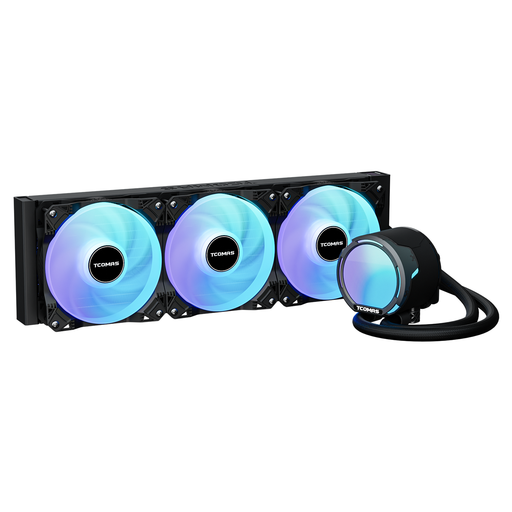
Why This Fits Their Persona: A practical match for long gaming sessions, rendering and other sustained workloads where measurable fan specifications are useful for planning a cooling setup.
The listing identifies PWM speed, airflow and pressure figures, giving buyers more concrete information than generic high-performance wording.
2500RPM PWM fans; 81.8CFM airflow; 3.2mmAq pressure; support for LGA 1851/1700/1200/115X and AM5/AM4.
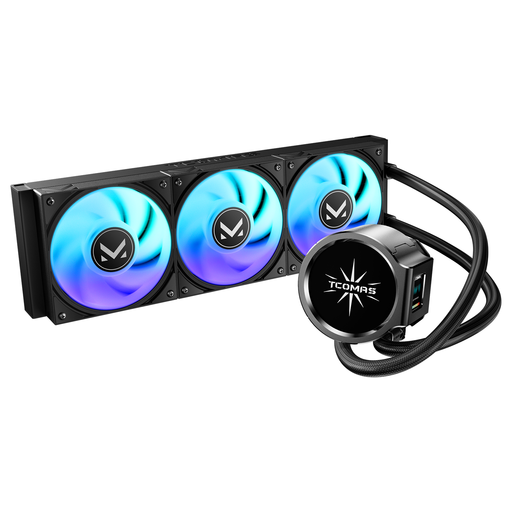
Why This Fits Their Persona: A suitable choice for a showcase gaming PC where monitoring and visual presentation are important parts of the build.
Its dual-screen pump design is stated directly: a round main display and square sub-display, rather than an unclear screen-size description.
Dual-screen pump design; ARGB fans; Intel LGA 1851/1700 and AMD AM5/AM4 compatibility.
We have compiled a complete, real-time list of products that fully satisfy these strict selection criteria and UK safety regulations.
It can suit gaming PCs with processors that produce substantial heat, particularly when the system is also used for streaming, video editing or other sustained workloads. For a low-power gaming processor, a smaller cooler may be sufficient and easier to install. The case layout and CPU model should guide the decision.
An AIO is a sealed cooling system, so it does not require routine coolant refilling. Its working life depends on pump operation, fan wear, installation and general system conditions. Keep dust away from the radiator and fans, monitor unusual pump noise or temperature changes, and replace the unit if leakage or visible damage occurs.
The cooler adds pump and fan power consumption to the PC, although the exact amount varies by model, speed settings and lighting use. PWM control can reduce fan speed during lighter tasks. Turning down ARGB lighting and configuring sensible temperature curves can also help limit unnecessary power use and noise.