What matters when choosing?
The useful dividing line is whether you can control light at the desk and whether the renders you approve are SDR or HDR. Compare the monitor's stated typical brightness separately from its HDR peak figure.
High-output anti-glare mini-LED
Consider it when: Daylight is hard to control and HDR highlight and shadow inspection is part of the work. ASUS United Kingdom specifies 1,000 cd/m² typical brightness and 2,304 local-dimming zones for the ProArt PA32UCXR.
Trade-off: This is a specialist choice, and its output still cannot remove a direct window reflection.
Matte, calibrated 4K IPS
Consider it when: You can turn the screen or shade the window and mainly review SDR renders. BenQ UK specifies a matte panel, factory calibration report and 400-nit typical brightness for the PD3225U.
Trade-off: Its stated typical brightness is lower than the PA32UCXR's, so assess the actual desk position before relying on it in exposed daylight.
| Concern | What to check | Who this matters to |
|---|
| Daylight and reflections |
Look for a stated matte or anti-glare finish, compare typical brightness and check whether you can turn the screen away from direct reflections. |
If the window cannot be shaded, I need to see subtle render detail without mistaking a reflection for part of the image. Around 33% of consumers would put daylight visibility first. |
| Consistent colour |
Match the exact model's colour mode and gamut to the delivery space; check its calibration report or supported calibration process. |
When approving colour across sessions, I need a repeatable display setup rather than an impressive-looking default mode. Roughly 27% of consumers would make colour consistency their primary concern. |
| HDR and tonal detail |
Confirm that your output is HDR, then distinguish typical from HDR peak brightness and check local dimming and the required HDR format. |
If I inspect HDR highlights alongside dark areas, I need to know how the display handles both before approving the render. Around 20% of consumers would prioritise HDR and tonal inspection. |
| Desk workflow |
Check stand adjustment, laptop display compatibility and any required USB-C or Thunderbolt charging capability. |
At a shared laptop workstation, I need to position the screen away from the window without making everyday connections awkward. About 20% of consumers would put desk workflow first. |
Joybuy monitors for render review
These 4K monitors offer different starting points for checking renders at a window-side desk. Check the screen finish, usable brightness and colour workflow of the exact model against your room and output requirements; HDR peak figures alone are not a daylight test.
 No image available
ASUS ProArt Display PA32UCG-K 32-inch 4K mini-LED monitor
Consider this model if HDR render review is part of your work, but confirm its typical brightness for your window-side position rather than relying on the brightness figure in the title.
The product name identifies an IPS mini-LED display with 120 Hz refresh, Dolby Vision and HDR10 support, and hardware calibration. Check the calibration process needed for repeatable colour approval.
View on Joybuy
 No image available
ASUS ProArt PA27DCE-K 4K OLED monitor
This is a 4K OLED option for render review where you can assess reflections and room light at the intended desk position. Confirm typical brightness for daylight use and the calibration process if colour approval must be repeatable.
View on Joybuy
 No image available
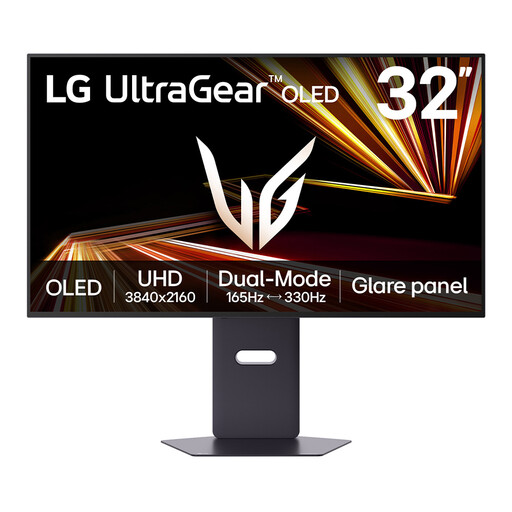
LG UltraGear 32GX850A-B 32-inch 4K OLED monitor
If one screen will handle both renders and high-refresh content, check whether its display modes meet each task rather than treating a peak-brightness figure as sustained daylight output.
The product name specifies a dual mode reaching a maximum of 330 Hz. For colour-critical approval, confirm the calibration process; take account of the listing's warning about image retention with prolonged static images.
View on Joybuy
 No image available
BenQ EW3290U 31.2-inch 4K display, white
This larger 4K screen is worth assessing for desk-based render viewing if you can manage light from the window. Check how its brightness figure applies to normal use, and confirm the stand adjustment and calibration process your setup requires.
The product name specifies a 31.2-inch, 3840 × 2160 display.
View on Joybuy
 No image available
LG UHD Monitor 27UP650K 27-inch 4K IPS, white
Consider this 27-inch format for a render-review desk where you can check the coating and control reflections. Confirm typical brightness and calibration arrangements before relying on it for exposed daylight or colour-critical approval.
The product name specifies 60 Hz, 95% DCI-P3 coverage and DisplayHDR 400.
View on Joybuy
Common questions
Will a brighter monitor solve glare from the window?
No: extra brightness does not remove a direct reflection. The Health and Safety Executive advises arranging the desk and screen to avoid glare and adjusting blinds or curtains where light is intrusive; assess brightness after considering that layout.
Is a matte screen preferable beside a window?
A stated matte or anti-glare finish is a sensible starting point for an exposed position, but check the particular screen and room layout. BenQ UK explains that matte surfaces scatter incoming light rather than reflecting it directly; they do not make strong reflections irrelevant.
Do I still need a colorimeter with a factory-calibrated monitor?
If repeatable colour approval matters, plan how you will check the display after its factory calibration. Datacolor describes calibration tools that measure the display and account for ambient light; confirm whether your chosen monitor has an embedded colorimeter or needs a separate compatible device.
When does mini-LED make sense for 3D render review?
It is worth considering when you inspect HDR highlights and dark areas, particularly if daylight is difficult to control. ASUS United Kingdom specifies 2,304 local-dimming zones and 1,000 cd/m² typical brightness for the PA32UCXR; for SDR work in a controllable room, first assess glare control, colour mode and calibration rather than assuming those HDR features are needed.


