Small-room quiz-show viewers
You need a TV that fits the room while keeping questions, scores and subtitles readable from your usual seat. Which? advises measuring the sofa-to-screen distance before settling on a size.


Choose between 43 and 50 inches by measuring both the viewing distance and the space available for the TV and its stand. Hisense positions 40–43-inch sets for smaller living spaces and 50-inch sets for smaller living rooms; for quiz shows, also check whether you can read on-screen questions, follow speech and use subtitles comfortably. Consider bright-room screen features if windows or lamps cause distracting reflections, rather than assuming a particular display technology is necessary.
You need a TV that fits the room while keeping questions, scores and subtitles readable from your usual seat. Which? advises measuring the sofa-to-screen distance before settling on a size.
You follow speech-led programmes closely, watch at a lower volume or rely on subtitles. Freeview says most programmes offer optional subtitles, but the controls and programme availability are worth checking.
Windows or lamps may be reflected in the screen during your usual viewing hours. Samsung distinguishes between anti-reflection and anti-glare treatments; check what the particular TV offers.
Settle the screen size and physical fit first, then check speech, subtitles and your route to live TV. Give reflection handling more weight if you regularly watch with daylight or lamps facing the screen.
| Concern | What to check | Who this matters to |
|---|---|---|
| Size and fit | Measure the sofa-to-screen distance, TV width and stand footprint. Compare 43 and 50 inches in the space you have. | If I need to read questions and scores from the sofa, the screen must also fit my cabinet without dominating the room. Around 36% of consumers put fit and legibility first. |
| Speech and subtitles | Check subtitle controls, the services you use and whether the TV’s built-in sound is clear enough for you. | When I follow rapid questions at a lower volume, easy subtitle access and intelligible speech matter more to me than gaming features. Around 29% of consumers make dialogue and accessibility their primary concern. |
| Daylight visibility | Note where windows and lamps reflect; check the exact model’s screen treatment. | With the curtains open, I do not want reflections obscuring question graphics. For around 21% of consumers, daytime visibility is the main priority. |
| Live-TV access | Confirm the required channels or apps, reception setup and programme guide on the exact model. | If quiz shows are my main use, I want a straightforward way to reach live and catch-up programmes rather than features I will not use. Around 14% of consumers put simple TV access first. |
A 50-inch TV may suit a smaller living room but still be too wide for its cabinet or too dominant at your seating distance.
Measure the viewing distance, available width and the exact model’s stand footprint before deciding between 43 and 50 inches.
Anti-reflection and anti-glare treatments work differently, and their presence depends on the model rather than the QLED, Mini LED or OLED name alone.
Identify the window or lamp causing the reflection, then check the exact screen treatment before choosing a bright-room TV.
Freeview says most programmes offer optional subtitles; availability can still depend on the programme and service.
Check how to switch subtitles on using your TV or set-top box, and assess whether its sound meets your needs.
GOV.UK says the UK licence requirement applies to watching or recording live TV on any channel or service, and to using BBC iPlayer; it is not determined by whether the device is new.
Before watching a live quiz show or using BBC iPlayer, check whether your household has a valid TV Licence.
The BRAVIA 3 range is relevant if you are comparing compact sizes and built-in sound features.
Its QLED ranges are worth examining when daylight and reflections affect viewing.
Its compact OLED models are relevant if off-centre seating and dark-room contrast matter to you.
Its 50U6NQTUK is a 50-inch Mini LED model to compare if that size fits your room.
Its 50C805K offers another 50-inch route to examine where reflections are a concern.
These 43-inch and 50-inch TVs offer sizes to compare for quiz-show viewing in a small living room. Check physical fit, subtitles and your intended live-TV setup for the particular model.
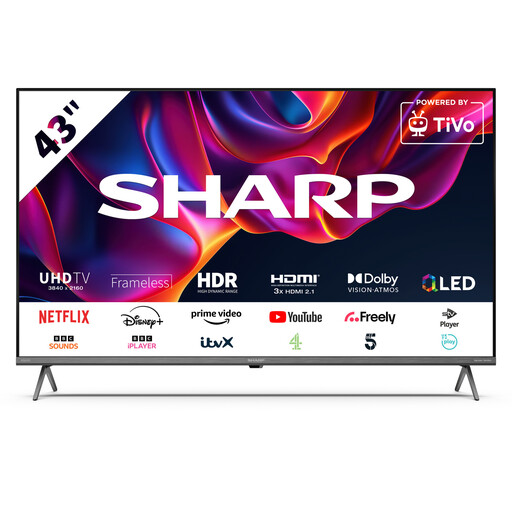 No image available
Consider this 43-inch option where cabinet space is tight; compare its size with the distance from your sofa.
The product name specifies a 4K Ultra HD smart TV. Check its subtitle controls and whether its TV services suit your viewing setup.
 No image available
Compare this 50-inch option if your seating distance and furniture can accommodate a larger screen.
The product name specifies QD-Mini LED, 4K HDR and Google TV. Check the stand footprint, subtitle controls, required live-TV services and screen treatment for your room.
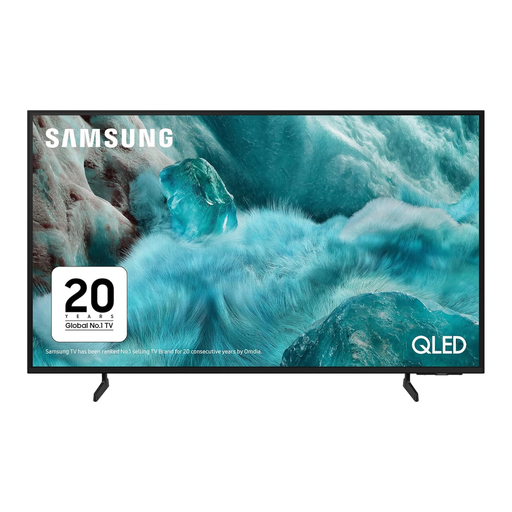 No image available
This 43-inch model is another size-conscious option for a compact living room.
The product name specifies 4K Ultra HD. Check the stand footprint, subtitle controls and access to the UK channels or apps you use.
 No image available
Consider this 43-inch model if you want to examine a Wi-Fi-based live-TV route alongside physical fit.
The product name specifies Freely, Fire TV and an E energy rating. Freely requires internet access; check current channel availability, dimensions and subtitle controls.
 No image available
Compare this 50-inch model with the smaller Haier option if the larger screen fits both your viewing position and TV unit.
The product name specifies Freely, Fire TV and an E energy rating. Freely requires internet access; check current channel availability, the stand footprint and subtitle controls.
Choose the size that fits your measured viewing position, TV unit and wall space. Hisense positions 40–43-inch TVs for smaller living spaces and 50-inch TVs for smaller living rooms; Which? advises measuring from the sofa to the proposed screen position rather than relying on the room label alone.
Yes, if you watch or record the show live on any channel or service, according to GOV.UK. A TV Licence is also required to use BBC iPlayer, including for on-demand programmes; check whether your household already has a valid licence.
Often, yes: Freeview says most programmes have optional subtitles. Check the remote or subtitle settings on your TV or set-top box, and confirm availability for the particular programme and service.
It provides an A-to-G efficiency class for standard dynamic range (SDR) content, as described by GOV.UK’s television energy-label information. Compare the label and product information sheet for the exact models you are considering rather than assuming one screen technology uses less energy.