
24/7 Customer Support

Free returns

Same-day & Next-day Delivery

Quality Guaranteed

Unlock Your Welcome Offers: FREE Delivery | Up to 80% OFF | Free 30-day JoyPlus trial
Download the APP
Stepping up to a 49-inch QD-OLED monitor is a significant investment in your gaming or productivity setup. The promise of total immersion is compelling, but the path to choosing the right one is filled with marketing jargon and technical specifications that can be misleading. Many buyers, drawn in by a single headline feature, end up with a display that doesn't quite live up to its price tag.
As a Joybuy Product Recommendation Officer, my role is to help you see past the hype. Before you commit, let's look at the common traps that can lead to buyer's remorse and the key features that truly matter.
Navigating the high-end monitor market requires a careful eye. Here are three frequent mistakes we see consumers make:
Many premium monitors promise a sleek, minimalist aesthetic, but this is often undermined by a lack of versatile ports. A display without a high-wattage USB-C connection means you'll still need a separate power brick for your laptop and a tangle of extra cables for peripherals. A truly clean desk requires a single-cable solution.
A 240Hz refresh rate sounds impressive, but it's only half the story. When paired with a slower panel technology like some older VA types, you can experience motion blur or "ghosting," where fast-moving objects leave a faint trail. The panel's response time must be fast enough to keep up with its refresh rate for a genuinely sharp and fluid picture.
"HDR" (High Dynamic Range) is a term used widely, but not all HDR is created equal. Many displays offer basic HDR10 support, which may only provide a marginal improvement in contrast. For the deep, inky blacks and brilliant highlights that OLED technology is known for, you need to look for specific certifications like DisplayHDR 400 True Black, which guarantees a minimum standard of performance.
To ensure you get the performance you're paying for, focus on these core parameters.
The heart of any great display is its panel. A 49 inch QD-OLED gaming monitor combines two leading technologies. The OLED (Organic Light Emitting Diode) part means each pixel generates its own light, allowing for perfect blacks and an almost infinite contrast ratio because pixels can be turned completely off. The QD (Quantum Dot) layer is added to enhance colour brightness and accuracy, resulting in an incredibly vibrant and lifelike image that standard LED-backlit monitors cannot match. This technology is particularly effective on a massive 32:9 gaming monitor, creating an unparalleled panoramic view.
This combination is the new benchmark for high-end ultrawide gaming. A 5120x1440 QD-OLED display, also known as Dual QHD (DQHD), offers the same screen real estate as two 27-inch 1440p monitors placed side-by-side, but without the distracting bezel in the centre. Pairing this immense resolution with a high refresh rate makes for an incredibly smooth and detailed experience. However, driving a DQHD 240Hz display requires a powerful graphics card, so ensure your PC is up to the task. For enthusiasts, a true ultrawide 240Hz monitor with a fast-responding QD-OLED panel is the target.
For those who use their setup for both work and play, modern connectivity is essential. A monitor with 90W USB-C is a standout feature. It allows you to connect a compatible laptop with a single cable that handles video, data transfer (for built-in USB hubs) and enough power to charge the laptop. This declutters your desk and simplifies switching between devices. Alongside this, look for HDMI 2.1 and DisplayPort 1.4 to ensure you have enough bandwidth for the highest resolutions and refresh rates.
Based on these practical criteria, here are a few options that align with different user needs.
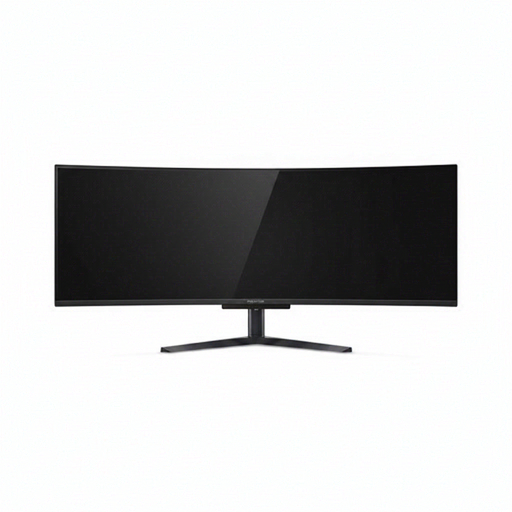
Why This Fits Their Persona: For the UK gamer or sim enthusiast who wants the most immersive experience possible. The combination of a vast 49-inch curved screen, QD-OLED colour, and a 240Hz refresh rate is ideal for flight simulators, racing games and epic single-player adventures.
It features a 0.03ms response time to match its 240Hz refresh rate, eliminating motion blur. It also has DisplayHDR 400 True Black certification and a 90W USB-C port, directly addressing all three common pitfalls.
The combination of a DQHD 240Hz display with QD-OLED technology provides exceptional motion clarity and colour depth. The comprehensive port selection makes it a versatile centrepiece for any high-end setup.
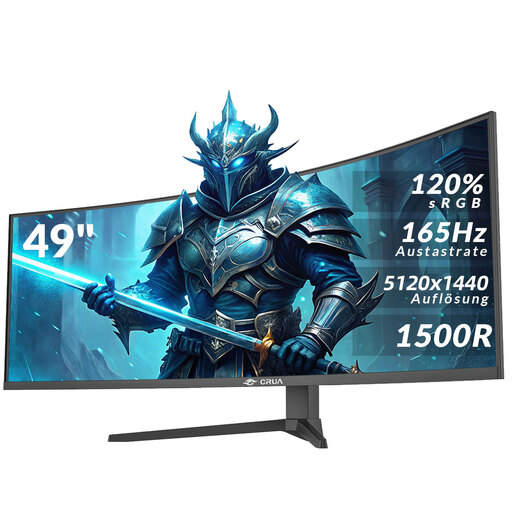
Why This Fits Their Persona: Ideal for a UK-based content creator, developer or stock trader who needs maximum horizontal screen space for timelines, code or charts. The 5120x1440 resolution is the main draw, and the 165Hz refresh rate is ample for after-hours gaming.
While it uses a VA panel instead of QD-OLED, it avoids the slow panel trap with a solid 165Hz refresh rate and AMD FreeSync. It also includes modern ports like HDMI 2.1 and DP 1.4, ensuring good connectivity.
It delivers the full 49-inch DQHD multitasking experience at a more accessible price point. The 120% sRGB colour gamut coverage also makes it suitable for creative work.
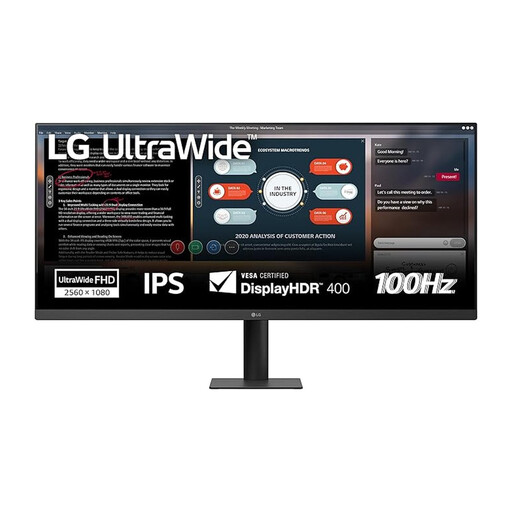
Why This Fits Their Persona: For someone curious about the ultrawide format but not ready for the size or cost of a 49-inch model. This 34-inch screen offers a noticeable upgrade in immersion and productivity space over a standard monitor, making it a great all-rounder for a home office.
It features DisplayHDR 400 certification, avoiding the trap of subpar HDR. Its IPS panel provides excellent colour accuracy (sRGB 99%) and viewing angles, ensuring a quality image that cheaper panels in this category often lack.
This monitor provides an accessible entry point into the ultrawide format from a reputable brand. The 100Hz refresh rate is a good balance for smooth general use and casual gaming.
We have compiled a complete, real-time list of products that fully satisfy these strict selection criteria and UK safety regulations.
Yes, this is a critical consideration. A typical 49-inch monitor can be over 1.1 metres wide and weigh more than 15kg with its stand. You will need a desk that is at least 80cm deep to ensure you are at a comfortable viewing distance and wide enough to accommodate the stand, which is often quite large. Always check the monitor's dimensions and weight against your desk's specifications before purchasing.
Modern QD-OLED panels have a long lifespan, often rated for tens of thousands of hours. To mitigate the risk of image retention or "burn-in" (where static images like taskbars can leave a permanent ghost), manufacturers include features like pixel shifting, static logo detection and screen refresh cycles that run automatically. For typical gaming and productivity use, where the on-screen image is varied, the risk is minimal with these protective features in place.
Power consumption can be significant. A large, high-brightness DQHD 240Hz display can consume between 100 to 200 watts during intense gaming or when displaying bright HDR content. This is considerably more than a standard 27-inch monitor. Check the manufacturer's technical specifications for typical and maximum power draw to understand the potential impact on your electricity bill.