
24/7 Customer Support

Free returns

Same-day & Next-day Delivery

Quality Guaranteed
Download the APP
Categories
Stepping into the world of 49-inch ultrawide monitors is a significant upgrade for any PC setup. The sheer scale can transform your gaming and productivity, but the high price point and complex specifications can make choosing the right one feel daunting. As a Joybuy Product Recommendation Officer, my role is to help you navigate these options with clear, practical advice, focusing on the features that truly matter for your experience.
This guide will break down the key considerations for selecting a large-format display and highlight a standout model that delivers on performance and immersion.
Before diving into specific products, it is helpful to understand the terminology. Focusing on these three areas will ensure you find a monitor that meets your demands for gaming, content creation or professional work.
A 49 inch ultrawide gaming monitor offers an expansive 32:9 aspect ratio. To make the most of this space, resolution is critical. Look for a 5K ultrawide monitor, which typically refers to a Dual QHD (DQHD) resolution of 5120 x 1440 pixels.
Essentially, a dual qhd monitor provides the same screen real estate and pixel density as two 27-inch 1440p (QHD) monitors placed side-by-side, but without the distracting bezel in the centre. This is a game-changer for an ultrawide monitor for productivity, allowing you to have multiple full-sized windows open simultaneously. For gaming, it creates an unparalleled field of view for incredible immersion.
For a smooth, fluid gaming experience, refresh rate is paramount. A higher refresh rate, measured in Hertz (Hz), means the image on the screen updates more times per second, reducing motion blur and providing a more responsive feel.
While 120Hz is a good starting point, a 165Hz curved monitor hits the sweet spot for competitive and immersive gaming. When paired with a low response time (e.g., 1ms) and adaptive sync technology like AMD FreeSync, it ensures that fast-paced action remains sharp and free from screen tearing.
A premium monitor should be a versatile hub for all your devices. To ensure future-proofing and maximum performance, check the available ports. For a monitor for PS5 and PC, look for multiple HDMI 2.1 and DisplayPort 1.4 connections. These standards support the high bandwidth required for 4K or 5K resolutions at high refresh rates, making it easy to switch between your gaming console and computer without compromising on quality.
Based on the features that deliver a truly next-generation experience, here is a model that stands out in the 49-inch category.
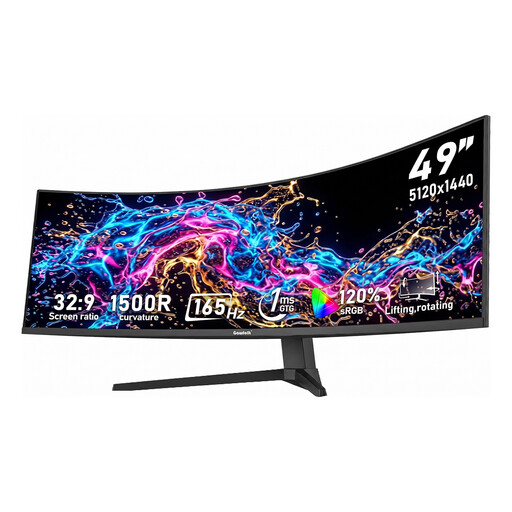
Why It Stands Out
This Gawfolk monitor combines all the key specifications that define a premium ultrawide experience. The 5120x1440 DQHD resolution on a 1500R curved panel creates a deeply immersive viewing arc that fills your peripheral vision. Its 165Hz refresh rate and 1ms response time are built for high-performance gaming, while the excellent colour coverage makes it a strong contender for creative work.
Pros
Who is it for? This monitor is aimed at hardcore PC gamers, professional content creators and productivity power users who want a no-compromise, all-in-one display to replace a dual-monitor setup.
A 49-inch monitor is a significant commitment in both desk space and budget. If you are looking for an immersive curved experience in a more manageable package, a smaller model might be a better fit.
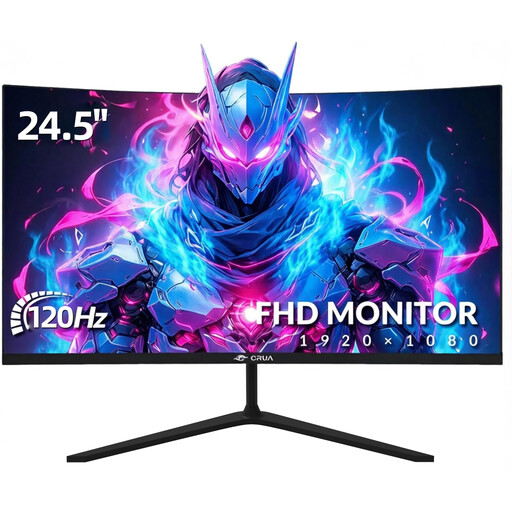
Why It Stands Out
The CRUA 24-inch monitor offers the core benefits of a curved display—immersion and viewing comfort—in a space-saving and affordable design. Its 120Hz refresh rate and Full HD resolution provide a smooth and clear gaming experience for many popular titles, making it an excellent entry point into curved displays.
Pros
Who is it for? This monitor is ideal for gamers with limited desk space, those seeking a high-value secondary monitor or anyone wanting to experience the benefits of a curved display without the investment required for a larger ultrawide model.
Your monitor is the centrepiece of your desk, but the surrounding environment also impacts your comfort and focus. Proper ambient lighting can help reduce eye strain caused by the contrast between a bright screen and a dark room. It also helps create a more immersive atmosphere for gaming or a more focused environment for work.
To complete your setup, consider adding lighting that complements the aesthetic of your new display. Explore our selection of curved lamps, which can match the modern lines of your monitor and enhance your overall desk arrangement.
Is a 49 inch ultrawide monitor good for productivity? Yes, it is an exceptional tool for productivity. The 32:9 aspect ratio on a dual qhd monitor allows you to view multiple application windows side-by-side without compromise, simulating a dual-monitor setup without a physical gap. This is ideal for tasks like coding, video editing, financial analysis and managing complex workflows.
Can you use a 49 inch monitor for PS5 and PC? Absolutely. A high-quality monitor for PS5 and PC should feature HDMI 2.1 ports, which are necessary to take full advantage of the PS5's 4K 120Hz capabilities. However, be aware that consoles like the PS5 do not currently support the 32:9 ultrawide aspect ratio, so the image will be displayed in a standard 16:9 format with black bars on the sides. It will still function perfectly, but you will not get the full-screen panoramic view that you would on a PC.
Is a 32:9 aspect ratio worth it for gaming? For many game genres, a 32:9 gaming monitor is a transformative experience. In racing simulators, flight simulators and many role-playing and strategy games, the expanded field of view provides incredible immersion and situational awareness. However, not all games support this aspect ratio natively, and in competitive first-person shooters, some players find the extreme width can be a disadvantage. It is best to check if your favourite games support ultrawide resolutions.