Call-and-text users who prefer tactile controls
If small touchscreen targets or crowded menus make calls difficult, try a 4G button phone with clearly distinguishable keys and a charging routine the person can manage.


Choose a 4G physical-button phone if calls and texts are the main tasks and tactile controls matter more than apps. Choose an accessible smartphone if messaging apps or video calls are important and someone can help with setup. Whichever route fits, check voice-call compatibility with the chosen provider and let the person try their everyday tasks on the handset.
Age UK Trading identifies eyesight and dexterity as factors that can make a mobile phone difficult to use; the right controls depend on what the person needs to do each day.
If small touchscreen targets or crowded menus make calls difficult, try a 4G button phone with clearly distinguishable keys and a charging routine the person can manage.
If WhatsApp, photos or video calls are essential, compare simplified layouts and larger icons. Establish who will configure the phone and help with changes later.
Test text legibility, call volume and alerts against the person’s needs. If they use a hearing aid, check compatibility for the exact handset and try a call with their usual aid where possible.
Start with the person’s most important communication tasks, then try the controls and check that calls will work with their chosen provider. Ofcom says UK 3G networks have been switched off and 2G networks are being withdrawn gradually, so a replacement must not depend on either for essential calling.
Choose when: Calls and basic texts matter most, and physical keys make them easier to manage.
Trade-off: App-based messaging and video calling may not be available.
Choose when: The person needs smartphone apps but benefits from a simpler interface and help with setup.
Trade-off: Accounts, updates and apps still need managing; the simplified interface depends on the model.
Choose when: The person is comfortable with a touchscreen or needs a wider choice of apps, and someone can configure useful settings.
Trade-off: Larger controls do not automatically make every app or task simple; try the configured phone before deciding.
| Concern | What to check | Who this matters to |
|---|---|---|
| Controls and visibility | Try answering a call and reading a message. Compare key spacing or touchscreen targets, contrast and text adjustment. | Small controls make everyday calls difficult when I cannot reliably see or press them; around 36% of consumers put usable controls and legibility first. |
| Confidence and apps | List essential apps and try finding contacts and messages. Agree who will handle setup and updates. | I want messaging apps or video calls without getting lost in menus; roughly 29% of consumers make manageable app access their main concern. |
| Calls and alerts | Check adjustable call and alert volume, vibration and model-specific hearing-aid information; try a call if possible. | Hearing the caller and noticing an incoming call matter more to me than a larger screen; about 21% of consumers prioritise call and alert audibility. |
| Charging and connection | Confirm the provider’s voice-call support, SIM requirements and box contents; try the charging method. | I need a phone that can be set up, kept charged and used for calls on the intended service; around 14% of consumers place that day-to-day continuity first. |
Ofcom says UK 3G networks have been switched off and 2G withdrawal is under way. A 4G label alone does not confirm that voice calls will work with every provider; some devices may need settings or software changes.
Choose a 4G- or 5G-capable handset and ask the intended provider to confirm voice calling, SIM compatibility and any required settings for the exact model.
Large keys will not resolve every difficulty with reading messages or remembering steps. Conversely, a person familiar with a touchscreen may find large on-screen icons easier to use.
Let the person answer a call, ring a saved contact, read a message, change the volume and put the phone on charge while there is still time to assess the purchase.
A handset’s assistance button may contact assigned people, but the button does not establish that emergency services can be reached or that someone will respond.
If this feature matters, configure and test it with the intended contacts. Assess emergency arrangements separately.
A cradle can provide a consistent place to charge the phone, but box contents vary by model. Emporia lists a charging cradle for its SIMPLICITY phone without a mains power supply.
Check the exact handset’s box contents and the compatibility of any cradle or adaptor before choosing it.
A compatible mains power supply may need to be obtained separately.
These brands offer different approaches to accessible calling and smartphone use. Features and network support must be checked for the particular model, not assumed from the brand name.
Doro offers button-led feature phones and Android smartphones with simplified interfaces.
Emporia offers large-button feature phones and simplified smartphones, with model-specific charging and accessibility features.
TTfone offers big-button phones for people whose main tasks are calls and messages.
An iPhone can suit someone who needs iPhone apps and is willing to configure its accessibility features.
These Nokia handsets are choices for people considering a feature phone chiefly for calls and texts, rather than an app-focused smartphone. Try the controls and confirm voice calling with the intended provider for the exact model before deciding.
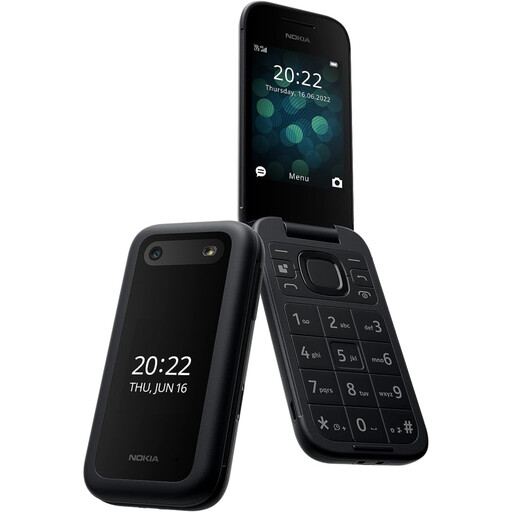 No image available
Consider this model for a call-and-text routine where operating the controls matters most. Try answering a call and reading a message, then confirm 4G voice calling and SIM compatibility with the chosen provider.
Check whether the mains adaptor needed for charging is included.
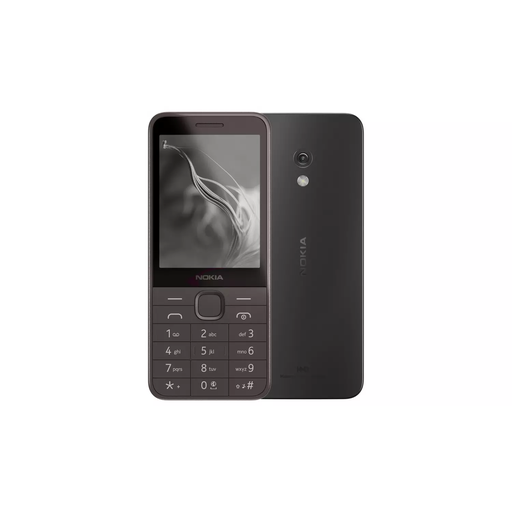 No image available
Consider this 4G model if calls and texts are the priority. Have the person try entering a contact and reading a message, and confirm voice-call and SIM compatibility with their provider.
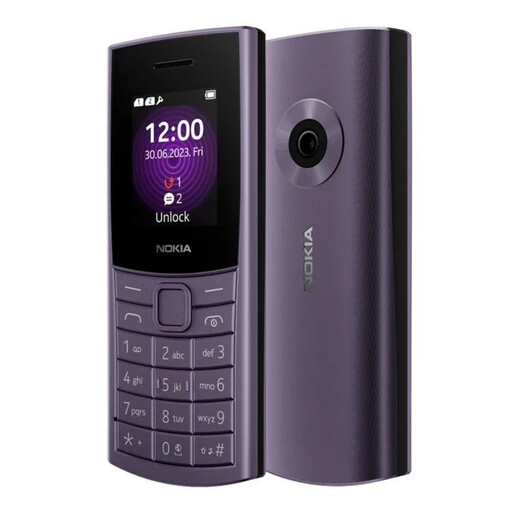 No image available
Consider this 4G variant for basic calls and texts. Check that its controls and display suit the person, and ask the provider to confirm SIM and voice-call compatibility.
Check whether a mains adaptor is included with this variant.
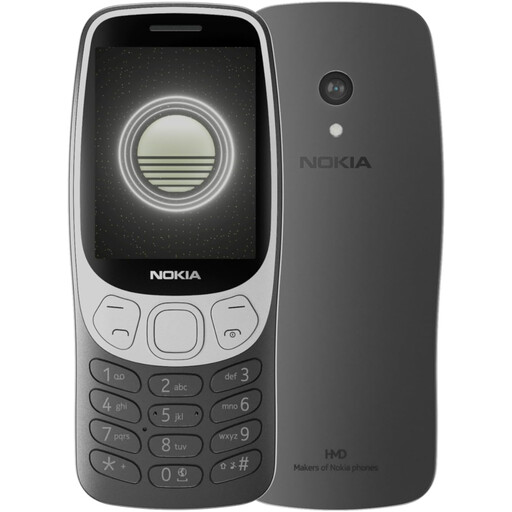 No image available
Consider this 4G variant for a call-and-text routine, provided the person can comfortably use its controls. Confirm SIM and voice-call compatibility with the intended provider.
If storage or additional connectivity features matter, confirm the specifications of this exact variant before relying on them.
No, not for essential UK mobile connectivity. Ofcom says UK 3G networks have been switched off. Choose a 4G- or 5G-capable replacement and confirm its calling and SIM compatibility with the intended provider.
Not necessarily. Ofcom notes that some 4G devices may need settings or software changes for calls, while providers have their own plans for withdrawing 2G. Ask the provider about the exact handset, SIM and voice-call setup.
Physical buttons may suit someone who wants tactile feedback for calls and texts; a touchscreen may suit someone who needs apps and can use a simplified layout. Have the person try their usual tasks on each type rather than deciding by button size alone.
Check whether the chosen phone lets the person adjust text size, display size or contrast. Google Accessibility Help describes display and voice-control options for Android, while Apple Support describes larger, more focused navigation through Assistive Access; available settings depend on the handset and software.
Check the exact model’s box contents for a cable, cradle and mains adaptor, then make sure the charging method is manageable for the person using it. Emporia, for example, lists a cradle with its SIMPLICITY phone but no mains power supply.