
24/7 Customer Support

Free returns

Same-day & Next-day Delivery

Quality Guaranteed

Unlock Your Welcome Offers: FREE Delivery | Up to 80% OFF | Free 30-day JoyPlus trial
Download the APP
Buying a camera based on “4K” alone can lead to disappointing results. The label describes resolution, but not necessarily stabilisation, autofocus, sound quality, battery performance or suitability for the way you plan to record.
For UK buyers, the right choice depends on whether you need a pocket-sized travel camera, a waterproof action camera, a mirrorless system for photography and video, or a webcam for meetings and streaming. This guide explains the specifications that matter and highlights practical options for different types of user.
Two cameras can both record 4K video while producing noticeably different results. Sensor size, lens quality, image processing, bitrate and lighting all affect the final image. A compact camera with a larger sensor may perform more effectively indoors than an action camera with a wide-angle lens, while an action camera is generally easier to mount during cycling or outdoor activities.
Also check the frame rate. 4K at 30fps is suitable for everyday filming, interviews and many vlogs. Higher frame rates can create smoother motion or slow-motion footage, but may increase file sizes, heat and battery consumption. Some cameras support 4K/120fps or 4K/240fps only in specific slow-motion modes.
“Stabilisation” can refer to different systems. Electronic image stabilisation uses software and may crop the image. Optical stabilisation works through the lens or sensor. A three-axis mechanical gimbal physically compensates for movement and can be useful for walking videos.
For fast sports, an action camera with electronic stabilisation may be more practical than a conventional camera. For handheld vlogging, a pocket gimbal camera can provide smoother movement without requiring a separate stabilising accessory.
A camera may not include a memory card, tripod, microphone, spare battery or waterproof housing. These extras can affect the real cost of ownership. Check whether the camera uses microSD or SD cards, the supported capacity, charging connection and whether it can transfer files over Wi-Fi or USB.
Water resistance also needs careful attention. A camera described as waterproof may require a case, while a water-resistant model may only be designed for splashes or light rain. Always follow the manufacturer’s instructions before using equipment near the sea, a swimming pool or open water.
Sensor size affects low-light performance, depth of field and the amount of detail captured. 1-inch sensors appear in several compact and vlogging cameras, while APS-C sensors in mirrorless cameras provide a larger imaging area and support interchangeable lenses.
Lens choice matters just as much. A wide-angle lens can include more of a room or landscape, but may distort faces near the edges. A kit zoom lens is useful for switching between wide scenes and closer framing without carrying extra lenses.
For cameras for YouTube, look for face and eye autofocus, product-detection modes or subject tracking. These features can reduce the need to adjust focus manually when presenting to camera. Sports users should also check whether tracking is designed for people, vehicles or general movement.
AI tracking cameras use automated subject recognition to follow players or presenters. This can be useful for football coaching, basketball training and parents recording school or club matches, but check the supported sports, storage method and whether any subscription is required.
Long recording sessions require more than a high-capacity battery. Resolution, frame rate, stabilisation, screen brightness and wireless functions all influence runtime. A camera with replaceable batteries may be more practical for travel or outdoor filming.
For 4K video cameras, use a compatible, sufficiently fast memory card. High-resolution files fill storage quickly, so built-in memory, bundled cards and maximum supported capacity are worth comparing. USB-C, HDMI, Bluetooth and dual-band Wi-Fi can simplify file transfers, live streaming and external audio connections.
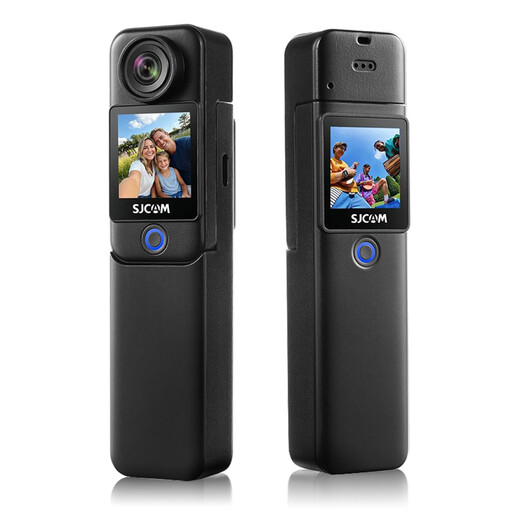
Why This Fits Their Persona: A straightforward option for first-time vloggers, travellers and families who want a compact camera for cycling, holidays or outdoor activities.
The stated 4K/30fps mode, 6-axis electronic stabilisation and supplied 64GB card make the basic setup clearer. Waterproof use requires the included case.
Supports 4K video, 20MP photos, 5GHz Wi-Fi and up to 460 minutes with the handle and auxiliary battery.

Why This Fits Their Persona: Suits creators who want high-resolution video and photography in one system, with room to expand into different lenses.
The APS-C sensor, 4K/60p recording and 10-bit 4:2:2 option provide more control than a resolution-only specification. A memory card is not included.
Includes a 16–50mm power zoom lens, Real-Time Eye AF, USB-C connectivity and 26MP still-image resolution.
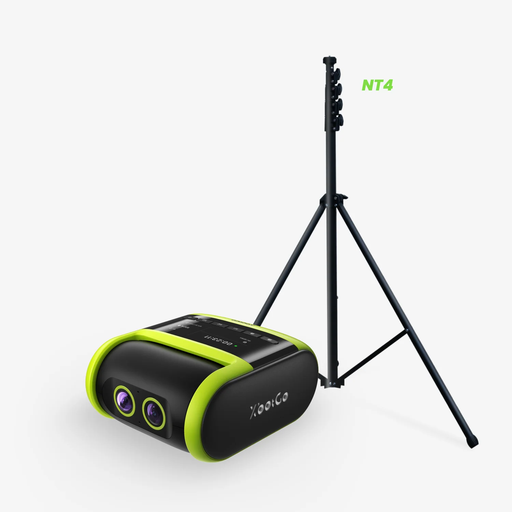
Why This Fits Their Persona: Designed for UK football, basketball and sports teams that need to record matches from the sideline with limited manual operation.
Its listed AI auto-tracking is intended for sports subjects, while the IPX5 rating clarifies that it is water-resistant rather than designed for submersion.
Includes a 13-foot tripod, dual-lens design, live streaming and up to 4.5 hours of recording. A microSD card is required and sold separately.
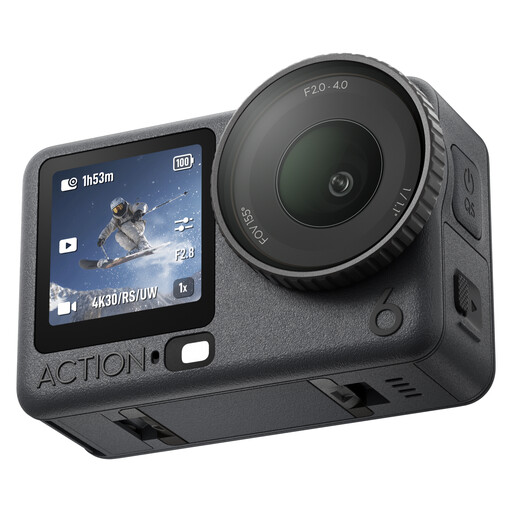
Why This Fits Their Persona: A practical match for hikers, swimmers, travellers and vloggers who need a small camera for changing outdoor conditions.
The listed 20-metre waterproof rating is specified without a housing, while the variable aperture and square sensor offer more detail to compare than resolution alone.
Features f/2.0–f/4.0 variable aperture, 50GB built-in storage, gesture control and up to four hours of stated recording time.
We have compiled a complete, real-time list of products that fully satisfy these strict selection criteria and UK safety regulations.
They can be worthwhile if you want cropping flexibility, detailed footage or a setup that can remain useful as your channel develops. However, upload platforms compress video, so good lighting, clear audio and stable framing may improve perceived quality more than resolution alone.
The amount varies according to frame rate, codec and bitrate. Higher frame rates and less compressed formats create larger files. A compatible high-speed card and regular file transfers are sensible for frequent recording. Check the camera’s stated maximum card capacity before buying.
Many vlogging cameras, webcams and action cameras support streaming, but the output resolution may differ from the recording resolution. Check USB streaming, HDMI output, Wi-Fi requirements, software compatibility and whether a capture card is needed. For online meetings, a dedicated 4K webcam may be simpler than a full interchangeable-lens camera.