
24/7 Customer Support

Free returns

Same-day & Next-day Delivery

Quality Guaranteed
Download the APP
Categories
Stepping into the world of high-fidelity gaming means leaving behind blurry textures and screen tearing. For PC and console gamers with powerful hardware, a high-performance display is the final, crucial piece of the puzzle. A 4K gaming monitor promises breathtaking detail, but navigating the market of refresh rates, panel types and technical jargon can be a challenge.
This guide is designed to help you understand the key features that matter in 2026. We will break down the essential specifications and present a few standout models to help you make an informed choice for your gaming setup.
Before diving into specific products, let's clarify a few key considerations. Understanding these will help you identify which features are most important for your needs, whether you're a competitive esports player or a fan of immersive, story-driven adventures.
The combination of 4K resolution (3840x2160) and a high refresh rate is what defines a premium gaming experience. While 4K delivers incredible sharpness, the refresh rate—measured in Hertz (Hz)—determines how smoothly motion appears on screen.
A standard office monitor typically operates at 60Hz. For gaming, a 144Hz gaming monitor is now the popular standard, offering a noticeably smoother and more responsive feel. For highly competitive players, a 240Hz gaming monitor provides an even greater advantage by displaying more frames per second. To achieve these high refresh rates at 4K, ensure the monitor and your graphics card support modern connections like DisplayPort 1.4 or HDMI 2.1.
The display panel is the heart of the monitor, and two technologies currently lead the high-end market: OLED and Mini LED.
Beyond the core specifications, look for features that enhance the visual experience. High Dynamic Range (HDR) expands the range of colour and contrast, making games look more vibrant and realistic. Look for VESA DisplayHDR certifications (e.g., DisplayHDR 600) as an indicator of performance.
Additionally, adaptive sync technology is crucial. Whether it's a G-Sync compatible monitor for NVIDIA GPUs or one with AMD FreeSync, this feature synchronises the monitor's refresh rate with your graphics card's frame output. This eliminates screen tearing and stuttering, which is especially important for a smooth experience on a high-end PC or a modern console like the PS5.
Here are a few models that showcase the different strengths available in the current market, each catering to a specific type of gamer.
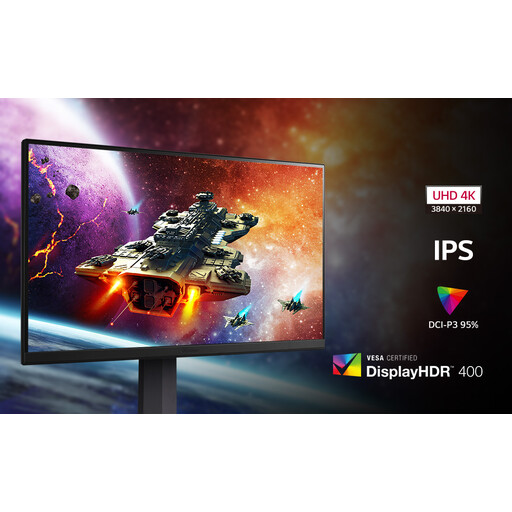
Why It Stands Out: The LG UltraGear 32GR93U represents a fantastic balance of performance and features. It combines the clarity of 4K with the smoothness of a 144Hz refresh rate on a vibrant IPS panel. This makes it a versatile and capable display for a wide range of gaming genres on both PC and console.
Pros:
Who is it for? This is an excellent choice for gamers making their first major upgrade to a high-performance 4K display. It’s a reliable all-rounder that excels with both PC and as a monitor for PS5 or Xbox Series X, delivering a premium experience without requiring the very highest-end investment.
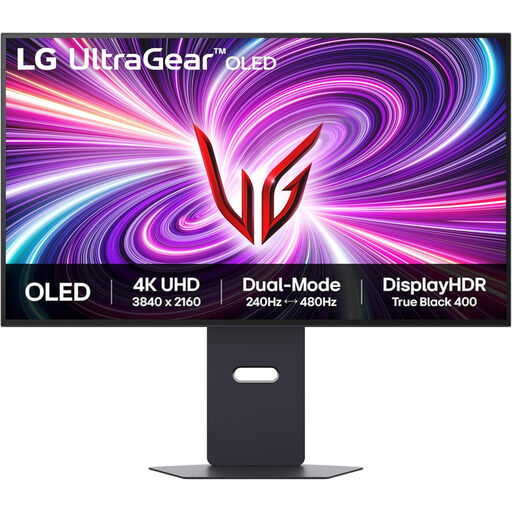
Why It Stands Out: This LG UltraGear model pushes the boundaries with its innovative Dual Mode feature and OLED panel. It allows you to switch between a stunning 4K 240Hz mode for immersive single-player games and an ultra-fast Full HD 480Hz mode for competitive esports. This flexibility is paired with the signature benefits of an OLED gaming monitor: perfect blacks and a near-instantaneous 0.03ms response time.
Pros:
Who is it for? This monitor is aimed at the serious enthusiast and competitive gamer who wants it all. If you play fast-paced shooters where every millisecond counts but also want to experience cinematic games in breathtaking 4K OLED quality, this display offers a unique, no-compromise solution.
View the LG UltraGear 32GS95UV-B
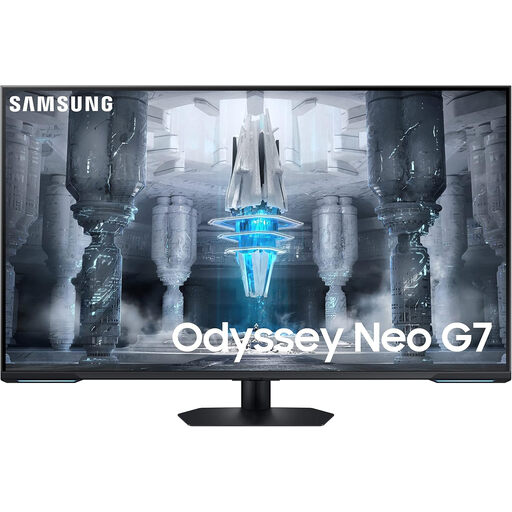
Why It Stands Out: The Samsung Odyssey Neo G7 is more than just a monitor; it's a complete entertainment centre. This large 43-inch display uses Quantum Mini LED technology for outstanding brightness and contrast, making it a phenomenal HDR gaming monitor. What truly sets it apart is its built-in Tizen OS, turning it into a smart gaming monitor with direct access to streaming apps and Samsung's Gaming Hub.
Pros:
Who is it for? This monitor is ideal for someone looking for a single screen to serve as both a high-end gaming display and a smart TV. It's perfect for a living room setup or for users who want a large, versatile screen that can handle gaming, movies and content streaming with equal prowess.
View the Samsung Odyssey Neo G7
The world of high-performance displays is vast. If these specific models aren't quite what you're looking for, or you'd like to compare more options, we have a wider selection. Explore our full range of 4K 144Hz gaming monitors to find the perfect fit for your setup.
Q1: Is a 4K 144Hz monitor worth it for a PS5? A: Absolutely. The PS5 supports 4K resolution and frame rates up to 120Hz in compatible games. A 144Hz gaming monitor with an HDMI 2.1 port is an excellent match, as it allows you to take full advantage of the console's capabilities for a smooth, highly detailed gaming experience.
Q2: What is the main difference between an OLED and a Mini LED gaming monitor? A: The primary difference lies in how they create light and colour. An OLED gaming monitor has self-lit pixels, offering perfect black levels and extremely fast response times. A Mini LED monitor uses a backlight made of thousands of tiny LEDs, allowing it to achieve very high peak brightness levels and excellent contrast, often without the risk of burn-in that can be a long-term concern for some OLED users.
Q3: Do I need G-Sync or FreeSync? A: Both are adaptive sync technologies that prevent screen tearing by matching the monitor's refresh rate to your graphics card's output. A G-Sync compatible monitor is certified for NVIDIA cards, while FreeSync is designed for AMD cards. Many modern monitors support both, making them a valuable feature for ensuring smooth, tear-free gameplay on any system.