For reviewing building plans, start with a flat 4K monitor: a 27-inch screen suits a smaller desk, while a 31.5–32-inch screen gives plans and reference documents more physical viewing area if you can position it comfortably. Check the stand, your computer's video output and any USB-C functions you intend to use before deciding; screen size alone will not make a home workstation comfortable.
Who is this for?
Detail-first plan reviewers
If you regularly inspect dimensions, annotations and fine linework alongside other documents, resolution and usable screen area will shape your choice. BenQ's AutoCAD guidance also favours a flat panel when judging straight lines.
Laptop-based home-office reviewers
If drawings are on your laptop, you may want the monitor to handle display output, charging and peripherals through a simpler desk connection. Check the functions of your laptop port and cable as well as those of the monitor.
Long-session home workers
If plan review keeps you at a screen for extended periods, consider how the monitor fits with your desk, chair and viewing position. The Health and Safety Executive advises that home workers should be able to maintain a comfortable, sustainable posture.
What matters when choosing?
Settle the screen size against your available desk space, then check linework visibility, positioning and the connection your computer needs.
| Concern | What to check | Who this matters to |
|---|
| Plan detail |
Check for native 3840 × 2160 resolution and confirm a flat panel if judging straight lines is important. |
When I inspect closely spaced lines and annotations, I want enough detail to read the drawing without overlooking its surrounding context. Around 42% of consumers put plan-detail visibility first. |
| Desk fit and posture |
Measure usable desk space; check stand adjustment or compatible VESA mounting for the exact model. |
During long sessions, I need to place the screen comfortably rather than adapt my posture to it. Comfortable workstation positioning comes first for around 33% of consumers. |
| Laptop connection |
Match the monitor's video and power-delivery functions to your laptop and cable; check any peripheral ports you need. |
If I work from a laptop, I want fewer desk connections without losing the display or charging functions I rely on. Around 25% of consumers prioritise laptop-connection simplicity. |
Buying pitfalls
-
Assuming USB-C always means one-cable docking
A USB-C connector does not, by itself, establish which video, data or charging functions will work between a monitor and laptop.
Check the exact monitor specification, your laptop's supported video output and charging requirements, and the cable's capabilities.
A separate charger, dock or compatible cable may be needed if the intended connection cannot provide every required function.
-
Choosing a larger panel before checking desk fit
A 31.5–32-inch display provides more physical screen area than a 27-inch display, but it also needs room for a comfortable viewing position. The Health and Safety Executive advises considering the whole home workstation, not just the screen.
Measure the desk and check whether the stand's adjustments or a suitable VESA mount would let you position the monitor comfortably.
An arm or a change to the desk arrangement may be needed if the included stand cannot place the screen appropriately.
-
Treating 4K as the only plan-review requirement
Resolution is relevant to fine detail, but it does not settle physical viewing area, screen positioning or computer compatibility. BenQ's AutoCAD guidance also recommends a flat panel for judging straight lines.
Compare the exact model's size, panel shape, adjustment options and connections alongside its native resolution.
Brands to consider for this setup
BenQ
BenQ's PD3205U is a reference point for a larger, design-oriented 4K screen.
- BenQ UK lists a 31.5-inch 3840 × 2160 IPS display, CAD/CAM mode, height adjustment, 100 × 100 mm VESA mounting and USB-C power delivery up to 90 W for the PD3205U.
- Check that a 31.5-inch screen can be positioned comfortably on your desk; the listed features are manufacturer specifications, not a test of plan-review performance.
Dell
Dell's U2725QE illustrates the smaller 27-inch 4K workstation route.
- Dell UK lists a 27-inch 4K IPS Black display with an anti-glare surface, height and pivot adjustment, and power delivery up to 90 W.
- A 27-inch panel has less physical viewing area than a 31.5–32-inch panel; confirm that its connections suit your laptop before relying on a single-cable setup.
LG
LG's 32U720A is a larger 4K option for buyers considering a USB-C laptop connection.
- LG UK lists a 31.5-inch 3840 × 2160 VA panel and USB-C display, data-transfer and charging functions with power delivery up to 90 W.
- If you view drawings from changing angles, compare the VA panel's appearance with the alternatives you are considering, and confirm laptop and cable compatibility.
Joybuy products for plan review
These 27-inch and 32-inch 4K monitors offer different screen sizes for reviewing plans at a home-office desk. Check the exact model's panel shape, desk fit and computer connection before choosing.
 No image available
BenQ MA270UP 27-inch 4K USB-C Mac Monitor
Consider this 27-inch screen if desk space favours a smaller display for plan review. Its name specifies a Nano Glossy IPS panel, USB-C and a height-adjustable stand. Confirm the panel is flat if straight-line appearance matters, and check your computer and cable against the connection functions you need.
View on Joybuy
 No image available
BenQ MA320UP 32-inch 4K USB-C Mac Monitor
Consider this larger screen if your desk can accommodate plans alongside reference documents. Its name specifies a Nano Glossy IPS panel, USB-C and a height-adjustable stand. Check comfortable placement, confirm whether the panel is flat and match the connection functions to your computer and cable.
View on Joybuy
 No image available
iiyama ProLite XUB2792UHSU-B6 27-inch 4K Monitor
This 27-inch 4K model is a size option for detailed plans where a larger screen would be difficult to place. Check its stand adjustments, whether the panel is flat and which connection functions work with your computer before deciding.
View on Joybuy
 No image available
LG 27UP650K 27-inch 4K IPS Monitor
This 27-inch option suits consideration when you want a smaller 4K screen for reviewing drawings. The product name specifies HDMI and DisplayPort connections and built-in speakers. Check that your computer can use the intended video connection and confirm the panel is flat if judging straight lines is important.
View on Joybuy
 No image available
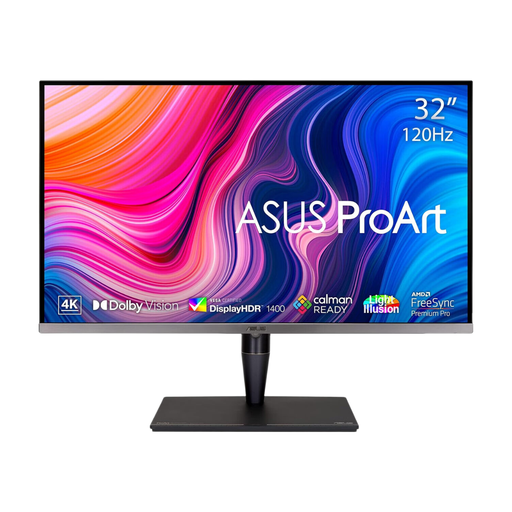
ASUS ProArt Display PA32UCG-K 32-inch 4K Monitor
Consider this 32-inch model if you have room for a larger plan-viewing area. Its name specifies an IPS Mini LED panel and Thunderbolt 3. Check the connection functions your computer requires, whether the screen is flat and how it can be positioned on your desk.
View on Joybuy
Common questions
Is a curved monitor suitable for reviewing architectural plans?
A flat panel is the more cautious choice if judging straight lines and geometry is central to your review. BenQ's AutoCAD guidance says curved screens can skew lines; that is manufacturer guidance, so confirm the shape of the particular monitor you intend to buy.
Can one USB-C cable display plans and charge my laptop?
Yes, if the monitor, laptop and cable support the required video and power functions together. BenQ lists USB-C display, data and 90 W power delivery for the PD3205U, while LG describes those functions for the 32U720A; check your laptop's video output and charging requirements against the exact monitor.
What should I check for long plan-review sessions at home?
Check whether you can position the monitor comfortably as part of the whole desk setup, including chair, keyboard and viewing position. The Health and Safety Executive advises a comfortable, sustainable posture for home display-screen work, rather than relying on screen features alone.


