For detailed maps beside a bright window, choose a 4K monitor whose screen surface, brightness controls and positioning options suit the desk; resolution alone will not remove a reflected window. A 27-inch screen suits a tighter workspace, while a 31.5- or 32-inch screen gives map labels more physical space but needs room on the desk. Check laptop connections and charging against your own computer rather than choosing them by monitor size.
Who needs which setup?
Window-side map readers
If daylight produces a visible reflection across labels, contours or imagery, prioritise screen placement and surface finish alongside adjustable brightness. The UK Health and Safety Executive advises arranging the desk and screen to avoid bright reflections.
Laptop-based map workers
A display connection that also carries data and charging can simplify a laptop desk, but only if the laptop supports the monitor’s video connection and its charging needs fit the available power delivery.
Large-workspace detail reviewers
If you keep several map panels, layers or reference windows open, consider whether a larger screen and adjustable placement help you see them at a comfortable distance. Check the desk space available before choosing the panel size.
What matters when choosing?
Start with the reflection you see from your normal seat, then choose the screen size that fits your map layout and desk. Check laptop connections and stand adjustment against the equipment you already use.
| Concern |
What to check |
Who this matters to |
| Daylight readability |
Check the exact screen finish and typical brightness; plan where the window will appear in the screen. |
If window reflections cover map labels at my usual seat, I need to control the light as well as choose the display. Roughly 33% of consumers put daylight legibility first. |
| Map workspace |
Compare 27-inch and 31.5- or 32-inch screens against your viewing distance, desk depth and preferred display scaling. |
When I compare several map panes, I want their labels to be large enough to inspect without crowding the desk. Physical workspace is the primary concern for around 27% of consumers. |
| Laptop connection |
Match the laptop’s video output and charging requirement to the exact monitor’s USB-C or Thunderbolt capabilities. |
If I bring a laptop to the map desk, I would rather avoid separate display and charging connections where compatibility allows. Around 20% of consumers prioritise that connection. |
| Screen positioning |
Check stand movement and, for a clamp-mounted option, whether the desk edge or mounting point is suitable. |
During long map-review sessions, I need to move the screen into a comfortable position instead of leaning around a reflection. Positioning comes first for roughly 20% of consumers. |
Buying pitfalls
-
Expecting 4K resolution to solve reflections
More image detail does not remove a window reflected across the screen. The Health and Safety Executive advises positioning the desk and display to avoid glare and bright reflections.
Before ordering, check the window’s position from your normal seat. Consider whether curtains, blinds or a movable display position will let you keep the reflection away from the map.
-
Using an HDR or peak-brightness label as a daylight test
A peak figure does not, by itself, tell you how a screen surface will handle a reflected window during ordinary map work.
Compare the exact model’s typical brightness and screen finish, then assess whether you can position it away from direct reflections.
-
Assuming USB-C will charge any laptop
Video support and power delivery must match the laptop. Manufacturer-specified charging power differs between monitor models.
Check the laptop’s supported video output and charging requirement against the exact monitor connection and its power-delivery specification.
If they do not match, you may still need a separate laptop charger or dock on the desk.
-
Choosing a large screen before measuring the desk
A 31.5- or 32-inch display takes more physical room, while a clamp stand needs a suitable mounting point.
Measure usable width, depth and rear clearance, and check the desk edge before choosing a large panel or clamp-mounted stand.
Relevant brands to consider
Dell
The 27-inch U2725QE is relevant if you want a compact 4K map display with laptop-hub features.
- Dell specifies an anti-glare and anti-reflective surface, an ambient-light sensor and up to 140 W power delivery for the U2725QE.
- Those features do not establish whether a reflection from your particular window will remain distracting; check the intended screen position.
BenQ
The PD3225U and PD2706U provide 31.5-inch and 27-inch 4K options respectively for different desk sizes.
- BenQ specifies matte coatings and typical brightness of 400 nits for the PD3225U and 350 nits for the PD2706U.
- Neither stated brightness figure alone establishes how the screen will handle reflections in your room.
ASUS ProArt
The 27-inch PA279CRV is relevant when map work also involves colour-sensitive imagery or outputs.
- ASUS specifies 99% DCI-P3 and Adobe RGB coverage and USB-C power delivery up to 96 W for the PA279CRV.
- Its stated colour features do not establish that it will control severe window reflections; assess the screen finish and placement separately.
LG
The 31.5-inch 32UN880K-B is relevant when moving a large map display into position is a priority.
- LG specifies a C-clamp stand for the 32UN880K-B that extends, retracts, swivels, pivots, raises and tilts.
- Check that the clamp suits your desk, and confirm the exact model’s screen finish and typical brightness for the intended window-side position.
Joybuy products for map desks
These 4K monitors offer different screen sizes and display types for a map desk. For each one, weigh the available desk space against screen placement and the daylight conditions you need to manage.
 Image unavailable
ASUS ProArt PA27DCE-K OLED 4K UHD
Consider this OLED 4K model if colour-focused map work is part of your brief. For a bright-window desk, check typical brightness and the screen finish for this exact variant; also confirm whether its connection meets your laptop’s charging needs.
View on Joybuy
 Image unavailable
ASUS ProArt Display PA32UCG-K 4K IPS Mini LED
Consider this larger-format 4K display if you have room for a broad map workspace. Its HDR description is not a substitute for checking typical brightness and reflection control in your intended position; confirm laptop charging compatibility separately.
View on Joybuy
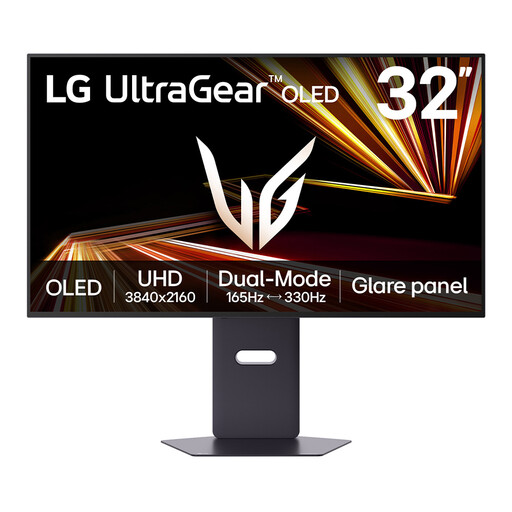 Image unavailable
LG UltraGear 32GX850A-B 32-inch OLED 4K UHD
The 32-inch screen is worth considering when you want physically larger map panels and have space to position the display. Check its typical brightness and how the exact screen finish handles your window reflection rather than relying on a peak-brightness claim.
View on Joybuy
 Image unavailable
ASUS Eye Care VY27UQ 4K UHD 60 Hz
This 4K option may suit a desk where a smaller display is easier to place away from the window. Check the exact screen finish and whether its positioning options give you enough movement for your seat and desk.
View on Joybuy
 Image unavailable
iiyama ProLite XUB2792UHSU-B6 27-inch 4K UHD
The 27-inch format is an option when desk width is limited but you still want a 4K map display. Check the screen coating for reflected-window control and confirm any required laptop video and charging functions for this exact model.
View on Joybuy
Common questions
Will 4K alone make maps readable beside a bright window?
No. A reflected window can still obscure map detail on a 4K screen. The Health and Safety Executive advises arranging the desk and screen to avoid glare and bright reflections, often by not positioning the screen directly facing a window.
Should I choose a 32-inch or a 27-inch 4K monitor for maps?
Choose by the physical size you want map labels and panels to appear, as well as the space and viewing distance available. A 31.5- or 32-inch panel provides a larger physical workspace; a 27-inch panel takes less desk space and has higher pixel density at the same 4K resolution.
Can one cable carry the picture and charge my laptop?
It can if both the laptop and the exact monitor support compatible video output and sufficient power delivery. Check the laptop’s charging requirement against the monitor connection: for example, ASUS specifies up to 96 W USB-C power delivery for the PA279CRV, while LG specifies up to 60 W for the 32UN880K-B.
What should I check about support before ordering?
Check the seller’s warranty and return terms for the exact monitor, including how faults or damaged goods are handled. Confirm the included power connection and the available repair or collection arrangements for the model you intend to order.


