Close-view map detail checkers
If you inspect small labels, boundaries or contour lines at a desk, pixel density is worth comparing. Dell UK and BenQ UK list approximately 163 PPI for their referenced 27-inch 4K models.


For close inspection of small map labels and fine lines, start with a 27-inch 4K monitor: BenQ UK lists 163 PPI for its PD2705U, compared with 140 PPI for its 31.5-inch PD3205U. Choose the larger screen when physical room for a map and reference windows matters more than pixel density. In either size, check reflections, stand adjustment and desk fit; prioritise USB-C charging only if its video support and power delivery match your laptop.
If you inspect small labels, boundaries or contour lines at a desk, pixel density is worth comparing. Dell UK and BenQ UK list approximately 163 PPI for their referenced 27-inch 4K models.
A physically larger screen can give a map, legend and reference document more room side by side, provided it fits your desk. BenQ UK lists its PD3205U as a 31.5-inch 4K model.
If you regularly connect a compatible laptop, USB-C may reduce the number of desk cables. LG UK states that the 27UP85ZK-W can carry 4K video, data and up to 90 W charging over one USB-C connection; check the laptop and cable requirements before relying on that arrangement.
Choose it when: Close-view map labels and fine linework take priority over physical screen area.
Trade-off: A 27-inch panel leaves less physical room for a map and several reference windows than a 31.5-inch panel.
Choose it when: You want a larger physical map canvas and have space for the screen at your desk.
Trade-off: The same 4K resolution covers a larger area: BenQ UK lists 140 PPI for the 31.5-inch PD3205U, against 163 PPI for the 27-inch PD2705U.
| Concern | What to check | Who this matters to |
|---|---|---|
| Fine map detail | Compare the exact model’s screen size and pixel density at 3840 × 2160, then check whether map labels remain readable at your viewing distance. | When I work through small labels and thin boundaries, I want detail to remain legible without giving up too much map context; around 42% of consumers put fine detail first. |
| Glare and positioning | Check the screen finish and available height or tilt adjustment against your desk and lighting. The Health and Safety Executive also advises positioning screens to avoid reflections. | For a long study session near a window or lamp, I need a screen position that avoids distracting reflections; roughly 33% of consumers make workstation comfort their primary concern. |
| Laptop connection | Check laptop USB-C video compatibility, the monitor’s power-delivery rating and the cable needed for the intended connection. | If I connect a laptop each day, I would rather keep video and charging on one compatible cable; about 25% of consumers prioritise laptop and desk integration. |
Screen size changes pixel density even at the same resolution. BenQ UK lists 163 PPI for the 27-inch PD2705U and 140 PPI for the 31.5-inch PD3205U.
Decide whether denser pixels at close range or a larger physical canvas matters more, then compare the size and PPI of the exact model.
USB-C charging differs by monitor: BenQ UK lists 65 W for the PD2705U, while Dell UK lists up to 90 W for the U2723QE. A single-cable display setup also depends on compatible laptop video output.
Check the laptop’s USB-C DisplayPort Alt Mode support and charging needs against the monitor’s stated ports, power delivery and cable requirements.
The Health and Safety Executive advises adjusting screen position and lighting to avoid reflections and taking breaks during prolonged display-screen work.
Position the monitor away from direct reflections, adjust its stand or compatible mount, and change activity or take breaks during long sessions.
Dell UK labels the U2723QE unavailable on its product page. Its specifications remain useful for comparing features, but they do not establish current availability.
Check availability and the exact model suffix before ordering; similarly named monitors may have different stands, ports or charging ratings.
The UltraSharp U2723QE is a reference point for a 27-inch 4K USB-C monitor with extensive stand adjustment.
The PD2705U and PD3205U provide a model-specific way to compare 27-inch and 31.5-inch 4K IPS screens.
The 27UP85ZK-W is relevant to a 27-inch 4K setup built around a compatible USB-C laptop.
These models include 27-inch screens for close-view map work and larger 4K screens for a roomier canvas. Compare each screen’s finish, connections and desk fit against your study setup.
 No image available
A 27-inch option for checking map detail at a study desk. The product name specifies a 4K UHD IPS panel, USB-C and a height-adjustable stand.
Check how the Nano Glossy surface handles your room’s reflections, and confirm USB-C video and charging compatibility with your laptop. If near-silent operation matters, check operating noise before ordering.
 No image available
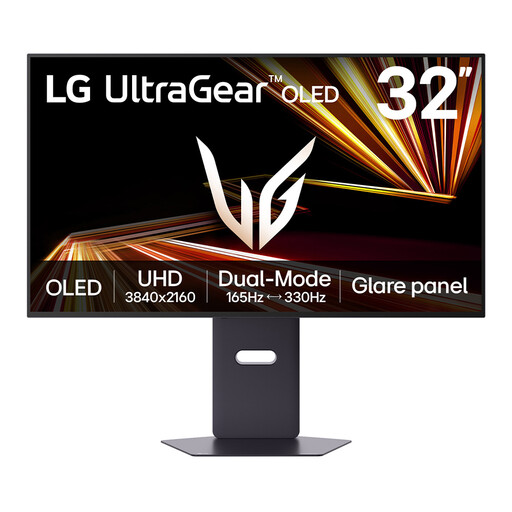
A larger-screen option if you want more physical room for a map and supporting windows. Its product name specifies a 32-inch 4K UHD OLED display and Dual Mode with a stated maximum of 330 Hz.
The listing warns of OLED image retention with prolonged static images, a material consideration if maps or interface panels stay in place for long periods. Check desk dimensions and operating noise for your setup.
 No image available
A 27-inch choice for close-view map work. Its product name specifies a 4K IPS screen, 60 Hz refresh rate, HDMI and DisplayPort connections, and built-in speakers.
If study lights or windows may reflect in the display, check its screen finish. Confirm that its connections suit your computer and check operating noise if silence is a priority.
 No image available
A 32-inch option when physical map area matters and your desk can accommodate a larger display. Its product name specifies a 4K IPS Mini LED panel, 120 Hz refresh rate, Thunderbolt 3 and HDMI 2.1.
Check its dimensions against your desk. If laptop charging matters, confirm the port’s power-delivery function and rating rather than assuming Thunderbolt 3 supplies the power you need; check operating noise for a quiet room.
 No image available
A larger 4K option for viewing a map alongside reference material. The product name specifies an IPS panel, USB-C and a height-adjustable stand.
Check that the Nano Glossy finish suits the study’s lighting and that the screen fits your desk. Confirm the USB-C functions your laptop requires, and check operating noise if quiet operation is important.
Speakers are not necessary for viewing maps. In a quiet study, check whether any built-in speakers can be muted and whether the monitor’s operating noise suits your workspace.
No monitor feature can replace a suitable workstation setup and breaks. The Health and Safety Executive notes that prolonged display-screen work can cause tired eyes and discomfort, and advises adjusting the screen and lighting to avoid reflections and changing activity or taking breaks.
For an eligible online purchase, GOV.UK states that you can cancel within 14 days of receiving the item and then have another 14 days to return it. Check the applicable conditions and the retailer’s return process; remedies for a faulty or misdescribed monitor are a separate matter.
Ask the retailer about same-type electrical-equipment take-back when buying a replacement. GOV.UK says retailers supplying new electrical equipment must offer a same-type take-back route; home collection may carry a transport charge, so confirm the available arrangements before disposing of the old monitor.