
24/7 Customer Support

Free returns

Same-day & Next-day Delivery

Quality Guaranteed
Download the APP
Categories
Navigating the world of high-performance displays can feel overwhelming. With a sea of technical specifications and marketing terms, it’s difficult to determine which features truly matter for your gaming or creative needs. If you're considering an upgrade to a 4K OLED gaming monitor, you're likely looking for the ultimate in visual fidelity—deep blacks, vibrant colours and instantaneous response times.
As the Joybuy Product Recommendation Officer, my role is to help you understand the key considerations for choosing a new monitor. This guide cuts through the clutter, focusing on practical advice and highlighting a couple of standout options that deliver on their promises for both enthusiast gamers and creative professionals.
Before diving into specific models, let's clarify a few key features. Understanding these will empower you to make a choice that aligns perfectly with your setup and usage.
For gaming, smoothness is paramount. A monitor's refresh rate, measured in Hertz (Hz), indicates how many times per second the screen updates the image. While 120Hz or 144Hz is a significant step up from standard 60Hz displays, a 240Hz monitor offers a level of fluidity that can provide a tangible edge in fast-paced, competitive titles.
Equally important is response time. OLED technology excels here, with pixel response times often as low as 0.03ms. This virtually eliminates motion blur and ghosting, ensuring that on-screen action remains crisp and clear, no matter how chaotic it gets.
A premium monitor needs premium inputs. The HDMI 2.1 monitor standard is essential for modern gaming, as it's the only way to unlock the full potential of consoles like the PlayStation 5 and Xbox Series X, enabling 4K resolution at 120Hz. For PC gamers, DisplayPort 1.4 remains a crucial connection for achieving the highest refresh rates at 4K.
Furthermore, many modern monitors now include USB-C with Power Delivery. This allows you to connect a laptop with a single cable that handles video, data and charging, creating a cleaner and more versatile workspace. This is particularly useful for a monitor for content creation, where switching between a desktop and a laptop is common.
The choice between a flat or a curved OLED monitor often comes down to personal preference. A curved screen can enhance immersion, particularly on a larger 32 inch gaming monitor, by filling more of your peripheral vision. Flat screens, however, are often preferred for colour-critical work where geometric accuracy is vital.
Finally, look for adaptive sync technology. Whether it's AMD FreeSync Premium or being a G-Sync compatible monitor, this feature synchronises the monitor's refresh rate with your graphics card's output. The result is the elimination of screen tearing and stuttering, leading to a much smoother and more enjoyable visual experience.
Based on a combination of features, performance and user needs, here are two excellent options to consider for your next upgrade.
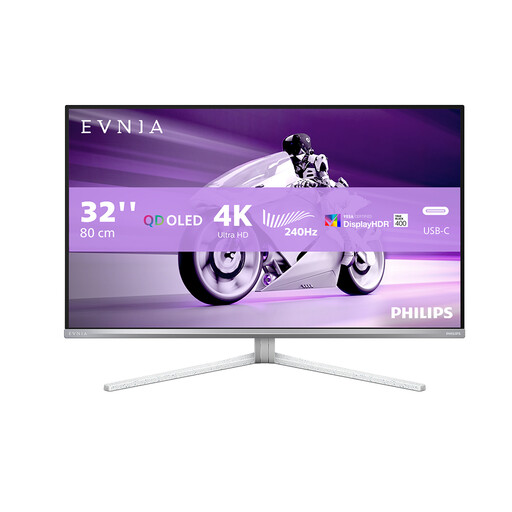
The Philips Evnia 32M2N8900 is engineered for those who refuse to compromise on speed. It combines a stunning 4K UHD OLED panel with a blistering 240Hz refresh rate, making it a formidable choice for competitive PC gaming.
Why It Stands Out Its main differentiator is the 240Hz refresh rate at a 4K resolution, a combination that represents the pinnacle of performance for high-end PC gaming rigs. Paired with a 0.03ms response time, it delivers exceptional motion clarity.
Pros:
Who is it for? This monitor is ideal for the dedicated PC esports player or enthusiast gamer whose hardware can push high frame rates at 4K. It’s built for those who prioritise refresh rate and response time above all else for a competitive advantage.
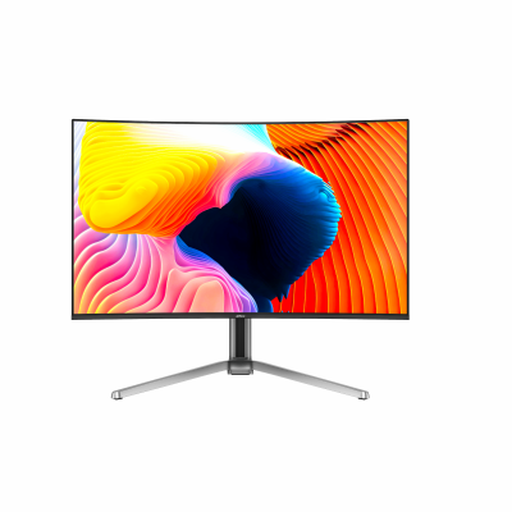
The Dahua 32-inch Curved OLED monitor offers a compelling blend of immersive visuals and high-performance features. Its 1700R curvature draws you into the action, while the QD-OLED panel ensures outstanding colour and contrast.
Why It Stands Out This model provides an immersive gaming experience thanks to its curved screen, making it a fantastic choice for single-player adventures and cinematic games. With a 99% DCI-P3 colour gamut, it's also a strong contender for content creators who need accurate colours.
Pros:
Who is it for? This is an excellent all-rounder. It's a great monitor for PS5 or Xbox Series X users due to its HDMI 2.1 ports and immersive curve. It also serves as a powerful monitor for content creation thanks to its wide colour gamut and 4K clarity.
A powerful monitor is the centrepiece of any desk, but achieving a truly clean and functional workspace often requires the right accessories. Both of the monitors recommended here feature USB-C connectivity, which pairs perfectly with a docking station or hub.
If you're looking to expand your ports, connect multiple peripherals and reduce cable clutter, a versatile Type C Hub is an essential addition to a modern setup.
Explore Our Range of Type-C Hubs
For those seeking the highest level of image quality, the answer is a firm yes. OLED panels provide per-pixel lighting, which results in true blacks, an effectively infinite contrast ratio and incredibly vibrant colours. This technology, combined with the sharpness of a 4K resolution, creates a level of depth and realism that conventional LCD monitors cannot match.
While burn-in (permanent image retention) was a concern with earlier OLED technology, modern OLED monitors include a suite of protective features to mitigate this risk. These include pixel shifting, static logo detection and screen refresh cycles that run automatically. By following the manufacturer's usage guidelines, such as not leaving static images on-screen for extended periods, the risk is significantly minimised for typical gaming and desktop use.
While not strictly necessary, having a G-Sync compatible monitor is highly recommended if you use an NVIDIA GPU. This technology ensures the monitor and graphics card are perfectly synchronised, preventing screen tearing and stutter for a smoother experience. The monitors listed here are compatible, providing tear-free gameplay for users of both NVIDIA and AMD graphics cards.