
24/7 Customer Support

Free returns

Same-day & Next-day Delivery

Quality Guaranteed

Unlock Your Welcome Offers: FREE Delivery | Up to 80% OFF | Free 30-day JoyPlus trial
Download the APP
Buying a 4K Smart TV should be straightforward: choose a screen size, compare prices and start streaming. In practice, product pages often combine native specifications with marketing terms that can make similar televisions appear very different. A careful comparison helps prevent paying for features you will not use or choosing a screen that does not suit your room.
This guide covers the main buying traps, the specifications worth checking and our top recommendations for 2026 from Hisense, TCL, Samsung and Vispera.
A television advertised as a “120Hz” or “144Hz TV” may support a high refresh rate only in particular resolutions or through a gaming mode. For example, some models list a 120Hz Game Accelerator for Full HD rather than a native 120Hz 4K panel.
If smooth 4K gaming matters, check the full specification for:
The Hisense 55U7QTUK Pro, for example, lists a native 165Hz refresh rate, 4K 120Hz input and 165Hz VRR across its HDMI 2.1 ports. By contrast, the TCL V6C range promotes a 120Hz Game Accelerator for FHD gaming, so buyers should not automatically treat it as a native 4K 120Hz TV.
QLED TV generally refers to an LED television using a quantum-dot colour layer. It can provide a wider colour range than some conventional LED designs, but QLED alone does not describe black levels or local dimming.
The backlight design also matters:
A QLED TV without local dimming may not deliver the same contrast control as a QD-Mini LED or Mini-LED television.
A Dolby Atmos TV may support Atmos decoding while relying on compact built-in speakers. The result depends on the speaker layout, power output, room and content source. Dolby Vision TV support also does not guarantee that every streaming service or HDMI device will provide Dolby Vision content.
Check the practical details, including:
For stronger built-in audio, the TCL P8K models specify a 2.1-channel Onkyo system with 35W output and Dolby Atmos support. A separate soundbar can still provide a more flexible upgrade path.
Screen size should suit both your viewing distance and furniture. A 43-inch TV can work well in a bedroom, study or smaller lounge. A 55-inch TV is a common choice for a main room, while a 65-inch TV offers a more cinematic image without requiring the wall space of larger formats.
A 75-inch TV or 85-inch TV needs careful planning. Measure:
For example, the Hisense 85E7QTUK is approximately 189.2cm wide without its stand. That measurement is more useful than the diagonal size alone when planning a UK living room.
For regular streaming and Freeview, a standard LED or QLED smart television may provide the features you need. If you watch films in a dim room or want stronger HDR highlights, Mini-LED or QD-Mini LED models offer more advanced backlight control.
The TCL Q7C lists up to 2,048 local dimming zones and a 144Hz native refresh rate. The TCL Q6C range lists up to 512 zones, 144Hz performance and HDMI 2.1 gaming features. These figures are model- and size-dependent, so confirm the exact specification for the screen size you intend to purchase.
A suitable gaming TV should match your console or PC. Features worth checking include:
A high refresh rate above 120Hz is mainly relevant to PC gaming and compatible content. It is not essential for every console owner.
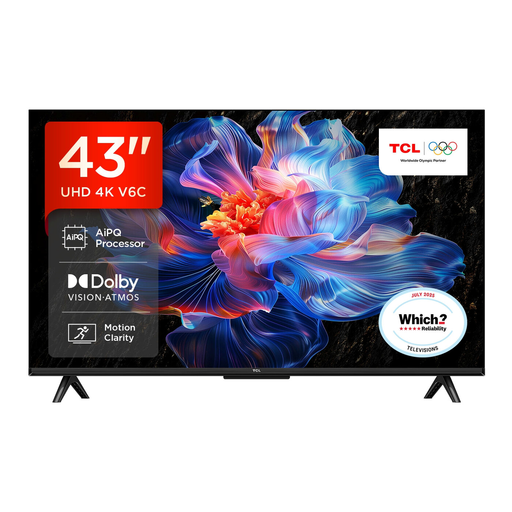
Why This Fits Their Persona: A practical option for a bedroom, study, first flat or smaller UK lounge, with 4K resolution and Tizen OS access to popular streaming services.
Its stated specification clearly identifies a 43-inch Direct LED panel and 20W audio output, avoiding confusion between screen size and premium backlight technology.
3840 × 2160 resolution, Freeview HD tuner, three HDMI ports, two USB ports and 200 × 200mm VESA compatibility.
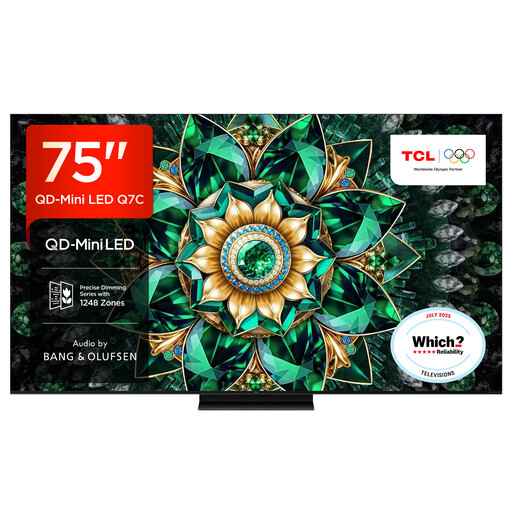
Why This Fits Their Persona: Designed for shoppers planning a large-screen lounge or dedicated media room, with QD-Mini LED technology and Google TV.
The listing specifies QD-Mini LED, up to 2,048 local dimming zones and a 144Hz native refresh rate, rather than relying on a generic “premium picture” description.
75-inch 4K resolution, Google TV, multiple HDMI 2.1 connections, Wi-Fi, Ethernet and audio co-engineered by Bang & Olufsen.

Why This Fits Their Persona: A 55-inch format suits many gaming rooms, while its listed connectivity targets users with current consoles, PCs and fast-action viewing needs.
The specification separates its 165Hz native refresh rate from its 4K 120Hz input information and lists VRR, ALLM and HDMI 2.1 directly.
Mini-LED with local dimming, QLED colour technology, four HDMI 2.1 ports, Dolby Vision IQ, Dolby Atmos and a stated input lag of up to 7ms at 4K 120Hz input.
We have compiled a complete, real-time list of products that fully satisfy these strict selection criteria and UK safety regulations.
Before ordering, check the product’s energy label, annual consumption information and physical dimensions. UK energy ratings use the A to G scale, and a larger or brighter display can consume more electricity than a smaller equivalent. Actual usage varies with brightness, viewing hours and picture mode.
For wall mounting, match the television’s VESA pattern with a suitable bracket and secure it to the correct wall structure. Leave ventilation space around the set and avoid blocking rear ports. If you use a soundbar, confirm that the TV has HDMI eARC or optical output as required.
Yes. Many models include a digital tuner, but tuner specifications vary. The Vispera TI43ULTRA and TI55ULTRA list Freeview HD support. Check the exact model if you need satellite, cable or terrestrial reception.
Service life varies according to usage, ventilation, component quality and software support. Keep the television updated, avoid excessive heat and use a surge-protected power arrangement where appropriate. Streaming app availability can change over time, so HDMI connectivity allows you to add an external streaming device later.
It can be worthwhile for sport, fast-action films and compatible console or PC gaming. For mainly watching broadcast television and standard streaming, a 50Hz or 60Hz model may meet your needs. Always confirm whether the advertised rate applies to 4K input, rather than only Full HD gaming modes.