
24/7 Customer Support

Free returns

Same-day & Next-day Delivery

Quality Guaranteed

Unlock Your Welcome Offers: FREE Delivery | Up to 80% OFF | Free 30-day JoyPlus trial
Download the APP
Choosing among today’s 4K smart TVs involves more than comparing screen size and price. Marketing often highlights impressive numbers while leaving out details that affect everyday viewing, gaming and running costs.
A carefully selected television can improve films, sport, streaming and console play. A poorly matched model may be too large for the room, lack the right HDMI standard or deliver features that your content and devices cannot use.
A television advertised as a 144Hz gaming TV may support that rate only with a compatible PC, specific resolution or selected input. Some models also quote an enhanced gaming mode rather than the panel’s native refresh rate.
Check the specification for:
For console gaming, HDMI 2.1, 4K at 120Hz, VRR and ALLM are generally more relevant than a large headline number. PC gamers may have more reason to consider 144Hz or higher support.
A QLED TV generally uses quantum dots to enhance colour, while a Mini LED TV uses smaller backlight LEDs and local dimming to improve control over bright and dark areas. Some televisions combine both technologies.
However, the label alone does not describe the whole picture. Local dimming zones, peak brightness, panel type and image processing all influence results. A model with more dimming zones may offer finer backlight control, but content, viewing angle and room lighting still matter.
A 75-inch 4K TV or larger model can create a cinema-style image, but it needs suitable wall or cabinet space. Measure the television’s width with its stand, not only the diagonal screen size. Also check:
A 55-inch 4K TV may suit a smaller lounge, while a 65-inch 4K TV can provide a more spacious image without taking up the wall area of a 75-inch model.
All the televisions discussed here use 3840 × 2160 pixels, commonly called 4K Ultra HD. This provides four times the pixel count of Full HD, although the benefit is easier to appreciate on larger screens or at a suitable viewing distance.
For many UK living rooms:
An HDR smart TV can display a wider range between dark shadows and bright highlights when the content and settings support it. Look for the formats you actually use, such as HDR10, HLG, HDR10+ or Dolby Vision.
Mini LED models use local dimming to adjust sections of the backlight independently. This can improve perceived contrast, but bright objects may still produce some haloing around dark backgrounds depending on the panel and processing.
For current consoles and gaming PCs, check for HDMI 2.1, VRR and ALLM. Also count the number of high-bandwidth ports if you plan to connect several devices.
A television may have four HDMI ports but not every port necessarily supports the same refresh rate or gaming functions. Confirm the detailed specification before buying. eARC is useful if you plan to connect a soundbar or AV receiver.
A Dolby Atmos TV can process compatible audio, but built-in speakers vary considerably in power and speaker layout. Dolby Atmos processing does not guarantee the same effect as a separate surround system.
Google TV brings streaming services, recommendations, Google Assistant and casting features into one interface. Other platforms, such as Tizen, webOS and VIDAA, offer different app libraries and menus. Check that your preferred UK streaming services are available before purchase.
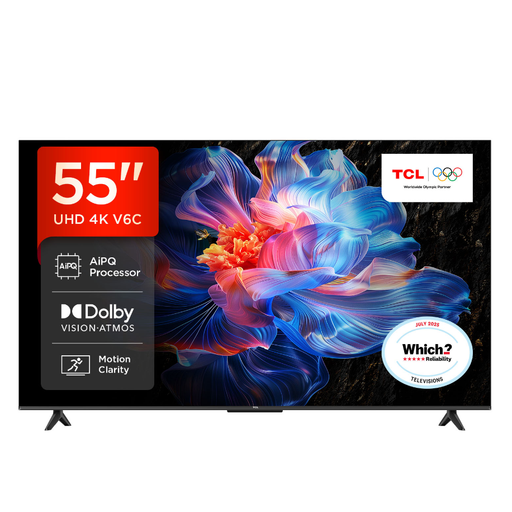
Why This Fits Their Persona: A practical 55-inch format for everyday streaming, films and general family viewing without moving to a larger, more demanding screen.
The specification lists 4K HDR, Google TV, multiple HDR formats, HDMI 2.1, VRR and ALLM, rather than relying only on a refresh-rate headline.
4K resolution, Dolby Atmos support, Google Assistant and a listed 120Hz Game Accelerator mode for compatible gaming use.
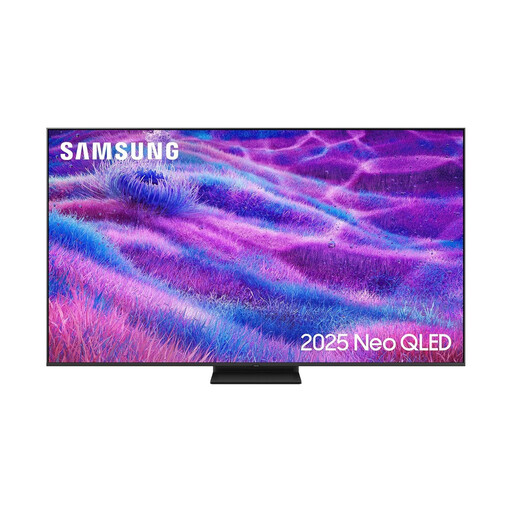
Why This Fits Their Persona: The large screen and Mini LED backlighting suit spacious UK lounges, film-focused viewing and sports watched from further away.
The listing identifies Neo QLED technology, Mini LED backlighting and a 100Hz native rate with support for up to 144Hz, making the specifications easier to assess.
Quantum Matrix technology, four HDMI ports, Tizen, eARC, Dolby Atmos decoding and FreeSync Premium Pro support.

Why This Fits Their Persona: A strong match for console and PC gamers, sports viewers and households wanting detailed motion performance from a manageable 55-inch screen.
Its specification separates the native 165Hz rate from other gaming functions and lists four HDMI 2.1 ports with VRR and ALLM.
Mini LED with QLED colour, Dolby Vision IQ, HDR10+ Adaptive, Dolby Atmos and a listed 2.1.2-channel audio system.
We have compiled a complete, real-time list of products that fully satisfy these strict selection criteria and UK safety regulations.
Running cost depends on screen size, brightness settings, energy efficiency and daily use. Larger Mini LED models can draw more power than smaller direct-LED televisions. The energy label provides a comparable consumption figure, but actual use varies with content and settings.
Not necessarily. It depends on seating distance, wall width and personal preference. Measure the television’s physical width and check that viewers can see the entire screen comfortably without awkward head movement.
Not always. Built-in speakers can be sufficient for everyday programmes, but a soundbar or AV system may provide clearer dialogue, stronger bass and a more noticeable surround effect. Check whether the television supports eARC if you intend to connect external audio equipment.