
24/7 Customer Support

Free returns

Same-day & Next-day Delivery

Quality Guaranteed

Unlock Your Welcome Offers: FREE Delivery | Up to 80% OFF | Free 30-day JoyPlus trial
Download the APP
A new television can look excellent on a product page yet disappoint once it is installed at home. Many UK shoppers focus on the number of pixels and overlook factors such as viewing distance, smart platform support, HDMI specifications and energy consumption.
Marketing language can also make comparison difficult. A TV may mention “120Hz”, for example, while offering that rate only in a particular resolution or gaming mode. Similarly, “Dolby Atmos” on a slim television does not necessarily mean it can replace a dedicated soundbar.
This guide explains the practical checks to make before buying 4K Smart TVs, followed by a selection of models suited to different households and viewing habits.
All 4K screens use a resolution of 3840 × 2160 pixels, but brightness, contrast, backlight design and HDR format support vary considerably. A basic Direct LED panel may be suitable for everyday television, while QLED TVs use quantum-dot technology to produce a wider range of colours. Mini LED TVs add more precisely controlled backlighting, which can improve contrast in suitable content.
HDR also depends on the source. Check whether the television supports formats such as HDR10, HLG, HDR10+ or Dolby Vision, rather than relying on the word “HDR” alone.
A high refresh rate can benefit sports viewers and gaming TV buyers, but the specification needs careful reading. Some screens list a higher rate through a game accelerator or at a reduced resolution. For console and PC gaming, look for HDMI 2.1, VRR and ALLM. These features are more relevant than a large refresh-rate number by itself.
Also check which HDMI ports support the advertised features. A television may have several HDMI connections, but not all may offer the same bandwidth.
The operating system determines how easily you access streaming services, voice control and casting. Google TV, Samsung Tizen TV, Roku TV and VIDAA Smart TV each have different interfaces and app selections. UK households should confirm support for the services they actually use, including BBC iPlayer, ITVX, Channel 4, Netflix, Disney+ and Prime Video.
A stable internet connection is important too. If the TV is far from your router, Ethernet may provide a more consistent connection than Wi-Fi.
Screen size should suit both the room and your seating position. Common options include 50-inch TVs, 55-inch TVs, 65-inch TVs, 75-inch TVs and 85-inch TVs.
As a practical starting point:
Measure the width of the TV unit, the distance between stand feet and the route through doors and stairways. Check the manufacturer’s dimensions without the stand if you are considering wall mounting.
Direct LED televisions can offer a straightforward balance between price and picture quality. QLED TVs add a quantum-dot layer for colour volume, while Mini LED models use many smaller LEDs and local dimming zones to control brightness more precisely.
Do not assume a particular panel type automatically suits every room. Consider:
For a games console or PC, verify the number of compatible HDMI 2.1 ports, plus support for VRR and ALLM. For a soundbar or AV receiver, eARC can carry compatible high-bandwidth audio formats.
Dolby Atmos TVs can process or output Atmos sound, but built-in speakers remain limited by the television’s size and cabinet. Models with a 2.1-channel system or built-in subwoofer may provide fuller audio, although a separate sound system can still offer greater placement flexibility.
For wall mounting, confirm the VESA pattern, wall strength and bracket load rating. Place the television on stable furniture or secure it properly to reduce the risk of tipping, particularly with larger 75-inch TVs and 85-inch TVs.
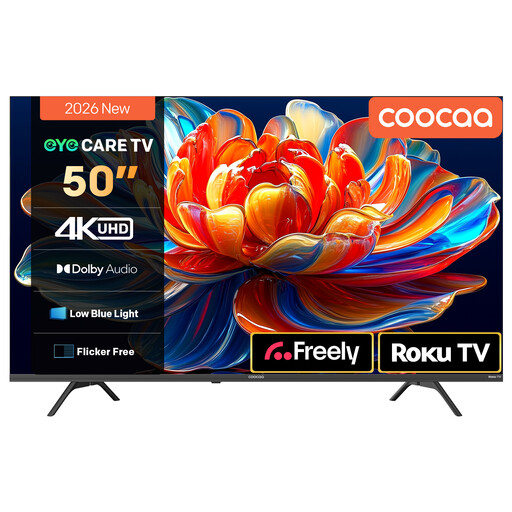
Why This Fits Their Persona: A 50-inch format and Roku TV interface make this a practical option for smaller lounges, bedrooms or first-time smart TV buyers who want straightforward access to streaming services.
The listing identifies 4K resolution, HDR10 and HLG support, plus MEMC motion processing, rather than relying on an unspecified HDR label.
Roku TV, Dolby Audio, voice-assistant compatibility and Wi-Fi streaming with Freely support listed in the product description.
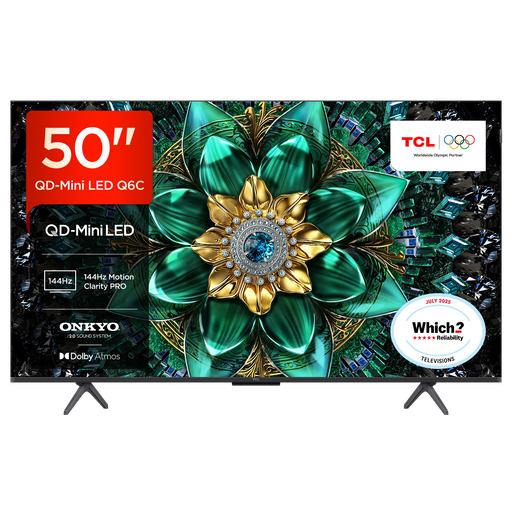
Why This Fits Their Persona: This 50-inch model suits film fans and design-conscious households wanting QD-Mini LED picture technology without moving to a much larger screen.
The specification lists Mini LED, QLED, local dimming, multiple HDR formats and a stated 144Hz gaming mode, making the display technology easier to assess.
Google TV, four HDMI connections, HDMI 2.1 gaming support, VRR and a 30W Onkyo 2.1 audio system.

Why This Fits Their Persona: Console and PC gamers, sports viewers and households watching action content regularly may value its high refresh rate and gaming connections.
Its listing separates native 165Hz refresh rate from gaming features and specifies HDMI 2.1, VRR and ALLM, helping buyers assess compatibility.
Mini LED with QLED colour, 4K HDR, a 2.1.2-channel Dolby Atmos system and four HDMI 2.1 ports.
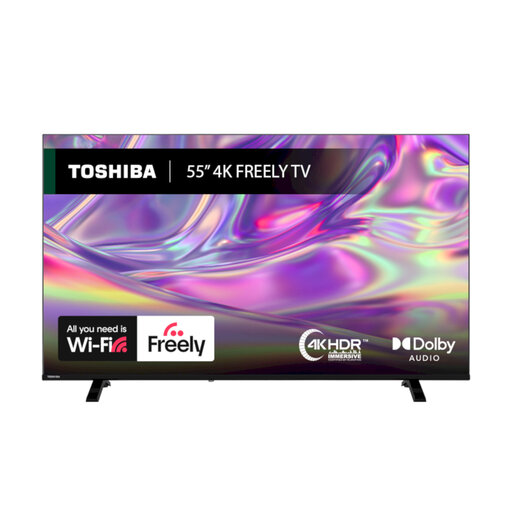
Why This Fits Their Persona: A 55-inch screen with VIDAA OS and Freely support is aimed at households combining streamed entertainment with UK live television.
The listing states which HDR formats are supported and explains that Freely works over Wi-Fi, so buyers can check whether an aerial-free setup suits their home.
Dolby Vision, HDR10 and HLG support, Dolby Audio, Bluetooth, Ethernet and a stated energy efficiency class D.
We have compiled a complete, real-time list of products that fully satisfy these strict selection criteria and UK safety regulations.
Running costs depend on screen size, brightness settings, usage time and the model’s energy label. Larger televisions generally use more electricity than smaller ones, while HDR viewing can increase power consumption. Check the product’s stated kWh usage on the UK energy label and use energy-saving settings where suitable.
There is no universal lifespan because usage, ventilation, software support and component reliability differ. Keep ventilation openings clear, avoid excessive heat or moisture, update the software when prompted and use a surge-protected setup where appropriate. A television with the apps and connections you need is less likely to require early replacement.
Not necessarily for every game, but HDMI 2.1 is useful when you want features such as 4K at higher frame rates, VRR and ALLM. Check the console or PC output, the TV’s supported resolution and refresh rate, and which HDMI inputs provide the required bandwidth before purchasing.