
24/7 Customer Support

Free returns

Same-day & Next-day Delivery

Quality Guaranteed

Unlock Your Welcome Offers: FREE Delivery | Up to 80% OFF | Free 30-day JoyPlus trial
Download the APP
Buying one of the many 4K Smart TVs available in the UK can be confusing. Screen size, QLED TVs, Mini LED TVs, OLED TVs, HDR formats, refresh rates and smart platforms all affect the viewing experience, but marketing descriptions do not always explain what those specifications mean in daily use.
A suitable television should match your room, viewing habits and connected equipment. Before choosing a model, watch for three common buying pitfalls.
A large-screen TV can create an immersive view, but it also needs suitable wall or furniture space, a comfortable viewing distance and safe installation. A 75-inch, 85-inch or 98-inch television may overwhelm a narrow lounge, while a 32-inch model may feel limiting in a larger living room.
Measure the available width, height and depth, including the stand. For wall mounting, check the VESA mounting dimensions and ensure the wall and bracket can support the television’s weight.
4K HDR TVs can support different formats, including HDR10, HLG, HDR10+, Dolby Vision and Dolby Vision IQ. HDR performance also depends on brightness, contrast and local dimming. A television may support HDR but still offer limited impact if its panel cannot produce bright highlights or control dark areas effectively.
Look for the supported formats and the type of backlight rather than relying on the HDR label alone.
A 144Hz gaming TV can display smoother motion, but the source device must support a compatible frame rate. Many consoles commonly target 4K at up to 120Hz, while suitable gaming PCs may make use of higher refresh rates.
Check the number of HDMI 2.1 ports, whether they support 4K at 120Hz or higher, and whether features such as VRR, ALLM and FreeSync are included. Also confirm which HDMI inputs provide the stated functionality.
Standard LED televisions use an LED backlight behind or around an LCD panel. They are available in a wide range of sizes and prices.
QLED TVs add a quantum-dot layer to an LED display. This can support a wider colour range and higher brightness, depending on the model. QLED does not describe one single panel performance level, so compare brightness, dimming and HDR support as well.
Mini LED TVs use many smaller backlight LEDs and local dimming zones. More zones can allow finer control of bright and dark areas, although the result also depends on image processing and panel design.
OLED TVs use self-lit pixels, so each pixel can switch off independently. This allows very deep blacks and avoids the need for a separate backlight. Buyers should still consider room brightness, viewing habits, price and the manufacturer’s warranty terms.
The native refresh rate indicates how frequently the panel can refresh the image. A 100Hz or 120Hz panel can provide smoother sports and action scenes than a 50Hz panel. Some 4K Smart TVs support 144Hz or 165Hz for compatible PC gaming.
Do not confuse a native refresh rate with motion-processing figures used in product descriptions. For gaming, prioritise:
The smart platform affects app availability, navigation and voice control. Google TV integrates streaming services, Chromecast and Google Assistant features. VIDAA Smart TV models provide a straightforward interface and access to popular services, although app availability should be checked before purchase. Samsung Smart TV models use Tizen, while LG Smart TV models use webOS.
Built-in speakers can be convenient, but their output varies. Dolby Atmos TVs may create a wider sound field through compatible processing and speakers, but a separate soundbar or AV system may still be preferable for larger rooms.
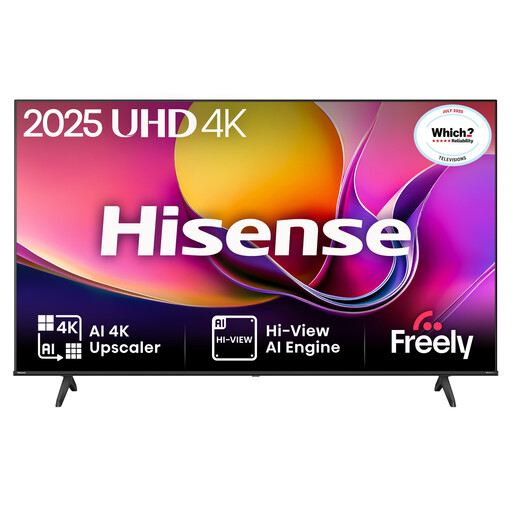
Why This Fits Their Persona: A practical 55-inch choice for UK households wanting 4K streaming, live television and occasional gaming without moving to a larger premium display.
Its Direct LED backlight and stated HDR10+, Dolby Vision and HLG support provide more information than a generic HDR label alone.
4K resolution, VIDAA OS, built-in Wi-Fi and Ethernet, plus multiple HDMI and USB connections.
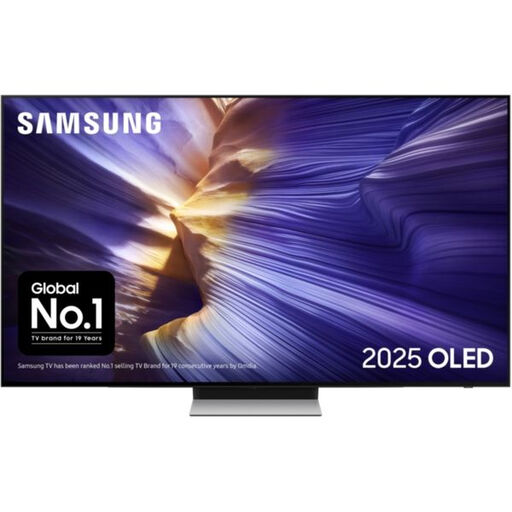
Why This Fits Their Persona: Suits film viewers and households prioritising OLED contrast, a slim design and integrated smart-home features.
The OLED panel is clearly identified, while the specification lists HDR10+ Adaptive, HDR10+ Gaming and HLG support.
OLED technology, 144Hz supported display refresh rate, four HDMI ports and Dolby Atmos audio decoding.

Why This Fits Their Persona: Designed around high-refresh-rate gaming and fast sports viewing, with a manageable 55-inch footprint for many UK rooms.
The product specifies four HDMI 2.1 ports, VRR up to 165Hz, ALLM and a stated input lag of up to 7ms at 4K 120Hz input.
Mini LED local dimming, QLED colour technology, Dolby Vision IQ, HDR10+ Adaptive and Dolby Atmos.
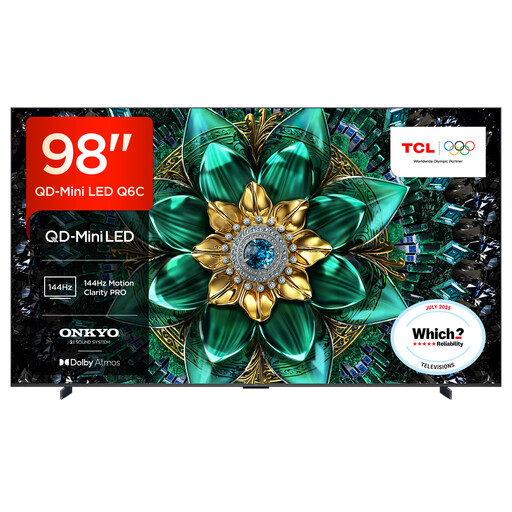
Why This Fits Their Persona: A large-screen option for spacious lounges, media rooms and viewers who want a cinema-style format for films, sport and group viewing.
The listing states the screen size, approximate dimensions, four HDMI 2.1 ports and VESA-compatible installation requirements, making room planning clearer.
QD-Mini LED backlighting, up to 144Hz VRR, 40W 2.1-channel Onkyo audio, Dolby Atmos and Google TV.
We have compiled a complete, real-time list of products that fully satisfy these strict selection criteria and UK safety regulations.
Yes, provided the television supports the services you use and your broadband connection can handle 4K streaming. Check the smart platform, app availability and whether the TV supports Wi-Fi or wired Ethernet. An Ethernet connection can be useful where the router is close to the television.
Lifespan depends on usage, ventilation, software support and component reliability. Keep ventilation openings clear, avoid unstable furniture and install large screens securely. Software update periods and warranty coverage vary, so check the product listing before ordering.
Running costs depend on screen size, brightness settings, HDR use and daily viewing time. Energy labels use standardised consumption figures, so compare the stated energy class and consumption information between models. Larger screens generally require more power than smaller screens, particularly when displaying bright HDR content.