What matters when buying?
Identify whether the screen, streaming interface or a narrower part of the setup needs changing. Ofcom describes smart TVs and external streaming devices as distinct connected-TV routes for UK viewers.
| Concern |
What to check |
Who this matters to |
| Keep the current screen |
Check its HDMI input and the services available on the exact streamer. For intended 4K viewing, check the display and HDCP requirements too. |
If the picture still suits the household but the apps do not, keeping the display avoids changing more than necessary; about 29% of consumers put a streaming upgrade without screen replacement first. |
| Replace an unsuitable display |
Compare the required screen size, picture capability and inputs before choosing the built-in platform. |
When the screen is faulty, too small or missing needed inputs, a new interface alone will not address the problem; about 29% of consumers primarily need to replace the display. |
| Make viewing accessible |
Verify the exact model’s navigation features and whether the intended apps and programmes provide captions or audio description. |
If someone sharing the TV needs readable menus, spoken feedback or accessible programmes, those needs shape the whole setup; about 24% of consumers place accessibility and shared control first. |
| Refine sound and controls |
Check the existing devices’ audio connections and control methods before selecting an accessory. |
Where the screen and apps already work well, dialogue or remote-control friction may be the remaining issue; about 18% of consumers chiefly want a narrower sound or setup improvement. |
Joybuy products for two viewing routes
These selections cover an HDMI streaming stick for keeping a suitable screen and connected televisions for replacing the screen and its built-in viewing platform. Check the exact model’s essential apps and access features against the needs of everyone sharing it.
 Image unavailable
Roku Streaming Stick 4K
Consider this streaming stick if the existing TV still meets the household’s screen needs but a separate streaming interface would be useful. Its 4K designation does not change the TV’s own picture capability; check the display, HDMI connection, essential services and accessibility features before choosing it.
View on Joybuy
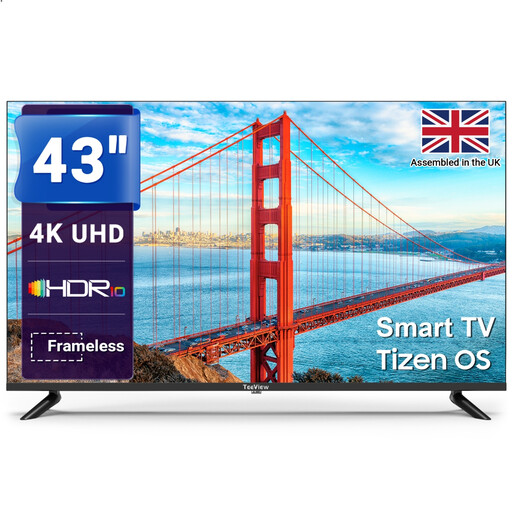 Image unavailable
TeeView TV43QUT-UK 43-inch 4K UHD smart TV
Consider this model when replacing a screen and choosing built-in streaming at the same time. The product name identifies a 43-inch 4K UHD television powered by Tizen OS. Confirm the household’s required apps, connections and accessibility settings on this exact model.
View on Joybuy
 Image unavailable
TCL 65V6C 65-inch 4K HDR Google TV
This is a screen-replacement option for a household considering a 65-inch display with Google TV. The product name lists Direct LED, 4K HDR and a 120Hz Game Accelerator mode qualified as FHD; that wording does not establish native 4K at 120Hz. Check required UK apps and accessibility functions on the exact TV.
View on Joybuy
 Image unavailable
TCL 43V6C 43-inch 4K HDR Google TV
Consider this screen-replacement model if a 43-inch display suits the room and the household wants Google TV built in. Its name lists Direct LED and 4K HDR; the advertised 120Hz Game Accelerator mode is expressly qualified as FHD. Confirm the precise mode, essential UK services and access features before buying.
View on Joybuy
 Image unavailable
Coocaa 40CTQH38ZUK 40-inch Full HD TiVo smart TV
Consider this model when replacing the screen with a 40-inch television and 4K resolution is not a requirement. Its name identifies a Full HD display with HDR10, Freely and TiVo; Full HD is not 4K. Verify the services, connections and accessibility options needed in the shared setup.
View on Joybuy
Common questions
Do we need a TV Licence for a smart TV or streamer?
Buying the device does not itself determine the requirement. TV Licensing says a UK TV Licence is needed to watch live TV on a channel or service, or to use BBC iPlayer, regardless of the device; watching other services solely on demand does not by itself require one.
Can someone outside our home use the same Netflix account?
Netflix says its account cannot be shared outside the Netflix Household, which it defines around devices connected to the internet at the main place Netflix is watched. Anyone outside it needs their own account or, where the plan and country allow, an extra-member arrangement; check the current terms before relying on that option.
Will a 4K streamer make an older TV show 4K?
No: the display and connection must support the intended format. Google specifies a 4K-capable display, HDCP 2.2 and at least 20 Mbps internet for its 4K streaming route, while Apple says 4K and HDR viewing with Apple TV 4K requires a compatible TV. Check the requirements of the particular streamer and TV before buying.
Will accessibility settings work with every programme?
No. A device may offer accessible navigation without every app or programme supplying captions or audio description. Roku says the programme must support captions for them to appear, and Samsung says broadcast audio description requires a supporting broadcast. Check the content the household actually watches.
What should we check before setting up a Google streamer?
Check the specific device’s display and network requirements and make sure a compatible phone or tablet is available for setup through Google Home. Those setup requirements concern the Google streaming-device route, not every TV or competing player.


