Choose a 27-inch 4K monitor if inspecting small waveform landmarks, clip edges and DAW controls matters more than seeing a long stretch of timeline at once. Choose a 34-inch 3440 × 1440 ultrawide if horizontal overview is the bigger constraint and your desk has room for it. Beside a bright window, check the screen surface and where reflections will fall: the Health and Safety Executive advises arranging the screen to avoid glare and bright reflections.
Who each format suits
Detail-first multitrack editors
If you compare many takes while zoomed out, small waveform landmarks and clip edges may matter more than timeline width. A 27-inch 4K screen is the detail-focused route; BenQ specifies 163 pixels per inch for its PD2706U.
Timeline-overview producers
If you regularly scroll between distant edit points or keep DAW panels side by side, a 34-inch 21:9 screen offers a wider arrangement view. Dell and BenQ specify 3440 × 1440 resolution for the U3425WE and PD3420Q respectively.
Window-side desk users
If daylight produces a visible reflection on your screen, consider monitor placement alongside surface treatment. The Health and Safety Executive advises arranging the screen to avoid glare and bright reflections; a different angle or window covering may still be needed with a matte or anti-glare display.
What matters when choosing
27-inch 4K
Choose it when: Fine waveform detail and small DAW controls take priority over an uninterrupted wide timeline.
Trade-off: The narrower format gives you less horizontal overview, and small interface elements may call for comfortable display scaling.
34-inch ultrawide
Choose it when: You need to see more of a long arrangement and adjacent panels without scrolling as often.
Trade-off: The cited 3440 × 1440 models take up more desk width and do not have the pixel density specified for BenQ's 27-inch 4K PD2706U.
| Concern |
What to check |
Who this matters to |
| Window reflections |
Check for a matte or anti-glare surface and whether the stand and desk layout let you change the screen angle. Consider blinds or curtains if daylight falls across the display. |
If a window reflection covers the takes I am comparing, I need to change the light path before relying on screen brightness. Around 42% of consumers put glare control first. |
| Fine edit detail |
Compare screen size, native resolution and pixel density; check whether DAW controls remain comfortable at your preferred scaling. |
When several takes are stacked, I need to distinguish small waveform landmarks and clip boundaries without losing my place. Fine-detail inspection comes first for around 33% of consumers. |
| Timeline overview |
Measure desk width for an ultrawide and check the inputs you need. For one-cable laptop use, confirm video output and charging requirements on both devices. |
If repeated horizontal scrolling breaks my view of an arrangement, I would prioritise seeing more edit points at once. Around 25% of consumers make timeline overview their primary concern. |
Mistakes to avoid
-
Choosing by a brightness or HDR badge alone
A reflection can remain visible when a screen faces the window, regardless of its brightness specification. The Health and Safety Executive advises arranging screens to avoid glare and bright reflections.
Check the intended position at the time of day you normally edit, then decide whether a different angle or blinds or curtains are needed alongside the monitor.
Changing the light path may also mean rearranging the desk or adding a window covering or monitor arm.
-
Assuming a wider screen makes every edit easier to inspect
A 34-inch 3440 × 1440 display gives more horizontal room, but width and fine-detail density answer different needs. BenQ specifies 109 pixels per inch for its PD3420Q ultrawide and 163 for its 27-inch 4K PD2706U.
Prioritise the ultrawide if scrolling is the main obstacle; prioritise 27-inch 4K if judging small clip edges is the harder part of your work.
-
Assuming every USB-C connection handles display and charging
A monitor's power-delivery rating alone does not establish that your laptop can send video over the connection or charge within that limit.
Check the laptop's video-output and charging requirements against the monitor's stated connection and power-delivery specifications, including the cable needed.
Relevant brands to consider
BenQ
The cited PD models offer a choice between a 27-inch 4K matte screen and a 34-inch matte ultrawide for different DAW viewing priorities.
- BenQ specifies a matte coating, 163 pixels per inch and height adjustment for the PD2706U.
- BenQ specifies 109 pixels per inch for the wider PD3420Q; choose its format for horizontal room rather than assuming it provides the same fine-detail density.
Dell
The cited UltraSharp models cover 27-inch 4K and 34.1-inch ultrawide formats, both with stated anti-glare treatment.
- Dell specifies an anti-glare, anti-reflective surface for the U2725QE and an anti-glare surface for the U3425WE.
- The U3425WE's stated 3440 × 1440 resolution serves a wider view, not a 4K-resolution requirement.
LG
LG's cited 27UP850K-W is a 27-inch 4K IPS option for a laptop setup that needs USB-C connectivity and stand adjustment.
- LG specifies height, pivot and tilt adjustment, plus USB-C charging of up to 90 W for the 27UP850K-W.
- For a window-side desk, confirm the 27UP850K-W's screen surface treatment in the current product documentation before choosing it for reflection control.
Joybuy monitor choices
These monitors offer 4K choices for detail-focused editing and a curved ultrawide choice for a longer timeline. Check each screen's surface treatment and your window's light path before deciding; the ASUS and Samsung models use OLED panels, so their ownership considerations differ from those of the other listed displays.
 No image available
ASUS ProArt PA27DCE-K 4K OLED monitor
Consider this 4K OLED model if fine on-screen detail is your priority, while checking how its surface looks beside your window.
The listing advises against leaving static images at high brightness for prolonged periods to reduce OLED burn-in risk; factor that in if your DAW interface stays on screen throughout long sessions.
View on Joybuy
 No image available
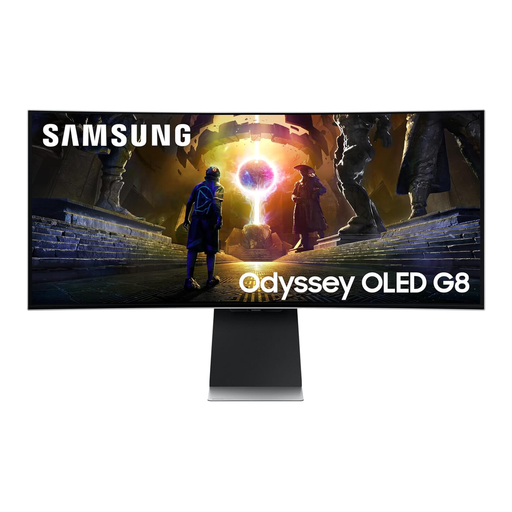
Samsung Odyssey G8 LS34DG850SUXXU 34-inch curved OLED WQHD monitor
Consider this 34-inch curved model if seeing a longer arrangement is more important to you than choosing a compact 4K screen.
Its name specifies an OLED panel and a 175 Hz refresh rate. The listing's Glare-Free wording does not guarantee that reflections from your particular window will disappear; check the light path at your desk.
View on Joybuy
 No image available
MSI MD272UPSW 27-inch 4K IPS smart monitor
This 27-inch 4K option fits a detail-focused DAW setup; confirm its screen surface treatment if reducing window reflections is a priority.
The product name specifies USB-C with 65 W power delivery. Check your laptop's video-output and charging requirements before planning a one-cable connection.
View on Joybuy
 No image available
iiyama ProLite XUB2792UHSU-B6 27-inch 4K monitor, Matte Black
This 27-inch 4K model is a format to consider when small edit details matter more than ultrawide timeline space.
Matte Black identifies the finish, not the screen coating. Confirm the display's surface treatment for your window-side position; if laptop charging matters, check the USB-C power-delivery specification separately.
View on Joybuy
 No image available
LG 27UP650K 27-inch 4K IPS monitor, White
This 27-inch 4K model is relevant when inspecting closely spaced tracks is the main reason for changing monitors.
Its product name specifies a 60 Hz refresh rate, HDMI and DisplayPort. Confirm the screen surface treatment and assess reflections at your intended desk position before choosing it for window-side use.
View on Joybuy
Common questions
Will a brighter monitor solve glare from a nearby window?
Not necessarily: a brightness figure cannot tell you whether a particular window will reflect in the screen. The Health and Safety Executive advises arranging the screen to avoid glare and bright reflections, so check its angle and consider blinds or curtains as well as surface treatment.
Which format should I choose for aligning multitrack takes?
Choose 27-inch 4K when small waveform details and clip boundaries are your main difficulty; choose a 34-inch 3440 × 1440 ultrawide when a longer uninterrupted timeline matters more. Check desk width, comfortable interface scaling and where window reflections will fall before settling on either format.
What should I check before using a monitor's USB-C connection for my laptop?
Check that the laptop supports video output through the intended connection and that the monitor's power-delivery limit meets its charging requirements. Confirm the required cable and connection mode too; a USB-C socket alone does not establish that both functions will work together.


