
24/7 Customer Support

Free returns

Same-day & Next-day Delivery

Quality Guaranteed

Unlock Your Welcome Offers: FREE Delivery | Up to 80% OFF | Free 30-day JoyPlus trial
Download the APP
In an era where remote and hybrid work are standard, presenting a clear and professional image on video calls is more important than ever. A grainy, poorly lit picture from a built-in laptop camera can detract from your message, whether you're leading a team meeting, teaching a class or presenting to a client. Upgrading to a high-definition or 4K webcam is a simple step to significantly enhance your virtual presence.
This guide is designed to help you navigate the key features of modern webcams. We will look at what makes a great camera for your home office, from resolution and low-light performance to microphones and privacy features, helping you find a model that fits your professional needs.
Choosing the right webcam involves more than just looking at the resolution. Here are a few practical points to consider to ensure you get a device that performs well in your specific environment.
While a 4K webcam offers the highest level of detail, it's useful to understand the differences. Standard HD is 720p, Full HD is 1080p, and 4K (or Ultra HD) provides four times the pixels of 1080p. For most video conferencing platforms like Zoom or Microsoft Teams, which often stream at 1080p or 720p, a high-quality 2K or 1080p camera provides a substantial improvement over a basic laptop camera. The main advantages of a 4K sensor are superior clarity, better performance when digitally zooming and future-proofing your setup.
Many home office setups lack professional studio lighting. This is where a good low light webcam makes a difference. A camera with a large image sensor and a wide aperture (a lower f-number, like f/1.6) can capture more light, producing a brighter and clearer image without the grainy noise common in cheaper models. Features like High Dynamic Range (HDR) also help balance exposure in rooms with tricky lighting, such as a bright window behind you.
An all-in-one solution is often the most convenient. A USB webcam with microphone that offers clear audio capture can save you from needing a separate device. For peace of mind, a webcam with a privacy cover, whether a physical cap or a built-in shutter, is a simple but crucial feature. Finally, ensure the model is a plug-and-play device compatible with your computer, whether it's a webcam for PC or a webcam for Mac, to avoid complicated driver installations.
Here are a few recommendations that stand out for their performance, features and suitability for professional use.
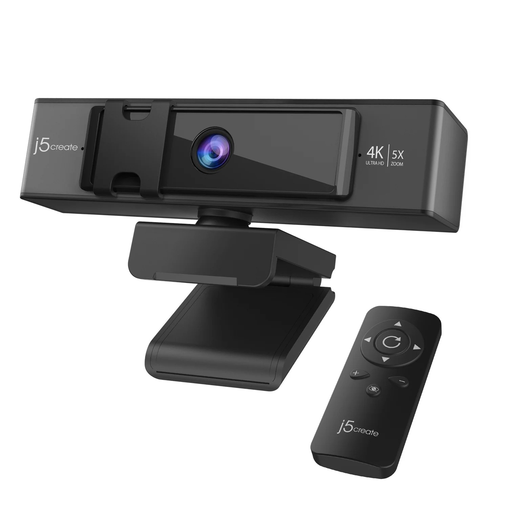
Why It Stands Out The j5create JVCU435 is a versatile powerhouse, delivering true 4K Ultra HD video quality. Its standout feature is the remote-controlled electronic pan, tilt and zoom (ePTZ), which allows you to reframe your shot or zoom in on a whiteboard without physically touching the camera. Combined with its strong low-light capabilities, it’s an excellent tool for dynamic presentations.
Pros
Who is it for? Professionals, educators and streamers who require maximum control and image quality. Its remote-controlled zoom makes it particularly useful for those who give presentations or need to focus on more than just their face.
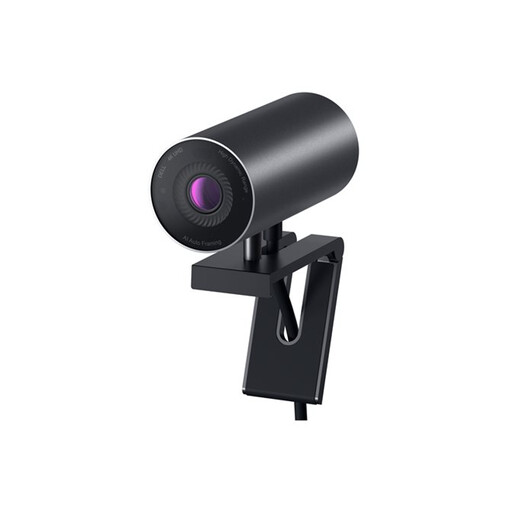
Why It Stands Out The Dell WB7022 is an intelligent AI webcam designed for a seamless user experience. It uses AI-powered auto-framing to keep you perfectly centred in the shot, even if you move around. Its large 4K Sony STARVIS CMOS sensor and Digital Overlap HDR technology work together to deliver a superb image in any lighting condition, from low light to harsh backlight.
Pros
Who is it for? The busy professional who values smart, automated features. If you want a "set it and forget it" camera that ensures you always look your best on calls without constant tweaking, this is a strong contender.
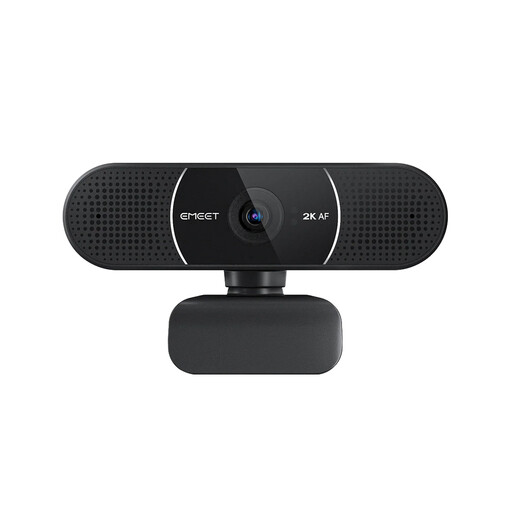
Why It Stands Out While not a 4K model, the EMEET E3115 offers a significant upgrade over standard 1080p webcams with its crisp 2K resolution. It focuses on delivering the essentials with excellence: a sharp picture, reliable autofocus and dead-simple setup. It’s a practical and effective choice for improving your daily video calls.
Pros
Who is it for? Users looking for a high-value, reliable HD webcam for Zoom and other platforms. It's ideal for anyone who needs a no-fuss, high-quality camera for daily meetings and remote work without the premium cost of 4K.
These recommendations cover a range of needs, from advanced AI features to straightforward high-definition performance. However, the world of webcams is vast, with many models prioritising different features.
For those who value simplicity and an instant, driver-free setup above all else, our curated collection of plug-and-play webcam models offers a wide range of choices to suit any need and budget.
Do I need a 4K webcam for Zoom or Microsoft Teams? While most platforms currently stream at 1080p or lower, a 4K webcam still offers noticeable benefits. Its superior sensor provides a much clearer downscaled image and better low-light performance. It also allows you to use digital zoom without a major loss in quality and ensures your setup is ready for when these platforms inevitably upgrade their streaming capabilities.
What is the difference between a 4K webcam and a 1080p webcam? The main difference is resolution. A 4K webcam captures an image with roughly four times as many pixels as a 1080p (Full HD) camera. This translates to a significantly more detailed and crisp picture. Furthermore, 4K models typically include higher-quality sensors and lenses, resulting in better colour fidelity and overall image quality.
Can I use a 4K webcam on my Mac and PC? Yes, the vast majority of modern USB webcams are designed for cross-platform compatibility. Models that are UVC (USB Video Class) compliant, like the ones featured here, are designed to work as a webcam for PC and a webcam for Mac straight out of the box, requiring no special drivers for basic operation.