
24/7 Customer Support

Free returns

Same-day & Next-day Delivery

Quality Guaranteed

Unlock Your Welcome Offers: FREE Delivery | Up to 80% OFF | Free 30-day JoyPlus trial
Download the APP
In an era where remote and hybrid work are standard, the quality of your video calls directly reflects your professionalism. A grainy, poorly lit image from a built-in laptop camera can detract from your presentation, no matter how well-prepared you are. Upgrading to a dedicated 4K webcam is no longer a luxury but a practical investment in your professional image.
This guide is designed to help UK professionals, content creators and IT managers navigate the features that matter. We will break down the key considerations for selecting a high-performance webcam and provide our recommendations to help you communicate with clarity and confidence.
Choosing the right webcam involves looking beyond the headline resolution. Here are a few key features to consider to ensure you get a device that truly enhances your virtual presence.
While 4K resolution (3840 x 2160 pixels) provides exceptional detail, the image sensor is the true heart of the camera. Models equipped with larger sensors, such as a Sony STARVIS CMOS sensor, capture more light. This results in a brighter, clearer picture with more accurate colours, especially in common home office lighting conditions which are often less than ideal. Furthermore, look for an HDR webcam. High Dynamic Range (HDR) technology balances the light and dark areas of your image, preventing you from looking like a silhouette against a bright window or washed out by a desk lamp.
A professional webcam for meetings should work for you, not the other way around. Features like AI auto framing use artificial intelligence to automatically keep you centred in the shot, even if you move around. This is particularly useful for dynamic presentations. Similarly, while fixed focus is reliable, a high-quality autofocus system ensures you remain sharp whether you are sitting back or leaning in to show a document. These smart features create a more polished and effortless viewing experience for your audience.
Clarity in communication is as much about audio as it is about video. A webcam with microphone and speaker can streamline your desk setup, reducing cable clutter. Look for models with a multi-microphone array and built-in noise reduction. This technology is designed to focus on your voice while filtering out distracting background sounds like keyboard typing or household noise, making it an excellent choice for a shared workspace or a busy conference room webcam.
Here are our recommendations, selected to meet the demands of various professional use cases, from individual remote workers to small team collaboration.

Why It Stands Out: This EMEET model is a complete conferencing solution in a single unit. It combines a high-quality 4K camera with a four-microphone array and dual AI-enhanced speakers, making it a powerhouse for clear and immersive virtual meetings.
Pros:
Who is it for? Professionals and small teams who need a simple, high-performance device that handles both video and audio for small meeting rooms or executive home offices.
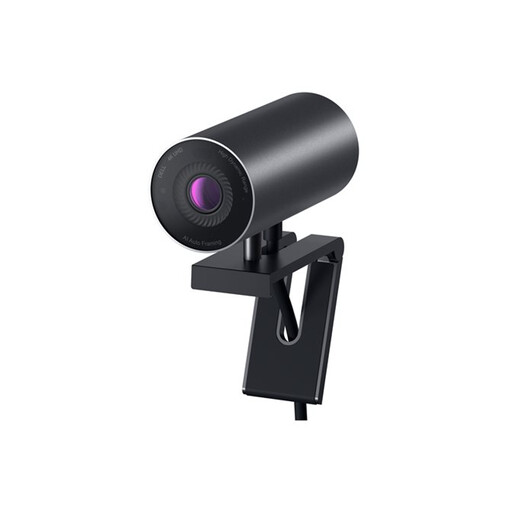
Why It Stands Out: The Dell UltraSharp webcam is engineered for intelligent, high-fidelity video. It leverages a large Sony sensor and advanced AI features to ensure you always look your best, with minimal effort.
Pros:
Who is it for? The individual professional or content creator who prioritises premium image quality and smart, automated features for a consistently polished presentation. It's an excellent business webcam for Mac or Windows users.
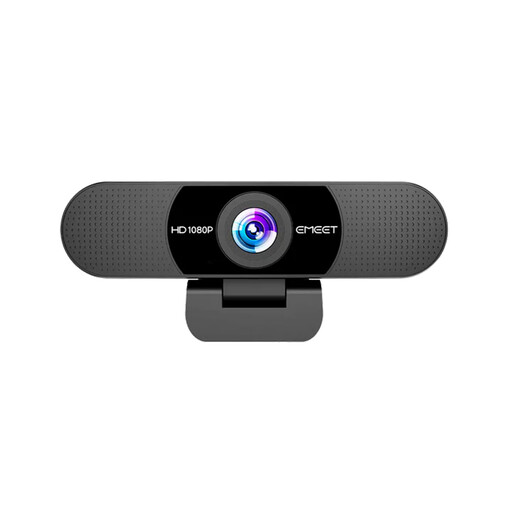
Why It Stands Out: For those who need a significant upgrade from their laptop's camera without the investment of 4K, this 1080p webcam for PC offers fantastic value. It delivers sharp, smooth video and clear audio in a simple, reliable package.
Pros:
Who is it for? Users looking for a dependable and affordable webcam for everyday video calls that offers a major improvement in video and audio quality over integrated cameras.
Our recommendations cover a range of professional needs, but every setup is unique. If you are looking for a model with a specific connection type or want to compare more devices, our full collection offers even more choices.
Browse our complete range of USB C webcams to find the perfect fit for your workspace.
1. Is a 4K webcam worth it for Zoom meetings? While most conferencing platforms compress video, starting with a 4K source provides a much higher quality downscaled image. The result is a noticeably sharper and more detailed 1080p stream compared to a native 1080p camera. The high resolution also enables digital zoom and AI framing features to work without a significant loss in quality.
2. Do I need special software for a 4K webcam? Most modern 4K webcams are designed to be plug and play, meaning they work automatically with major operating systems (Windows, macOS) and video conferencing applications. However, many manufacturers offer optional software that allows you to fine-tune settings like brightness, contrast, field of view and enable features like HDR or AI framing for greater control.
3. What is the difference between a 4K webcam and a 1080p webcam? The main difference is resolution. A 4K webcam captures an image with 3840 x 2160 pixels, which is four times the detail of a 1080p webcam (1920 x 1080 pixels). This results in a significantly crisper, more lifelike video feed, especially on larger monitors. While a quality 1080p model is a great step up for general use, 4K offers a more premium and future-proof experience for professionals who value image fidelity.