
24/7 Customer Support

Free returns

Same-day & Next-day Delivery

Quality Guaranteed

Unlock Your Welcome Offers: FREE Delivery | Up to 80% OFF | Free 30-day JoyPlus trial
Download the APP
In the world of hybrid work and online communication, your video presence is your digital handshake. A grainy, poorly lit or awkwardly framed image can undermine your professionalism. While upgrading to a 4K webcam with zoom seems like a straightforward solution, the market is filled with technical jargon and misleading claims that can lead to a disappointing purchase. This guide will help you navigate the common pitfalls and identify the key features that truly matter for a crystal-clear, professional video experience.
As the Joybuy Product Recommendation Officer, my role is to help you see past the marketing clutter and focus on practical, objective criteria for making a smart investment.
Before you add a new webcam to your basket, be aware of these common traps that catch out many UK buyers.
To ensure you get a device that performs under pressure, focus on these non-negotiable specifications.
For a genuinely sharp and detailed image, the webcam must have a sensor capable of capturing a native 4K resolution (3840 x 2160 pixels). This typically requires an 8MP image sensor. This level of detail is crucial for a professional webcam for Zoom or Teams, as it allows you to present with confidence, knowing that your expressions are clear and any visual aids are perfectly legible.
For dynamic presentations or group meetings, a simple crop-to-zoom is not enough. Look for a 4K webcam for conference room settings that specifies ePTZ capabilities. This feature uses the high-resolution 4K sensor to allow you to pan, tilt and zoom digitally without any moving parts, all while maintaining a crisp HD image. A webcam with remote control makes this even more practical, letting you adjust the frame on the fly to focus on a speaker, a whiteboard or different members of a group.
In 2026, seamless connectivity is key. A USB C webcam offers a modern, reversible connection that is standard on most new laptops and docks. For wider compatibility, check if the manufacturer includes a USB-C to USB-A adapter. Furthermore, ensure the webcam is UVC (USB Video Class) compliant. This is a critical standard that allows the device to work instantly on Windows, macOS and ChromeOS without needing to install any special drivers—true plug-and-play convenience.
We have selected a few products that meet these strict criteria, matching them to the needs of different professional users.
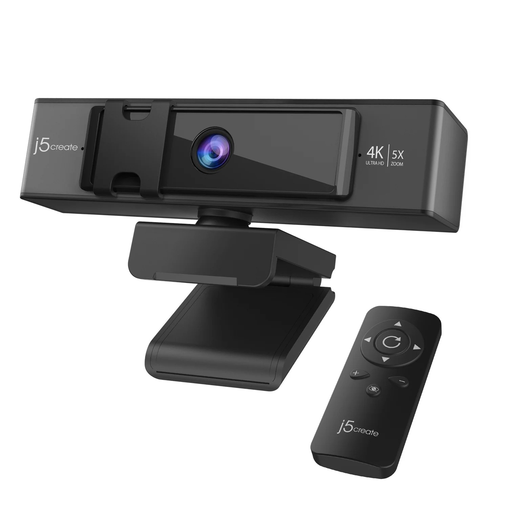
Why This Fits Their Persona: Ideal for managers and presenters who need to frame group discussions or demonstrate on a whiteboard. The remote-controlled zoom and pan/tilt functions allow for dynamic, professional presentations without being tied to the keyboard.
Its 8MP sensor provides true 4K, so the 5x ePTZ zoom remains sharp. The wide F/1.6 aperture and low-light enhancement directly counter the grainy image pitfall.
Remote-controlled ePTZ for flexible framing and dual high-fidelity microphones for clear audio capture in one device.
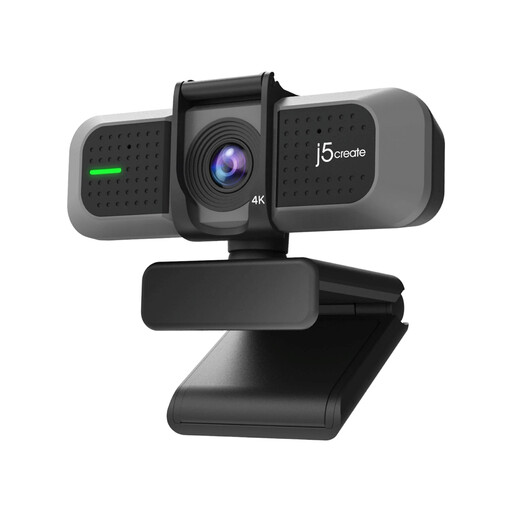
Why This Fits Their Persona: Perfect for consultants, remote workers and educators who need a significant video quality upgrade without the complexity of remote controls. It focuses on delivering a superb 4K image in a simple package.
It features a genuine 8MP CMOS sensor to avoid the "fake 4K" trap and has a wide f/1.8 aperture, providing strong low-light performance that far exceeds built-in laptop cameras.
Delivers true 4K resolution and excellent low-light capability in a straightforward, plug-and-play design. A great balance of performance and value.
We have compiled a complete, real-time list of products that fully satisfy these strict selection criteria and UK safety regulations.
1. Do I need special software for a 4K webcam with zoom? Most modern 4K webcams are UVC (USB Video Class) compliant, which means they are plug-and-play on Windows, macOS and ChromeOS. Core functions work immediately with popular applications like Zoom, Microsoft Teams and Skype. For advanced features like ePTZ customisation, some manufacturers may offer optional software, but it is not required for general use.
2. Will a 4K webcam work with my older USB-A port? Yes, in most cases. Many new USB C webcams are packaged with a USB-C to USB-A adapter to ensure backward compatibility with a wide range of computers. However, for the most reliable, uncompressed 4K video stream, connecting to a USB 3.0 (or higher) port is recommended to ensure sufficient bandwidth.
3. How much of a difference does a good low light webcam really make? The difference is substantial. A webcam with a large sensor and a wide aperture (a low f-number like f/1.6 or f/1.8) can produce a bright, clean and professional-looking image even in a room with standard ambient lighting. In contrast, a basic webcam will often produce a dark, noisy and unprofessional video feed in the same conditions, forcing you to invest in extra lighting.