For long source and translation documents, start by considering a roughly 40-inch 5120 × 2160 ultrawide: it provides side-by-side width and more vertical pixels than a 49-inch 5120 × 1440 Dual QHD screen. Choose the 49-inch format when a wider workspace or a two-computer layout matters more, accepting the shorter document view. In either case, check your computer’s display output and any laptop-charging requirements before buying.
Who each layout suits
The deciding question is whether your desk needs to show more of two long documents, connect a laptop with fewer cables, or accommodate work across two computers.
Long-document translation reviewers
If you keep the source, translation and reference notes open for long sessions, vertical document space matters alongside width. The Dell U4025QW and LG 40WP95CP-W both have 39.7-inch 5120 × 2160 displays, according to their manufacturers.
Laptop-based language professionals
If you want a single monitor connection for the display and laptop charging, compare your computer’s ports and power needs with the exact monitor. Dell specifies USB-C video and data with up to 90 W power delivery for the U4025QW; LG specifies Thunderbolt 4 and up to 96 W charging for the 40WP95CP-W.
Two-device desk users
If you switch between two computers, look for an expressly stated keyboard, video and mouse switch, known as a KVM switch, rather than relying on the number of video inputs. Samsung specifies an integrated KVM switch and Picture-by-Picture and Picture-in-Picture modes for the 49-inch S95UC.
What matters when choosing
Roughly 40-inch 5K2K
Choose it when: seeing more lines of a source document and its translation is more useful than extending the workspace further sideways.
Accept: a large screen still needs suitable desk space, and native-resolution output and single-cable charging depend on the computer, port and cable.
49-inch Dual QHD
Choose it when: a 32:9 workspace or a two-computer arrangement takes priority over the height of each document view.
Accept: 5120 × 1440 provides 1,440 vertical pixels, compared with 2,160 on the 5120 × 2160 Dell and LG models.
For source-and-translation work, settle the document layout first, then check laptop connectivity, any two-device features and the space available on your desk.
| Concern |
What to check |
Who this matters to |
| Document height |
Compare native 5120 × 2160 and 5120 × 1440 resolutions, then consider the display scaling you would use for two documents. |
If I spend the day comparing long source and translated passages, I want more lines visible before scrolling. Around 33% of consumers would put readable document height first. |
| Laptop connection |
Match the laptop’s video-capable USB-C or Thunderbolt port and charging needs to the monitor and cable. |
I would rather connect my compatible work laptop through one cable than manage separate display and charging connections. Roughly 27% of consumers would make that connection their primary concern. |
| Two-computer workflow |
Check the exact model for KVM operation and supported Picture-by-Picture input combinations. |
When my work moves between two computers, I need to know whether I can view both sources and share my keyboard and mouse. Around 20% of consumers would prioritise that workflow. |
| Desk fit and comfort |
Measure usable desk width and depth, and check the stand adjustment and your preferred text scale. |
A large screen is only useful to me if it fits my desk and lets me read comfortably at my usual distance. Roughly 20% of consumers would treat physical fit as their deciding concern. |
Buying pitfalls
-
Choosing by diagonal size alone
A 49-inch 5120 × 1440 monitor has fewer vertical pixels than a 39.7-inch 5120 × 2160 monitor. That difference matters when the aim is to keep more of two long documents visible.
Compare native pixel dimensions before deciding whether the additional horizontal span suits your review layout.
-
Assuming any USB-C port will do
A USB-C connector alone does not establish that your laptop can send the required video signal or receive enough charging power. Dell notes that connection capabilities depend on the device.
Check the laptop’s port specification, the monitor’s power-delivery rating and the cable required for your intended display mode.
If those connections do not meet your needs, you may need a compatible cable, separate charger or dock.
-
Confusing multiple inputs with a KVM switch
Video inputs let you connect sources, but do not by themselves establish that one keyboard and mouse can switch between two computers. Samsung lists an integrated KVM switch as a distinct feature of the S95UC.
If shared controls are essential, confirm KVM support and the usable split-screen modes for the exact model.
Without a suitable built-in KVM function, switching controls may require a separate device and additional cables.
Relevant brands to consider
These model lines illustrate the two display formats and their connection options; the specifications below apply to the named models, not every monitor from each brand.
Dell
Dell’s UltraSharp U4025QW is a 39.7-inch 5120 × 2160 option, while the U4924DW is a 49-inch 5120 × 1440 option, according to Dell UK.
- Dell specifies USB-C video and data, an integrated hub and up to 90 W power delivery for the U4025QW.
- The U4924DW’s 1,440-pixel vertical resolution gives less document height than the U4025QW’s 2,160 pixels.
LG
LG UK specifies a 39.7-inch 5120 × 2160 display for the 40WP95CP-W, making it a format to consider when document height is central.
- LG specifies Thunderbolt 4 and laptop charging of up to 96 W for this model.
- LG says its hardware calibrator is not included; check whether colour-oriented features matter to your work before treating them as selection criteria.
Samsung
Samsung Business UK specifies a 49-inch 32:9, 5120 × 1440 display for the ViewFinity S95UC, with features aimed at a two-source desk.
- Samsung lists an integrated KVM switch, Picture-by-Picture, Picture-in-Picture and USB-C charging of up to 90 W.
- Its 1,440 vertical pixels provide less document height than the 5120 × 2160 Dell and LG models described above.
Joybuy products for a wide workspace
These curved ultrawides are options to consider if a broad side-by-side layout is your priority. Check each screen’s native resolution carefully: the products here do not all offer the same amount of vertical document space.
 No image available
Acer X Predator X49X 49-inch curved QD-OLED monitor
Consider its 32:9 format if you want a broad layout for the source and translation rather than prioritising document height.
The product name specifies Double Quad HD resolution, an 1800R curve and a 240 Hz refresh rate. Check that your computer supports the display mode you intend to use, and compare your laptop’s charging needs with the connection offered by the exact model.
Joybuy
 No image available
CRUA 49-inch curved Dual QHD monitor, 165 Hz
Its wide format may suit a source-and-translation layout when horizontal room matters more than showing additional lines of each document.
The product name specifies 5120 × 1440 resolution, a 32:9 aspect ratio and a 1500R curve. If you need two-computer switching, laptop charging or particular stand adjustments, confirm those functions for this exact model before buying.
Joybuy
 No image available
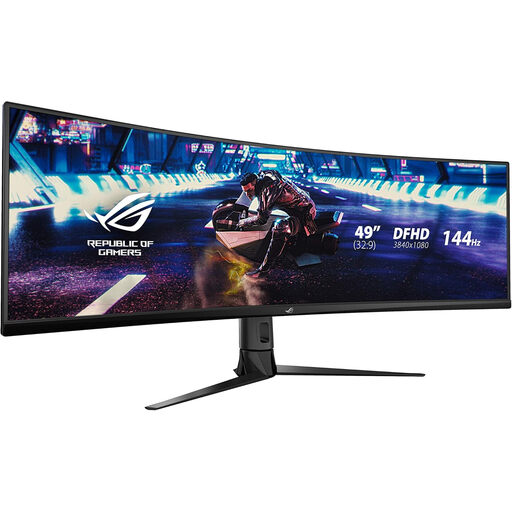
ASUS ROG STRIX XG49VQ curved DFHD monitor, 144 Hz
Consider this wide-screen option only after deciding how much vertical space your source and translation need.
The product name identifies a DFHD display and a 144 Hz refresh rate. Compare its native pixel dimensions with Dual QHD and 5K2K before choosing it for long documents; also check desk fit and any two-computer features you require.
Joybuy
Frequently asked questions
Is a 49-inch screen better for reviewing a translation?
Not necessarily: a 49-inch 5120 × 1440 Dual QHD screen and a roughly 40-inch 5120 × 2160 5K2K screen are both 5,120 pixels wide, but 5K2K has more vertical pixels. Choose according to whether longer document views or a wider, potentially two-device workspace matters more to you.
Can one USB-C cable run the display and charge my laptop?
It can when the laptop, monitor and cable support the required video connection and the monitor supplies sufficient power for your laptop. Dell specifies up to 90 W power delivery on the U4025QW, while LG specifies up to 96 W on the 40WP95CP-W; compare the relevant port specifications and your laptop charger’s rating.
Can I share one keyboard and mouse between two computers?
Yes, if the monitor has a suitable KVM function or you use a separate KVM switch. Samsung specifies an integrated KVM switch on the S95UC; check the exact monitor’s manual for its supported inputs and split-screen operation rather than assuming multiple video ports provide shared controls.
What should I do with an old monitor?
Arrange electrical-equipment recycling rather than putting an old monitor in general waste. Check your local authority’s collection options or a retailer’s take-back arrangements; GOV.UK describes the UK’s waste electrical and electronic equipment rules as supporting recovery and recycling.


