What matters when choosing?
Start with the space your mouse needs, then decide which keys you want within reach and whether you intend to adjust movement-key response.
| Concern |
What to check |
Who this matters to |
| Mouse room |
Measure the available keyboard-and-mouse area and compare actual board widths. Check whether you can live with the shortcuts required by a 60% layout. |
If I need a broad mouse sweep at a narrow desk, the keyboard cannot take up the space I use to aim; around 42% of consumers put mouse room first. |
| Movement-key response |
Check the exact model’s actuation settings and Rapid Trigger controls, including how you save or change a profile. |
I want to adjust movement inputs without making accidental presses too easy. Around 33% of consumers give that tuning priority over the other concerns here. |
| Layout and everyday keys |
Confirm the exact key arrangement and UK-ISO configuration if required; identify which controls are physical keys and which use an Fn layer. |
When the same keyboard handles matches and typing, I want familiar key placement and convenient navigation; roughly 25% of consumers put that everyday access first. |
Joybuy keyboards for small desks
These compact keyboards cover 60% and 65% choices for the small-desk setup. Compare their key arrangements with the mouse space you need; if you want the extra physical keys of a 75% layout, use the same checks rather than assuming a compact model will meet that need.
 No image available
ASUS ROG Falchion Ace HFX 65, UK layout
Consider this 65% model if you want a compact board without choosing a 60% layout. Its product title specifies a UK layout; check the actual key arrangement and dimensions against your typing needs and mouse area.
View on Joybuy
 No image available
Razer Huntsman V3 Pro Mini, 60% analogue optical
This 60% model suits a mouse-space-first choice if you can use shortcuts for absent dedicated keys. Razer specifies 0.1 mm to 4.0 mm adjustable actuation and Rapid Trigger Mode for the Huntsman V3 Pro Mini; check this unit’s key layout before ordering.
View on Joybuy
 No image available
AULA Hero 68, 60%, US layout, White&Black King Magnetic Switch
The title identifies a wired 60% Hall-effect keyboard with Rapid Trigger, which makes it relevant if you want a small board and configurable input. It specifies a US layout and describes 0.01 mm adjustment without establishing the full actuation range; check both details if they matter to you.
View on Joybuy
 No image available
Redragon M68, 68-key magnetic switch, US layout
Consider this compact 68-key model if you want to compare a layout with more keys against 60% choices. Its title specifies Rapid Trigger, an 8000 Hz polling rate and a US layout; compare its dimensions and key positions with your available mouse room.
View on Joybuy
 No image available
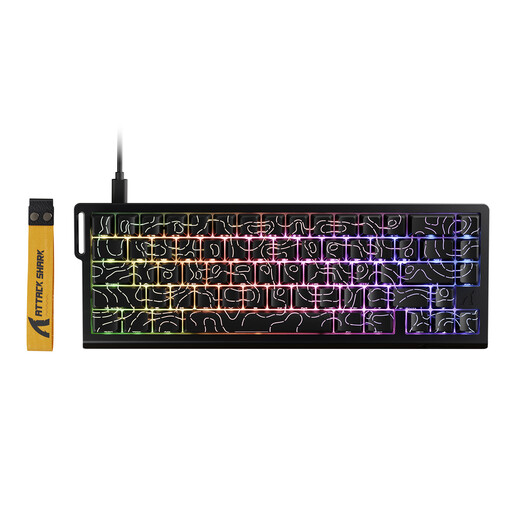
ATTACK SHARK X68 HE, Black Contours, Pattern Shine Through keycaps
This is a compact magnetic-switch option if you are comparing Rapid Trigger keyboards for a small desk. Check its exact key arrangement, legends and dimensions if direct-access navigation keys or UK-ISO placement are important.
View on Joybuy
Common questions
Should I choose a 60% keyboard for ranked games at a small desk?
Choose a 60% layout when mouse room matters more to you than direct access to arrows, navigation keys and a function row. If you use those keys frequently outside matches, compare 65% and 75% layouts against the desk space you can spare.
Should I set Rapid Trigger to its most sensitive setting straight away?
No. Start with a setting you can control consistently, then adjust it as you practise. A very shallow setting may make unintended movement inputs more likely for some players.
Will I need software to change keyboard settings?
You may need the model’s software or web configurator to change features such as actuation or key profiles. Check how the exact keyboard saves settings and whether its configuration method works with your computer; Wooting documents app and browser options for its Wootility configurator.
Does a compact keyboard from a brand with UK models have UK-ISO keys?
Not necessarily. Check the layout of the exact model and configuration: Keychron lists UK-ISO keyboards, while its cited Q1 HE product page specifies ANSI. Photographs of the Enter key and printed legends can help you check what you are ordering.


