Players who need mouse room
If the keyboard crowds your mouse on a small desk, a 60% layout is worth considering—provided you are happy to use shortcuts for omitted keys. Razer describes that trade-off for its Huntsman Mini.


For point-and-click adventures at a small desk, start with a 75% keyboard if you want more mouse room while keeping arrows and utility keys within direct reach. Choose 60% when freeing up as much desk width as possible matters more, and you are comfortable using shortcuts for keys omitted from the physical layout. Check the exact key arrangement rather than relying on the layout percentage alone.
If the keyboard crowds your mouse on a small desk, a 60% layout is worth considering—provided you are happy to use shortcuts for omitted keys. Razer describes that trade-off for its Huntsman Mini.
If you move between game menus, guides and everyday typing, direct access to arrows and utility keys may matter more than the smallest footprint. CORSAIR and Keychron describe 75% models that retain commonly used keys.
If familiar UK key placement or switching between devices matters to you, check the selected layout and connection options. Keychron documents a UK-ISO V1 Max variant with 2.4 GHz wireless and Bluetooth 5.1.
Choose it when: you want a compact board but prefer arrows and utility keys within direct reach, as on the 75% models described by CORSAIR and Keychron.
Trade-off: it takes more desk width than a 60% layout.
Choose it when: mouse space takes priority and you are comfortable using secondary functions for omitted keys.
Trade-off: Razer says its Huntsman Mini omits the physical function row, home cluster and numpad, so those inputs require shortcuts.
| Concern | What to check | Who this matters to |
|---|---|---|
| Mouse space | Compare the board’s dimensions with the space available beside your mouse, then consider whether a 60% shortcut layout suits you. | If my mouse feels crowded, reclaiming desk width matters more than having every key directly available. Around 38% of consumers put mouse space first. |
| Direct key access | Check which arrows, function keys and navigation keys are physically present on the exact layout. | When I switch between an adventure game, guides and typing, I want familiar keys without repeated layer shortcuts. Direct access comes first for around 37% of consumers. |
| Layout and connections | Confirm the selected UK-layout variant if needed, plus the wired or wireless connections your devices require. | If I use more than one device or expect UK key placement, the selected variant has to fit that setup. Around 25% of consumers prioritise layout and connection flexibility. |
Razer says its 60% Huntsman Mini moves the function row, home cluster and numpad inputs to secondary functions. Frequent shortcuts may feel less convenient when you also browse guides or use desktop controls.
Note the keys you use during play and everyday PC tasks. If direct arrows and utility keys matter more than maximum mouse room, consider a 75% layout.
Compact keyboard families can include different regional variants; a family name or generic image does not establish the selected key arrangement.
If UK key placement matters, confirm that the specific listing and selected variant identify a UK or UK-ISO layout.
SteelSeries documents adjustable actuation on the Apex Pro Mini Wireless, but that feature does not restore keys omitted from a 60% physical layout.
Decide how much mouse room and direct key access you need before assessing whether switch adjustment is useful to you.
Its K65 Plus Wireless is a 75% option for balancing mouse room with direct access to common keys.
The Huntsman Mini represents the 60% route when desk width is the overriding concern.
The Apex Pro Mini Wireless combines a 60% layout with adjustable switch actuation.
The V1 Max is a UK-ISO 75% option for buyers weighing key access alongside connection choices.
These keyboards cover 60%, 65%, 75% and other compact designs for a small desk. Compare their stated layouts with the mouse room and direct key access you need; a percentage alone does not establish the exact key arrangement.
 No image available
Consider this compact option if you want a UK layout but not necessarily a 60% board.
The product name specifies a 65% analogue gaming keyboard. Check its physical key arrangement against the arrows and navigation controls you use.
 No image available
Consider this 75% option if retaining familiar keys while reducing keyboard width is your priority.
The product name identifies a wireless UK keyboard. Measure the available desk space and check the selected variant’s key arrangement and connection options.
 No image available
Consider this 60% model when freeing mouse space matters more than direct access to every key.
The product name specifies analogue optical switches. Check how its arrow shortcuts work and confirm the selected physical layout if you need UK key placement.
 No image available
Consider this compact board if a US layout suits you and you want to assess its key arrangement rather than choose by a layout percentage.
The product name specifies magnetic switches and 68 keys. Check the selected board’s arrows and other navigation keys before ordering.
 No image available
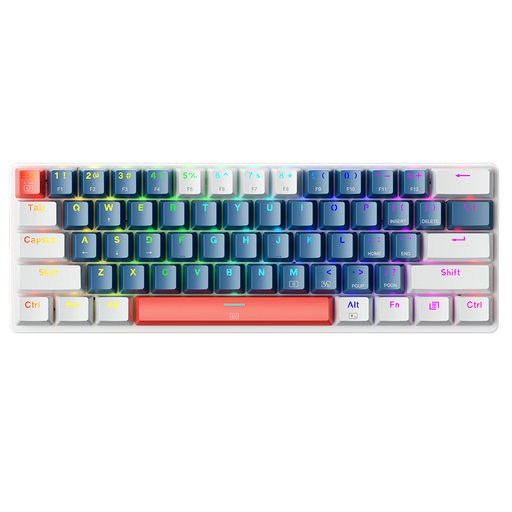
Consider this 60% option if desk width takes priority and a US QWERTY layout suits your typing.
The product name specifies a wired mechanical keyboard with Brown switches and RGB lighting. Check how to access the arrows and navigation functions you use.
Yes, if mouse room is your priority and secondary-key shortcuts suit you. Razer says the Huntsman Mini omits the physical function row, home cluster and numpad; if you want direct access to commonly used keys, compare a 75% layout instead.
Choose one if familiar UK physical key placement and legends matter to you. Check the selected variant, not just the product-family name or image; Keychron, for example, identifies a UK-ISO V1 Max option.
Some can, but the connections depend on the exact model. Keychron specifies 2.4 GHz wireless and Bluetooth 5.1 for the V1 Max; confirm the selected keyboard’s device-switching options, receiver and compatibility with your setup.
Check your local authority’s or retailer’s current electrical-equipment collection instructions. GOV.UK defines electrical and electronic equipment by its dependence on electric currents or electromagnetic fields to work, but collection arrangements need a local check.