
24/7 Customer Support

Free returns

Same-day & Next-day Delivery

Quality Guaranteed

Unlock Your Welcome Offers: FREE Delivery | Up to 80% OFF | Free 30-day JoyPlus trial
Download the APP
A 60-minute visual timer can make study sessions, classroom activities, cooking and daily routines easier to follow because the remaining time is visible rather than communicated only through an alarm. However, not every countdown timer suits a busy UK household or workplace.
Parents may need a visual timer for kids that children can set independently. Students may want a quiet Pomodoro timer without distracting ticking. Teachers and professionals may prioritise a clear display, adjustable alerts and straightforward operation.
Before buying, watch for these common pitfalls.
A conventional digital or mechanical kitchen timer may show numbers or provide an alarm, but it does not necessarily show the passage of time intuitively. For younger children, a shrinking coloured section can be easier to understand than a changing digital display.
Check that the product has a genuinely visible countdown area and that the remaining time can be read from a normal working distance.
A timer described as “quiet” may still have an audible alarm at the end. This can be unsuitable for a library, meeting, sensory-sensitive environment or shared study area.
Look for a silent countdown timer with a clearly stated mute setting. Ideally, the alert should also offer more than one volume level so it can be adjusted for a classroom, kitchen or home routine.
Battery-powered products are convenient, but batteries may not be included. A timer without a protective cover could also be more vulnerable to knocks when used by children or moved between rooms.
Before ordering, check the battery type, whether batteries are supplied, the presence of a low-battery indicator and whether a timer with protective case is available.
For routines lasting up to an hour, choose a timer with a 60-minute countdown range. The display should reduce progressively and visibly, rather than simply switching between a few preset stages.
A rainbow timer or coloured disc is particularly useful for children, as it creates a simple visual link between the disappearing colour and the remaining task time. This can support activities such as reading, tooth brushing, screen-time limits and homework without requiring constant verbal reminders.
A twist control is usually quicker than entering numbers through several buttons. Check whether turning the control sets the desired duration directly and whether the timer begins counting down immediately.
For a kids’ study timer or classroom timer, simple operation matters. Children should be able to understand the control without repeatedly asking an adult for help. Adults may also value this when setting a short cooking, meeting or work interval.
A suitable mute alarm timer should state whether it is silent while running and whether the final alert can be muted. Some products offer different alert lengths or volumes, which can be useful when moving between quiet study and noisy kitchen environments.
Also check the battery requirements. The protective-case model described below uses 2 × AAA batteries, which are not included, and has a low-battery indicator. This is practical information to consider before the first use.
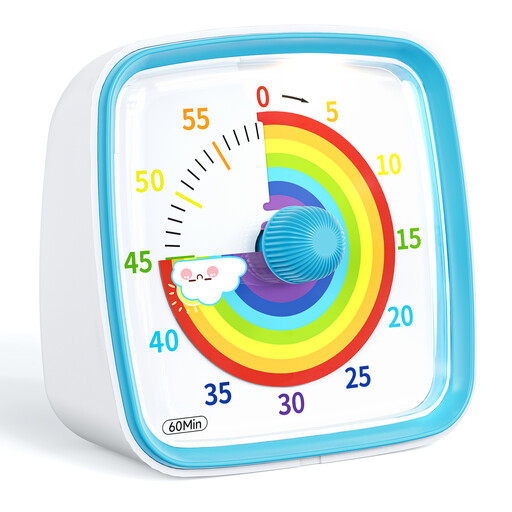
Why This Fits Their Persona: A straightforward option for households, students or teachers seeking a simple 60-minute visual display for everyday routines, study periods and kitchen tasks.
It provides a visible 60-minute countdown and a mute alarm function, helping buyers avoid a timer that relies only on sound.
Twist-to-set control; three alert modes are listed: mute flash, low and loud.
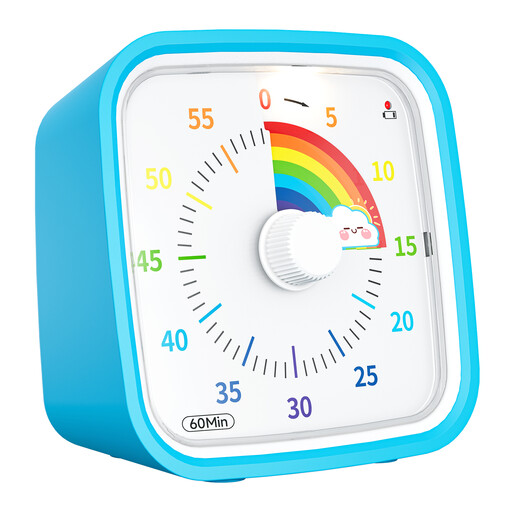
Why This Fits Their Persona: Suitable for buyers who want added protection and more detailed alert control for regular use around the home, classroom or office.
The stated no-ticking design and mute option address noise concerns, while the protective cover helps guard the timer during handling.
Three alert levels; selectable 3- or 30-second alert duration; low-battery indicator.

Why This Fits Their Persona: This listing is for an acrylic appreciation plaque, not a countdown timer. It is included as a mismatch alert for shoppers comparing unrelated search results.
Do not select this item when searching for a 60-minute visual timer; its listed function is display gifting rather than time management.
Acrylic display with wooden base; intended for appreciation, retirement or promotion gifting.
Yes. A 60-minute range can be used for a 25-minute focus period, a five-minute break or a longer study block. It is a flexible kids’ study timer and adult time management tool, although it does not automatically alternate between work and rest intervals.
Some are, but buyers should check the product description carefully. The Yunbaoit models listed above state that they have no ticking during operation. Their alert settings also include mute options, allowing the end signal to be silenced when required.
Running costs depend mainly on battery life, usage frequency and the type of AAA batteries purchased. The protective-case model requires two AAA batteries, not included. Switching off the timer when it is not needed and using the mute or shorter alert setting may help reduce unnecessary battery use.