Choose a 60% keyboard if space for your mouse or pen tablet matters most and you are comfortable using secondary key functions. A 65% layout gives you a compact board with more physical controls, while tenkeyless makes more sense if familiar shortcut access matters more than saving the last bit of desk width. Aseprite and Blender let you customise shortcuts, but remapping cannot add dedicated keys to a smaller board.
Who each layout suits
Mouse and tablet space maximisers
If your pointing device competes with the keyboard for desk width, a 60% layout is worth considering. You gain room by accepting secondary functions in place of some dedicated keys; check the dimensions of the particular board before planning your workspace.
Shortcut-heavy sprite editors
If you repeatedly navigate frames, layers or editing commands, test your frequent shortcuts before choosing the smallest layout. Aseprite documents shortcut customisation, and the Blender Manual describes its Keymap editor, so you can assess whether a revised set of commands works for you.
UK-layout compact-board buyers
If familiar key positions and legends matter to you, check the selected keyboard variant rather than relying on the product family name. Keychron lists UK-ISO options alongside other regional ISO layouts.
What matters when choosing
For sprite animation on a cramped desk, start with the space your mouse or tablet needs, then decide how many physical shortcut keys you are willing to give up.
60% keyboard
Choose when: Your pointing device needs as much of the desk as practical.
Trade-off: Frequently used function and navigation commands may require secondary key combinations.
65% keyboard
Choose when: You want a compact board but would benefit from more physical controls than a 60% layout provides.
Trade-off: It takes more desk width; check the exact key arrangement against your editing commands.
Tenkeyless keyboard
Choose when: Familiar access to more keys matters more than the smallest possible footprint.
Trade-off: Removing the number pad still leaves a wider board than the compact routes.
| Concern |
What to check |
Who this matters to |
| Pointing-device space |
Place your mouse or tablet where you use it, then measure the width left for the keyboard. Compare actual board dimensions, not just layout names. |
If my tablet crowds the keyboard, I need enough room to position it comfortably. Around 42% of consumers put pointing-device space first. |
| Shortcut access |
Try your most-used frame, layer and navigation commands on the intended key layout. Check how any keyboard remapping works. |
When I edit with repeated commands, reaching them without constant layer switching matters most. Around 33% of consumers prioritise shortcut access. |
| Layout and connection |
Check the exact UK-layout variant, supported connection modes and compatibility with your computer. |
If I rely on familiar UK key positions or need a particular desk connection, the selected variant has to fit my setup. Around 25% of consumers put layout and connection fit first. |
Pitfalls to avoid
-
Assuming every compact layout handles shortcuts alike
A 60% board moves more functions away from dedicated keys than a 65% or tenkeyless board. That can matter when you frequently navigate frames, layers or timelines.
List the commands you actually use in Aseprite or Blender, try them on the intended layout and choose the smallest arrangement you can use comfortably.
-
Assuming a product family always has a UK layout
Regional variants can have different physical key arrangements and legends. A family name alone does not identify the version you will receive.
Check the selected variant's layout in the title, specifications and checkout selection.
-
Overlooking software needed for a macro feature
Razer Support says on-the-fly macro recording on the Huntsman Mini requires Synapse to be installed and running. That condition applies to that feature on that model, not automatically to other Razer keyboards.
If macro recording is important to you, check the software requirements for the exact keyboard and feature you intend to use.
-
Applying Great Britain guidance to every UK destination
GOV.UK's guidance on UKCA and CE marking cited here covers Great Britain: England, Scotland and Wales. It does not, by itself, establish the requirements for a delivery to Northern Ireland.
If delivery is to Northern Ireland, confirm the applicable product information with the seller for that destination.
Relevant brands to consider
Keychron
The Q2 Max ISO is a reference point for buyers considering a configurable 65% keyboard with a UK-ISO option.
- Keychron lists QMK/VIA support and 2.4 GHz wireless, Bluetooth 5.1 and Type-C wired connection options for the Q2 Max ISO.
- Select the exact UK-ISO variant and check its key positions. A 65% board also needs more desk width than a 60% board.
Logitech G
Its PRO X 60 and PRO X TKL illustrate two different ways to balance desk space and physical-key access.
- Logitech G describes the PRO X 60 as a 60% wireless keyboard with configurable controls and lists programmable keys for the tenkeyless PRO X TKL.
- The 60% format calls for more use of secondary functions; the tenkeyless format occupies more width. Check the exact layout variant before choosing either.
Razer
The Huntsman Mini and Huntsman V3 Pro Mini are examples of Razer's 60% keyboard format.
- Razer places omitted full-size functions on secondary keys on the Huntsman Mini. Razer Support gives that model a width of 293.30 mm, a measurement to use only when planning for that exact model.
- Razer Support says the Huntsman Mini needs Synapse running for on-the-fly macro recording. Check software needs and the selected layout separately for any other model.
Compact keyboards on Joybuy
These 60% and 65% keyboards are options to assess if you are making room for sprite-animation tools on a small desk. Compare each selected variant's keys, layout and connection against your own shortcuts; this product list does not cover the tenkeyless route.
 No image available
Razer Huntsman V3 Pro Mini 60% analog optical keyboard
Consider this 60% model if preserving mouse or tablet space is your priority and you are comfortable using a compact key layout.
It is identified as an analog optical keyboard. Check the selected key layout and the configuration options needed for your sprite-editing shortcuts; do not assume the Huntsman Mini's software requirements also apply to the V3 Pro Mini.
View on Joybuy
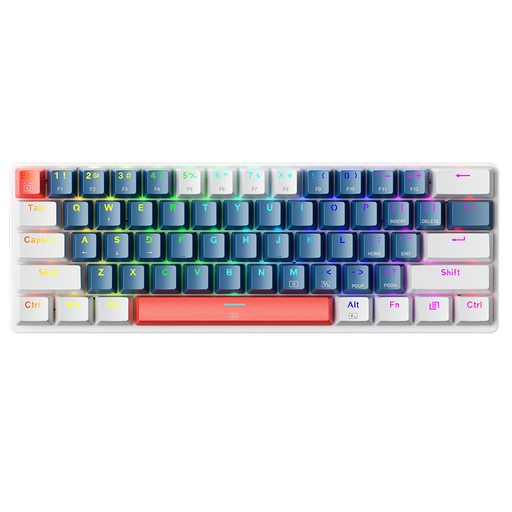 No image available
MACHENIKE K500-B61 60% wired keyboard, US layout, blue switches
Its 60% format suits a desk where keyboard width competes with mouse or tablet space.
The product name specifies a wired mechanical keyboard with a QWERTY US layout, blue switches and RGB lighting. Check that the US key arrangement suits you, and confirm software compatibility if you plan to reassign commands.
View on Joybuy
 No image available
ASUS ROG Falchion Ace HFX 65 analog keyboard, UK layout
Consider this 65% option if you want a compact keyboard but prefer more physical controls than a 60% layout offers.
The product name identifies an analog keyboard in a UK layout. Check the positions of your frequent animation commands, any remapping options and compatibility with your operating system.
View on Joybuy
 No image available
AULA WIN60HE 60% wired keyboard, black and grey magnetic-switch variant
This is another 60% format to consider when desk room for a mouse or tablet takes priority over dedicated keys.
The product name specifies magnetic switches, hot-swappable switches, adjustable actuation and an 8000 Hz polling rate. Check the selected key layout and how you would reach or remap your frequent editing commands.
View on Joybuy
Common questions
Is a 60% keyboard practical for sprite animation?
A 60% keyboard can be practical if freeing desk space matters more to you than dedicated function and navigation keys. Razer explains that the Huntsman Mini makes omitted functions available through secondary keys; test whether that kind of access remains comfortable for the commands you use often.
When should I choose 65% instead of 60%?
Choose a 65% layout when you still need a compact board but want more physical controls within reach. Check the exact key arrangement rather than relying on the percentage alone; Keychron's Q2 Max ISO is one 65% example with a UK-ISO option and QMK/VIA support.
Can shortcut customisation make up for fewer keys?
It can help you reorganise commands, but it cannot restore missing dedicated keys. Aseprite provides Keyboard Shortcuts settings and the Blender Manual describes a Keymap editor; try your most frequent actions on the proposed layout before committing to it.
Should I check the UK layout on a compact keyboard?
Yes, if familiar UK key positions and legends matter to you. Check the exact variant you are selecting: a product family may include different regional layouts, and a 60% or 65% label describes size rather than the UK key arrangement.


