Players who need mouse room
If a wide mouse sweep competes with your keyboard for space, a 60% layout is worth considering—provided you are comfortable using secondary-key shortcuts.


Start with a tenkeyless (TKL) keyboard if you want more mouse room but still use dedicated function keys and familiar shortcuts. Choose 60% when clearing space for your mouse matters more than direct access to those controls; adjustable actuation is worth considering only if you want to tune how your movement keys respond.
If a wide mouse sweep competes with your keyboard for space, a 60% layout is worth considering—provided you are comfortable using secondary-key shortcuts.
If you use function keys, voice-chat controls or desktop shortcuts regularly, a TKL layout removes the number pad while keeping more familiar keys within direct reach.
If you want to adjust when movement keys register, look at configurable switches and allow time to test settings that also work for menus and chat.
Decide how much mouse room you need before choosing switch features: a smaller layout changes which controls have dedicated keys, while adjustable actuation is an optional setting to tune.
| Concern | What to check | Who this matters to |
|---|---|---|
| Mouse room | Measure the space available beside your mouse and check whether a 60% board’s secondary-key controls suit your binds. | If my mouse sweep is cramped, I would give up dedicated keys to clear more desk space. Around 42% of consumers put mouse room first. |
| Dedicated controls | Check how often you use function keys, arrows and navigation keys; compare their placement on 60% and TKL layouts. | When I switch between co-operative play, voice chat and everyday PC tasks, I want familiar controls without an Fn combination. Keeping dedicated controls comes first for around 33% of consumers. |
| Movement-key tuning | For the exact model, check whether actuation is adjustable and whether your preferred settings can be saved. | If I like changing how readily movement keys register, I am willing to spend time testing the settings. Around 25% of consumers prioritise that control. |
UK and US layouts can be separate variants of the same model, changing key legends and positions used for typing or shortcuts.
Check the selected layout before ordering rather than relying on the retailer’s location.
A 60% board trades dedicated function and navigation keys for a smaller footprint. Those inputs may still be available through secondary functions, but reaching them can be less convenient.
Check your game binds and voice-chat controls. If you use those keys often, compare TKL layouts before giving them up.
A very short setting may cause unintended presses if it does not suit the way you use the keyboard.
Choose the feature if you want to tune it, and start with a moderate setting before making small changes.
The Huntsman V3 Pro Mini is a 60% option for players who put mouse clearance ahead of dedicated function and navigation keys.
The K70 CORE TKL is relevant if you want to remove the number pad without giving up familiar function keys.
The G515 LIGHTSPEED TKL is a low-profile option for buyers considering a slimmer TKL board.
The Apex Pro TKL Gen 3 is relevant if you want a TKL layout with configurable movement-key actuation.
These choices include 60% keyboards for prioritising mouse room and other compact models to consider when you want to keep more controls. Check each board’s dimensions and key layout against your desk and the shortcuts you use.
 No image available
Consider this 60% model if mouse clearance matters more to you than dedicated function and navigation keys.
Razer specifies adjustable actuation from 0.1 mm to 4.0 mm for the Huntsman V3 Pro Mini. Check the selected UK or US layout variant before ordering.
 No image available
Its 60% layout suits a setup where leaving room for the mouse takes priority over dedicated shortcut keys.
The title specifies magnetic switches, adjustable actuation, Rapid Trigger and an 8000 Hz polling rate. Check the selected key layout and which controls use secondary functions.
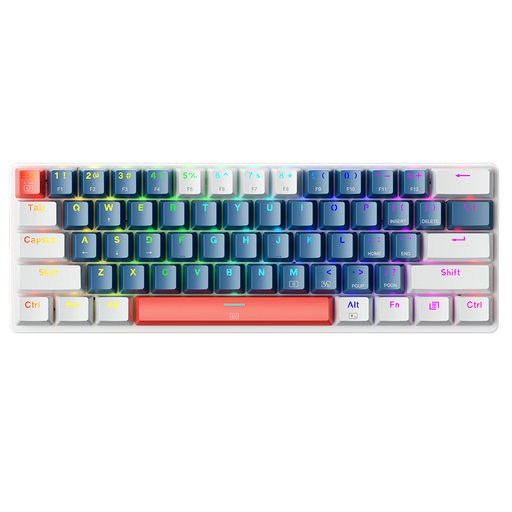 No image available
This is another 60% option to assess if you can use secondary shortcuts in exchange for mouse room.
The title identifies a US QWERTY layout, brown switches and RGB lighting. Check its physical dimensions and whether the US key layout suits your typing.
 No image available
Consider this compact alternative if you are weighing mouse clearance against keeping arrow keys within reach.
The title identifies an analog keyboard and a UK-layout variant. Compare its physical fit and key placement with the controls you use most often.
 No image available
This compact option is worth checking if you regularly use shortcuts alongside games and do not want to choose by minimum keyboard size alone.
The title identifies a wireless UK model. Check its width and dedicated-key arrangement against your available desk space.
No. Choose 60% if maximising mouse room matters more than dedicated controls. Razer’s 60% keyboard documentation explains that the function row and navigation cluster are absent; if you use those keys regularly, compare TKL layouts before deciding.
Check the selected variant before ordering, not just the retailer’s location. Razer lists UK and US layouts as separate options for the Huntsman V3 Pro Mini, so the model name alone does not settle which key layout you will receive.
Start at a moderate setting and make small changes if you want a lighter response without unintended presses. Razer and SteelSeries specify adjustment from 0.1 mm to 4.0 mm on the cited compact models, but that range does not establish one setting for every player.
Not necessarily. Check whether the exact model can save the settings you use on the keyboard itself, particularly if you move between PCs; do not assume every configurable feature works the same way without software.