Single-laptop users
If the laptop is normally the only device connected, concentrate on its required USB-C PD output and the cable rating rather than extra charger ports.


Choose a USB-C PD charger that states at least 65W from the port used by the laptop when it is charging alone, and use a USB-C to USB-C cable rated for at least 65W. If you want to charge another device at the same time, check the exact port-allocation table: a 65W total rating does not mean the laptop will still receive 65W.
If the laptop is normally the only device connected, concentrate on its required USB-C PD output and the cable rating rather than extra charger ports.
If one charger needs to serve both devices, the power available to the laptop with both connected matters more than the charger’s headline total.
If the charger goes in your bag, consider its size and plug arrangement alongside the output and cable needed by the laptop.
Start with the laptop’s charging requirement, then check how any additional devices affect the available power. For use away from home, check the plug supplied with the exact charger as well.
| Concern | What to check | Who this matters to |
|---|---|---|
| Full laptop power | Confirm USB-C PD and at least 65W from the chosen port with the laptop connected alone; use a USB-C to USB-C cable rated for at least 65W. | If the laptop is my main device, I want its required charging power without depending on a shared output. Around 42% of consumers put that laptop-first need ahead of the other concerns here. |
| Power sharing | Read the output table for the exact ports you will use together. Belkin states 45W plus 20W for its WCH013myBK when both USB-C ports are active. | When I charge my phone beside the laptop, I need to know what remains available to the laptop. For around 33% of consumers, using one charger for both devices is the primary concern. |
| Portability and plug | Check the size or foldable-plug design and the plug supplied; a charger connecting directly to a Great Britain BS 1363 socket needs a compatible plug. | I carry the charger between places, so packing it and connecting it to the intended socket matter once it meets the laptop’s needs. Portability comes first for around 25% of consumers. |
Connecting a second device can reduce the power allocated to the laptop. Belkin specifies 65W from one port on its WCH013myBK, but 45W plus 20W when both USB-C ports are used.
Check the manufacturer’s table for your exact port combination. If the laptop needs its full 65W while another device charges, choose a configuration whose stated allocation provides it.
A cable’s charging rating can limit the path between charger and laptop. The USB Implementers Forum identifies 20V at 3A as 60W, below this laptop’s stated 65W requirement.
Check that your USB-C to USB-C cable has a stated charging rating of at least 65W.
A stated output does not, by itself, establish how a mains charger is made or whether its product information is adequate. Which? has reported safety risks in chargers it bought from online marketplaces.
Look for a traceable seller, an identifiable model, clear manufacturer or importer information, rated outputs and a plug suitable for the intended socket.
A compact body or travel-oriented name does not establish which plug heads come with a particular package. For direct use in a Great Britain BS 1363 socket, confirm that the supplied plug is compatible.
Check the included plug heads before buying and the requirements at any overseas destination.
If the supplied plug does not suit the intended socket, you may need a separate suitable adaptor or charger.
The Anker 735 Charger (GaNPrime 65W) is a multi-port option for someone who also charges smaller devices.
The WCH013myBK makes its two-device power split clear for buyers considering a dual-USB-C charger.
UGREEN’s Nexode range includes compact and multi-port 65W charger designs for different carrying and device setups.
This 65W USB Type-C charger is a choice to consider for charging one laptop from mains. Check the laptop’s required USB-C PD output and your cable before deciding whether it fits your setup.
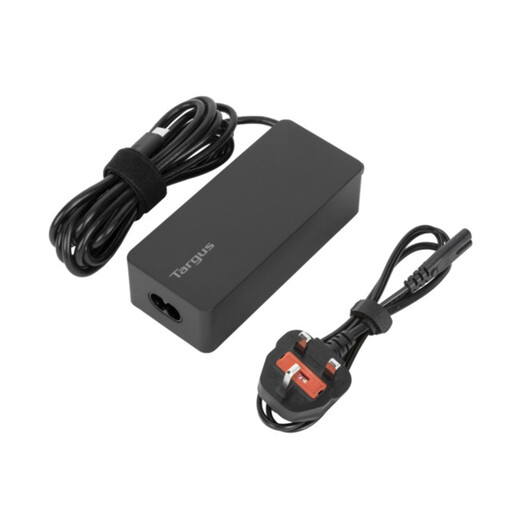 No image available
Consider this for a laptop charged on its own, provided its required USB-C PD output matches the charger. Check that you have a USB-C to USB-C cable rated for at least 65W; do not assume full laptop power while another device is connected.
No. Confirm that the laptop accepts USB-C PD and that the charger offers at least 65W from the port you will use. Check your laptop maker’s specified charging requirements too; Apple advises meeting at least the manufacturer-recommended minimum wattage for its USB-C laptops.
Yes. For a full 65W charging path, use a USB-C to USB-C cable with a stated rating of at least 65W. The USB Implementers Forum’s 20V at 3A example equates to 60W, so do not assume a cable marked only 60W meets this requirement.
It can charge both only within the power allocation specified for those ports; it will not necessarily give the laptop 65W. Belkin states that its WCH013myBK provides 45W plus 20W when both USB-C ports are used, rather than 65W to the laptop port.
For a charger intended to plug directly into a Great Britain BS 1363 socket, check that its supplied plug is compatible with that socket. The Electrical Equipment (Safety) Regulations 2016 address socket compatibility for plug-in devices; this Great Britain guidance should not be assumed to settle the requirements for Northern Ireland or an overseas destination.