Finding the right keyboard can feel like a compromise. A full-size board offers every key you could need but dominates your desk space. A compact 60% or 65% layout reclaims that space but often at the cost of the function row or dedicated arrow keys, which can hinder productivity. This is where the 75% keyboard comes in, offering a balanced solution for a clean and efficient workspace.
As a Joybuy Product Recommendation Officer, my role is to help you navigate the market. This guide is designed to cut through the clutter, focusing on the practical features that matter. We will explore what makes the 75 percent layout so popular and highlight a few standout models to help you find the right fit for your needs, whether you're a gamer, a programmer or simply looking to optimise your home office.
How to Choose the Right 75% Keyboard for You
Before diving into specific models, let's cover a few key considerations. Understanding these features will empower you to make a more informed decision.
1. Mechanical vs. Membrane: The Feel and Sound of Typing
The core of any keyboard is its switch technology. Your choice here will define the entire typing experience.
- Mechanical Switches: Favoured by enthusiasts, gamers and typists, mechanical keyboards use individual physical switches under each key. This provides distinct tactile feedback, a satisfying sound and superior durability. Many are also a hot-swappable keyboard, meaning you can easily change the switches without soldering to customise the feel and sound.
- Membrane Keys: These use a rubber dome layer under the keycaps. They are generally much quieter, have a softer feel and are often found in more affordable or ultra-slim designs. This makes them a great choice for open-plan offices or for those who prefer a less audible typing experience.
2. Connectivity: Wired, Wireless and Multi-Device
How your keyboard connects to your devices is crucial for convenience and performance.
- Wired: A wired connection via USB-C offers a stable, lag-free connection, making it a reliable choice for competitive gaming or a permanent desk setup. It also means you never have to worry about battery life.
- Wireless Keyboard: For a clutter-free desk or for those who work on the go, a wireless keyboard is ideal. Look for models with multi-mode connectivity, offering both 2.4GHz (via a dongle for low-latency performance) and Bluetooth for broad compatibility with laptops, tablets and even smartphones. Some can switch between multiple paired devices at the press of a button.
3. Build and Bonus Features
The materials and extra features can elevate a keyboard from a simple tool to a premium piece of hardware.
- Mounting Style: In the mechanical world, the way the internal components are mounted affects the typing feel. A gasket mount keyboard, for instance, uses soft material to suspend the key-switch plate, resulting in a softer, more cushioned and often quieter typing experience compared to more rigid mounting methods.
- Materials: Cases can be made from durable ABS plastic or premium CNC-milled aluminium. Keycaps are also important; PBT plastic is more resistant to shine and wear than standard ABS.
- Extra Controls: A dedicated keyboard with volume knob is a highly sought-after feature, allowing for quick and intuitive audio adjustments without interrupting your workflow or game.
Our Top 75% Keyboard Recommendations for 2026
Based on features, build quality and user needs, here are our recommendations for 2026.
Ticktype EVO75 Custom Tri-Mode Wireless Mechanical Keyboard
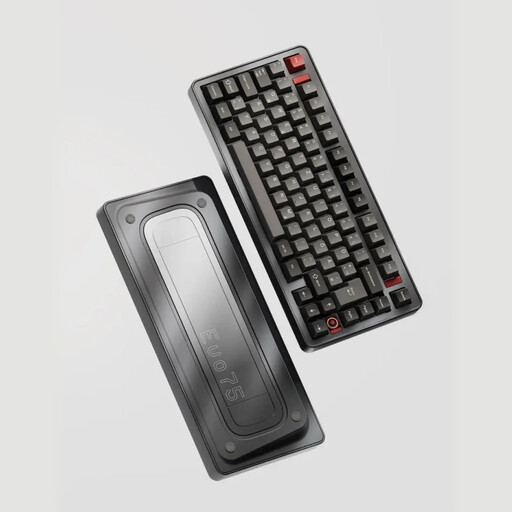
- Why It Stands Out: The Ticktype EVO75 is built for the enthusiast who wants a premium experience straight out of the box. Its full aluminium case, leaf spring mount and tri-mode wireless connectivity (Wired, 2.4GHz, Bluetooth) set a high standard. The hot-swappable PCB allows for deep customisation, while the massive 8000mAh battery provides exceptional endurance for a wireless keyboard.
- Pros:
- Premium full aluminium construction.
- Flexible tri-mode connectivity.
- Hot-swappable for easy switch customisation.
- VIA compatibility for advanced key remapping.
- Exceptional battery life.
- Who is it for?
- Keyboard enthusiasts, developers and professionals seeking a high-end, customisable and durable wireless keyboard that can serve as the centrepiece of their desk setup.
AJAZZ AK820 75% Wired Mechanical Keyboard
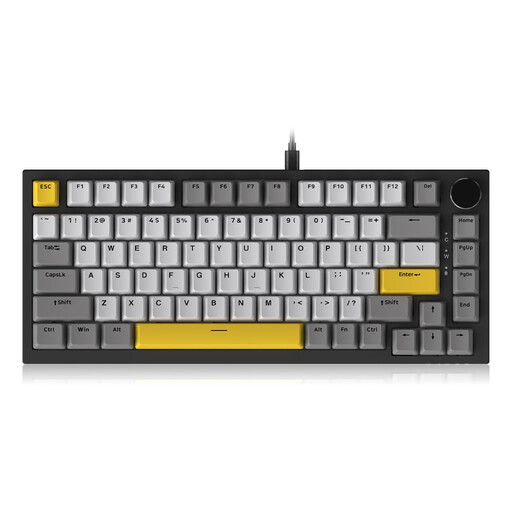
- Why It Stands Out: The AJAZZ AK820 makes premium features more accessible. It offers a gasket mount keyboard structure, which provides a comfortable and cushioned typing feel typically found in more expensive models. The inclusion of a CNC-machined keyboard with volume knob and a hot-swappable PCB makes it an excellent value proposition for those wanting to enter the world of customisable mechanical keyboards.
- Pros:
- Soft and pleasant typing feel thanks to the gasket mount.
- Convenient and well-built volume knob.
- Hot-swappable sockets for 3/5-pin switches.
- Durable PBT keycaps.
- Who is it for?
- Gamers, students and office workers looking for a high-quality compact mechanical keyboard with a great typing feel and modern features, without the premium price tag.
RAPOO E9050L 75% Wireless Membrane Keyboard
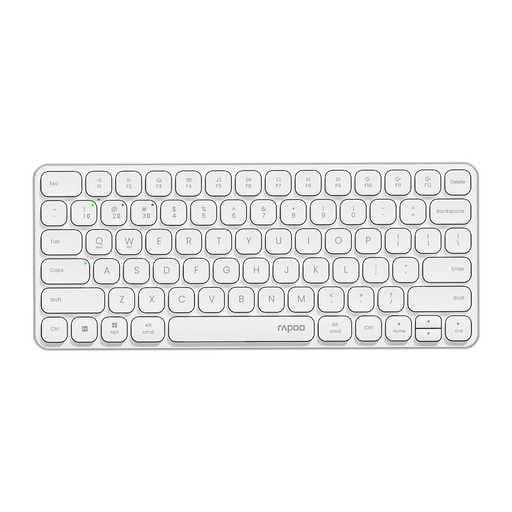
- Why It Stands Out: The RAPOO E9050L prioritises portability, quiet operation and multi-device workflow. Its ultra-slim 0.2-inch profile and quiet membrane keys make it an ideal companion for travel or quiet office environments. Its standout feature is the ability to connect to and seamlessly switch between up to four devices, making it a powerhouse for users who juggle a laptop, tablet and desktop.
- Pros:
- Ultra-slim and lightweight, making it a highly portable keyboard.
- Quiet membrane keys for distraction-free typing.
- Seamlessly switch between up to 4 connected devices.
- Excellent battery life with USB-C charging.
- Broad compatibility, including a dedicated keyboard for Mac mode.
- Who is it for?
- Mobile professionals, students and anyone who needs a single, quiet and reliable keyboard to use across multiple computers and devices in various locations.
Looking for More Options?
If our recommendations don't quite match what you're looking for, or if you'd like to explore different layouts and features, we have a wider selection available. From full-size ergonomic models to ultra-compact gaming boards, there's a keyboard for every user.
Browse our full range of keyboards on the computer to find the perfect fit for your desk.
Frequently Asked Questions about 75% Keyboards
What is a 75% keyboard? A 75% keyboard is a compact layout that retains the full function row (F1-F12), arrow keys and a column of navigation keys (like Page Up, Page Down and Delete). It achieves its smaller footprint by removing the number pad and compressing the remaining keys, offering a great balance between functionality and desk space.
Is a 75% keyboard good for gaming and programming? Yes, it's an excellent choice for both. For gamers, the compact form factor provides significantly more room for mouse movement. For programmers, the retention of the function row and dedicated arrow keys is crucial for efficiency, offering a clear advantage over smaller 60% or 65% layouts.
Can I use a 75% keyboard with a Mac? Absolutely. Many modern 75% keyboards are designed with cross-platform use in mind. Look for models that explicitly mention keyboard for Mac compatibility. These often include features like a switch to toggle between Windows and macOS layouts or provide alternative keycaps for Command and Option keys. The Ticktype EVO75 and RAPOO E9050L are both strong examples of Mac-friendly options.


