
24/7 Customer Support

Free returns

Same-day & Next-day Delivery

Quality Guaranteed

Unlock Your Welcome Offers: FREE Delivery | Up to 80% OFF | Free 30-day JoyPlus trial
Download the APP
A 75% mechanical gaming keyboard can give you more desk space without removing the arrow keys and function row that many 60% models omit. For UK gamers, programmers, students and office workers, it can be a practical middle ground between a full-size board and an ultra-compact layout.
However, product pages often highlight RGB lighting and “gaming” styling while giving less attention to layout compatibility, wireless performance and long-term maintenance. The following guide explains which details deserve closer attention before you buy.
Not every keyboard described with gaming terminology contains genuine mechanical switches. Some compact models use membrane technology with a mechanical-style key feel. These can be suitable for basic typing, but they do not offer the same switch replacement options or customisation as a genuine mechanical board.
Check whether the listing clearly states the switch type, actuation force and whether the switches are replaceable. Terms such as “mechanical feeling” should not be treated as equivalent to a mechanical switch system.
A 75% keyboard usually retains the arrow keys and function row, but the exact arrangement varies. A QWERTY US layout keyboard normally uses an ANSI-style Enter key and may not have dedicated UK symbols such as £. You can change the operating system layout, but the printed legends may not match what appears on screen.
Before ordering, check the product photographs, key count and operating system compatibility. This is particularly important for coding, spreadsheet work and frequent use of punctuation.
A wireless mechanical keyboard may offer Bluetooth, 2.4GHz wireless and USB-C wired modes, but these connections serve different purposes. Bluetooth is convenient for tablets and laptops, while a 2.4GHz wireless keyboard is generally the more suitable option for a desktop gaming setup. Wired mode is useful when charging or when you want a direct connection.
Also check the stated battery capacity and whether the quoted runtime applies with RGB switched on. Lighting can reduce operating time considerably.
A 75% keyboard commonly has around 80–84 keys and measures roughly 30–34 cm wide, depending on the case and knob. It saves space compared with a full-size keyboard while retaining more dedicated controls than a 60% model.
If you need maximum mouse room for FPS games, a compact gaming keyboard can be useful. If you regularly use a number pad, navigation cluster or dedicated media keys, a 75% layout may still require compromises.
Linear red-style switches provide a smooth keystroke without a tactile bump, which can suit rapid gaming and general typing. Tactile or clicky switches create more noticeable feedback but may be less suitable in shared offices or bedrooms.
A hot-swappable keyboard lets you replace compatible switches without soldering. Confirm whether the sockets support 3-pin, 5-pin or both types, and insert switches carefully to avoid bending their pins.
A gasket mount keyboard uses flexible mounting elements and internal dampening layers. This can create a softer key feel and reduce case resonance, but the result depends on the plate, foam and stabiliser tuning. It is not a guarantee of quiet operation.
PBT keycaps generally resist surface shine better than standard ABS keycaps, although durability also depends on thickness and manufacturing method. A mechanical keyboard with PBT keycaps can be a sensible choice for frequent users.
RGB lighting is mainly an aesthetic and visibility feature. Look for per-key control, brightness adjustment and whether settings can be stored in onboard memory. A volume knob can also be useful for gaming, video calls and editing, but it adds width and cost.
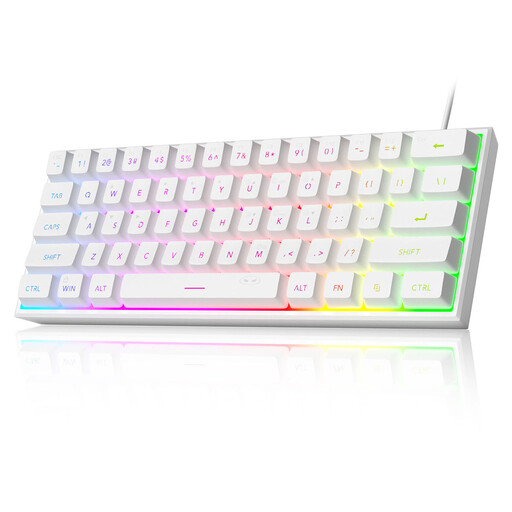
Why This Fits Their Persona: A low-cost, wired option for students and casual players, with a small footprint where a 60% layout is more useful than dedicated arrow and function keys.
The listing identifies it as membrane technology with a mechanical feel, so buyers can set realistic expectations rather than assuming it is a switch-based mechanical keyboard.
Wired USB connection, adjustable RGB modes and a stated IPX4-rated circuit board. The USB connection itself should still be kept away from liquids.
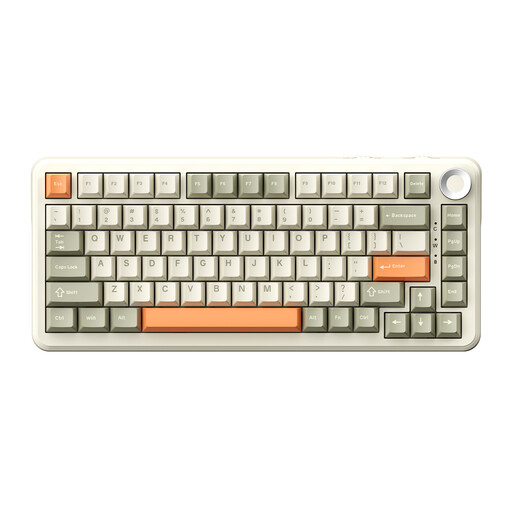
Why This Fits Their Persona: Suitable for users wanting customisation, wireless flexibility and a more substantial feature set for gaming, work and creative software.
Its 75% layout retains the F-row and arrow keys, while hot-swappable support makes future switch changes possible without soldering.
Tri-mode connectivity, an aluminium volume knob, PBT keycaps and a listed 8000mAh battery. The stated runtime is up to 120 hours without backlighting or 55 hours with RGB on.

Why This Fits Their Persona: Designed for gamers and creators who want a flexible setup across a desktop, laptop or other compatible device.
The listing specifies full-key hot-swap functionality, tri-mode connection and a 75% layout, making the main compatibility points easier to verify.
4000mAh battery, Bluetooth, 2.4GHz and wired modes, a control knob, RGB lighting and Cherry-profile double-shot PBT keycaps.

Why This Fits Their Persona: A straightforward choice for users who prefer a detachable wired USB-C connection and do not need wireless charging or Bluetooth.
Its specifications clearly identify the 84-key 75% layout, red linear mechanical switches and wired USB-C connection.
Detachable cable, LED backlighting, anti-ghosting with N-key rollover and compatibility listed for Windows, macOS and Linux.
We have compiled a complete, real-time list of products that fully satisfy these strict selection criteria and UK safety regulations.
Yes, provided you check the layout carefully. Many products use a QWERTY US arrangement, which can differ from a UK ISO keyboard in the Enter key shape, symbols and £ key position. You can select a UK software layout, but the printed legends may remain different.
It depends on your priorities. A 60% keyboard saves more space, while a 75% model normally keeps the arrow keys and function row. For programming, office work and shortcuts, the additional keys can reduce reliance on function combinations.
Routine care is limited to dust removal, gentle keycap cleaning and occasional switch replacement if the board is hot-swappable. Wireless models also require battery charging, while wired models avoid battery ageing but need a clear cable connection.