
24/7 Customer Support

Free returns

Same-day & Next-day Delivery

Quality Guaranteed

Unlock Your Welcome Offers: FREE Delivery | Up to 80% OFF | Free 30-day JoyPlus trial
Download the APP
As a Joybuy Product Recommendation Officer, my role is to help you navigate the crowded market of office equipment. When your business needs to produce large-format documents, from architectural plans to vibrant marketing materials, the limitations of a standard A4 printer quickly become apparent. Outsourcing these jobs can be costly and time-consuming, creating bottlenecks in your workflow.
An in-house A3 all-in-one printer is a powerful solution, bringing large-format printing, scanning and copying capabilities directly into your office. This guide will walk you through the key considerations for choosing the right model and highlight some of our top recommendations for 2026 to help you make an informed decision.
Before diving into specific models, it's important to understand the features that will have the most impact on your business's productivity and running costs.
The choice between inkjet and laser technology is a critical one for A3 printing.
Ensure the model you choose is a true A3 printer scanner copier. Some devices may only print in A3 but are limited to A4 for scanning and copying. For businesses like architectural firms or design agencies that need to digitise or duplicate large-format plans and drawings, a machine with an A3-capable flatbed scanner and Automatic Document Feeder (ADF) is essential.
In a modern office, seamless connectivity is non-negotiable. A wireless A3 printer with dual-band Wi-Fi (5 GHz) provides a stable connection for multiple users. Mobile printing support (like Apple AirPrint or Mopria) allows your team to print directly from smartphones and tablets. For businesses handling sensitive information, look for robust security features such as WPA3 encryption, secure print functions and network access controls to protect your data.
Based on features, performance and suitability for professional environments, here are our recommendations.
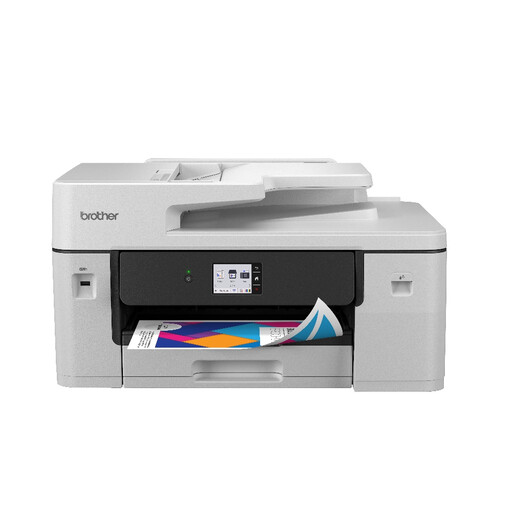
Brother MFC-J6760DW All-in-one Inkjet Printer
Why It Stands Out: The Brother MFC-J6760DW is a purpose-built A3 multifunction printer designed for demanding business use. Its MAXIDRIVE print technology delivers impressive speeds that compete with laser models, with a first page out in as little as 4.4 seconds. It offers full A3 printing, scanning, copying and faxing, supported by a 50-sheet ADF and Dual CIS scanning. The use of premium pigment inks ensures that documents are not only vibrant but also water and fade-resistant.
Pros:
Who is it for? Small to medium-sized businesses, creative agencies and professional practices that require a fast, reliable and secure solution for producing high-quality A3 documents in-house.
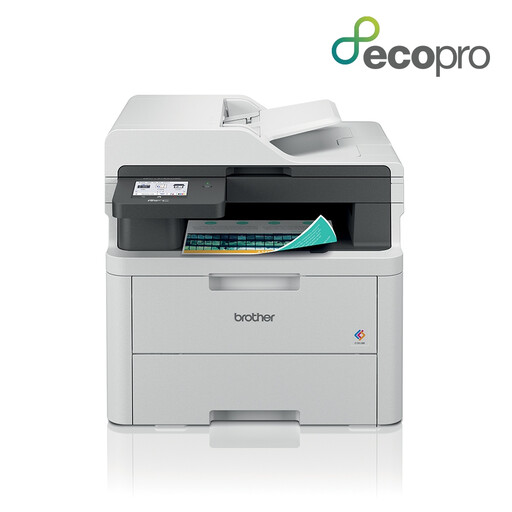
Brother MFC-L3740CDWE All-in-one Colour Wireless LED Printer
Why It Stands Out: While this model is focused on A4, it is an exceptional choice for offices that need professional colour quality without the A3 size requirement. Its LED print technology delivers crisp, vibrant documents at a resolution of 600 x 2400 DPI. A standout feature is its quiet operation, printing at just 46 dB, making it ideal for shared or open-plan offices. The large 8.8cm colour touchscreen simplifies navigation and workflow customisation.
Pros:
Who is it for? Busy home offices and small workgroups that prioritise high-quality A4 colour printing, quiet performance and an intuitive user experience.
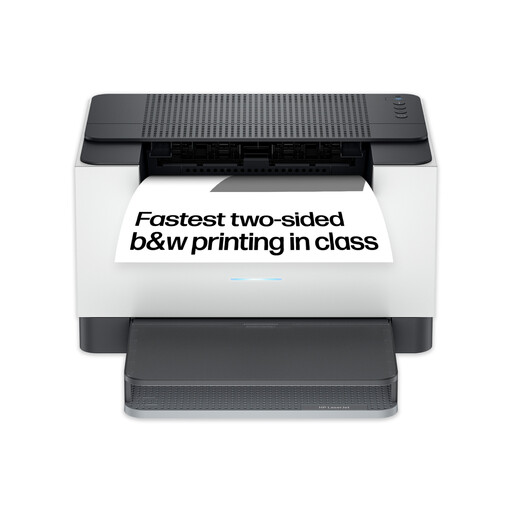
HP LaserJet M209dw Wireless Black & White Printer
Why It Stands Out: For businesses that primarily handle text-based A4 documents like contracts, invoices and reports, the HP LaserJet M209dw is a compact and highly efficient workhorse. It focuses on doing one thing exceptionally well: fast monochrome printing. With speeds of up to 30 pages per minute and automatic two-sided printing, it powers through large jobs. Its self-resetting dual-band Wi-Fi ensures a reliable connection, and the HP Smart App allows for easy management from any device.
Pros:
Who is it for? Small businesses, home offices and professionals who need a fast, reliable and compact printer for high-volume black-and-white A4 document printing.
If these recommendations don't quite match your specific needs, there is a wide world of printing solutions available. From compact photo printers to high-capacity office machines, finding the right fit is key.
Explore our complete range of home and office printers to discover more models.
1. What is the main difference between an A3 and an A4 all-in-one printer? The primary difference is the maximum paper size they can handle. An A4 printer's maximum size is 210 x 297 mm, which is standard office paper. An A3 all-in-one printer can handle paper up to 297 x 420 mm, which is double the size of A4. This makes it suitable for printing posters, large spreadsheets, architectural plans and marketing proofs.
2. Is an inkjet or laser printer better for business A3 printing? It depends on your primary use case. A business inkjet printer is generally preferred for tasks requiring high-quality, vibrant colour, such as creating marketing materials or photo proofs. A laser printer excels at producing large volumes of sharp, black-and-white text documents quickly and often with a lower cost per page, making it ideal for reports and contracts.
3. Can a wireless A3 printer be secure enough for a business? Yes, provided you choose a model with modern security protocols. Look for printers that support WPA3, the latest Wi-Fi security standard, as well as features like secure printing (requiring a PIN to release a job), network user authentication (802.1x) and encrypted data transmission (SSL/TLS). Models like the Brother MFC-J6760DW are specifically designed with these enterprise-grade security layers.