
24/7 Customer Support

Free returns

Same-day & Next-day Delivery

Quality Guaranteed

Unlock Your Welcome Offers: FREE Delivery | Up to 80% OFF | Free 30-day JoyPlus trial
Download the APP
Buying A4 printer paper seems straightforward until pages curl, ink shows through the reverse side or a printer repeatedly misfeeds. The lowest price per ream is not always the lowest cost in use, particularly when paper is unsuitable for your printer or your documents.
Whether you need white A4 paper for everyday administration, coloured A4 paper for classroom and marketing materials or an Epson A4 printer for a home office, check the following points before buying.
Printer packaging may show a high pages-per-minute figure, but this can refer to draft mode rather than normal ISO-rated output. Colour printing, duplex printing and document complexity can all reduce practical speed.
For occasional home printing, a compact printer with print, scan and copy functions may be more useful than a faster print-only model. For a small business or busy office, paper capacity and automatic document feeding can save more time than a headline speed figure.
A cheap ream can become wasteful if sheets stick together, feed unevenly or show text through the reverse side. Paper should match the machine and the task. Standard 80gsm printer paper is suitable for many routine documents, while lighter 75gsm stock can reduce paper weight for high-volume work. Heavier 120gsm printer paper is more appropriate for colour documents, presentations and handouts where a firmer feel is useful.
Always check the printer’s supported media range. Inkjet and laser printers use different methods to place ink or toner on the sheet, so paper intended for one process may not produce the expected result in another.
Coloured stock changes the appearance of printed ink. Darker shades can reduce contrast, while pastel shades generally preserve readability. A coloured sheet may also have a matte, uncoated or coated surface, which affects feeding and the visual finish.
For notices, filing dividers, school communications and promotional leaflets, coloured A4 paper can make documents easier to identify. Before buying in bulk, check whether the colour and surface suit your printer and whether black text remains easy to read.
GSM means grams per square metre and indicates the paper’s weight, not simply its thickness.
For routine copying and laser printing, 80gsm copier paper offers a useful balance between handling and capacity. For double-sided work, also consider opacity, as a bright, opaque sheet can make reverse-side text less distracting.
Standard UK A4 paper measures 210 × 297mm. Confirm that the printer tray is set to A4 rather than Letter or another format. Store reams flat in their original packaging, away from damp rooms, radiators and direct sunlight. Moisture can contribute to curling and paper-feed problems.
For everyday documents, a smooth matte surface is generally practical. Glossy or coated surfaces should be selected only when the printer and intended use support them. Always follow the paper-loading guidance in the printer manual and avoid overfilling the tray.
A wireless multifunction printer can print, scan and copy from laptops, phones and tablets without requiring a permanent USB connection. However, consider the complete running cost:

Why This Fits Their Persona: A compact option for UK households, students and occasional home-office users needing print, scan and copy functions in one device.
Its 100-sheet rear feed, automatic duplex printing and individual four-colour cartridges provide practical control for everyday A4 jobs.
Wi-Fi, Wi-Fi Direct, Apple AirPrint, USB and a flatbed scanner support flexible home use.
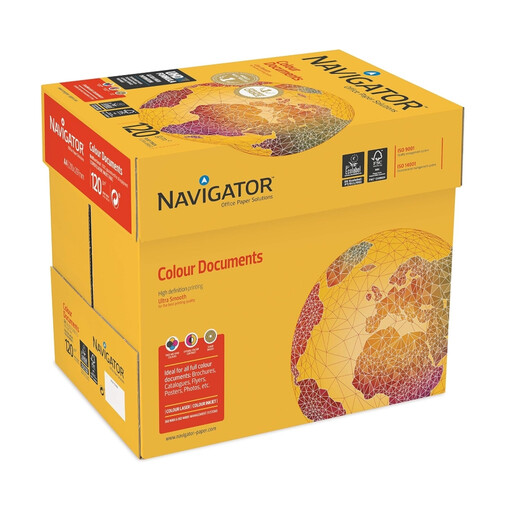
Why This Fits Their Persona: Suitable for presentation sheets, brochures and colour-led documents where a heavier, smoother sheet is preferred.
The clearly stated 120gsm weight helps buyers avoid mistaking standard office paper for presentation stock.
Smooth matte finish, 169 CIE whiteness, FSC certification and EU Ecolabel approval are specified features.

Why This Fits Their Persona: Designed for home offices, schools and small businesses handling frequent print, scan and copy tasks.
Its refillable tank design, 250-sheet tray and 35-page automatic document feeder are specified for regular workloads rather than occasional use.
Automatic duplex printing, Wi-Fi, Ethernet and stated included-ink yields of up to 13,300 black and 5,200 colour pages support sustained use.
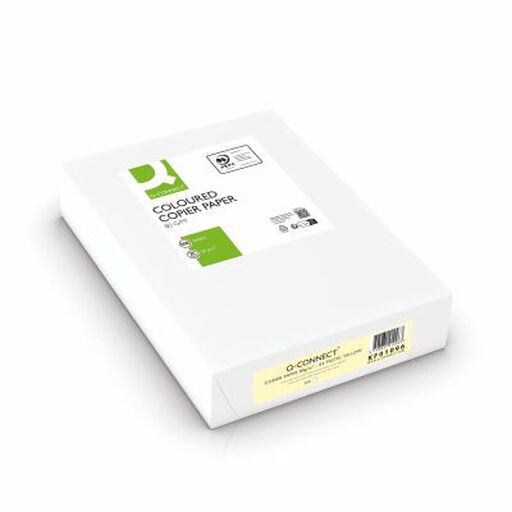
Why This Fits Their Persona: A practical choice for colour-coded notices, leaflets, classroom materials and internal communications printed on laser printers or copiers.
The A4 format, 80gsm weight, 500-sheet ream and stated laser-printer and copier compatibility make the intended use clear.
Pastel yellow stock and a smooth surface provide a visible alternative to standard white office paper.
We have compiled a complete, real-time list of products that fully satisfy these strict selection criteria and UK safety regulations.
Usually, yes, provided the printer supports standard plain paper. Check the printer manual and select the correct paper setting. For dense colour coverage or photographs, inkjet-specific paper may provide a more suitable finish than ordinary copier paper.
It depends on the printer’s supported media range and duplex mechanism. Check the specification before loading 120gsm stock. If automatic duplex is not supported at that weight, manual double-sided printing may be required.
Keep reams sealed until needed and store them flat in a cool, dry place. Avoid lofts, garages, kitchens and areas close to heating appliances, where humidity or temperature changes may affect feeding. For offices buying bulk printer paper, use older stock first and keep cartons off damp floors.
An EcoTank printer can reduce the frequency of cartridge replacement for users with regular workloads because it uses refillable tanks. Actual costs depend on page coverage, print settings, ink prices and maintenance. Compare expected monthly pages with the printer’s stated yield rather than relying only on the purchase price.