If the desk clock is your only AA-powered device, check its instructions before buying rechargeable cells and a charger; suitable disposable cells may be the simpler choice. If you already use rechargeable AAs, a USB-input charger can avoid occupying another wall socket when you have a compatible USB source, while an individual-slot mains charger makes more sense when you need to prepare single cells or AA and AAA spares and can spare a socket.
Who is this decision for?
Clock-only users
If the desk clock is your only AA-powered device, the decision starts with whether it should use rechargeable cells at all. Energizer advises against NiMH rechargeables in clocks, while the clock maker's instructions determine what is suitable for your model.
Rechargeable users short of sockets
If you already charge AA cells for other devices, a USB-input charger could help you prepare clock spares without taking another wall socket, provided you have a compatible USB power source.
Households preparing different spares
If you charge AA and AAA cells for several devices, independently controlled slots can be useful when you have just one cell to prepare. You would still need a socket for a mains-powered model such as the Panasonic eneloop BQ-CC55.
What should you check before buying?
No charger
Consider this when: The clock is your only AA device and its instructions favour disposable cells.
Trade-off: You avoid a charging routine but need to replace and recycle used cells.
USB-input charger
Consider this when: You already use rechargeable AAs and have a compatible USB source available instead of a spare wall socket.
Trade-off: Slot rules vary. Panasonic's BQ-CC80, for example, requires two cells of the same size together and uses a fixed 10-hour timer.
Individual-slot mains charger
Consider this when: You need to charge a single spare or different AA and AAA cells and can use a wall socket.
Trade-off: A model such as the Panasonic eneloop BQ-CC55 offers separate slots but occupies a mains outlet while charging.
| Concern |
What to check |
Who this matters to |
| Rechargeables for the clock |
Read the clock's battery label and instructions for cell type, polarity and any guidance on rechargeables. |
If the clock is my only AA device, I want to know whether a charging routine is worthwhile before buying into one. Around 36% of consumers put that clock-only decision first. |
| Wall-socket use |
Check the charger's power input and whether you have a compatible USB source; check adapter inclusion separately. |
When sockets are scarce, I want to charge batteries without occupying another one. Avoiding a wall socket is the primary need for around 29% of consumers. |
| Charging routine |
Check the minimum cell count and whether the charger uses a fixed timer or indicates charging status. |
I would rather have a straightforward way to prepare the cells I actually use than choose by a headline charging time. Keeping the routine simple comes first for around 21% of consumers. |
| Flexible spares |
Confirm individual-slot operation and support for the AA and AAA rechargeable cells you plan to charge. |
If I also need spares for other devices, charging one cell or different sizes matters more than saving a socket every time. Around 14% of consumers prioritise that flexibility. |
Mistakes to avoid
-
Assuming every AA cell is rechargeable
AA describes a cell size, not its chemistry. A charger intended for nickel-metal hydride (NiMH) rechargeables must not be used to charge disposable alkaline or other dry cells.
Check the labels and instructions for both charger and batteries before inserting any cells.
-
Choosing USB power without checking the setup
A USB connection only helps with limited sockets if you have a suitable power source. Panasonic's BQ-CC80 also requires two AA cells or two AAA cells together; it cannot charge one cell on its own.
Confirm the input requirement, what comes in the box and the minimum number of cells the particular charger accepts.
If you do not already have a compatible USB source, you may need a separate power adapter.
-
Reading a charging-time claim as a promise for every battery
Stated times apply under particular conditions. Duracell's approximately four-hour figure for its Hi-Speed Value Charger concerns four 1300 mAh AA NiMH cells reaching about 90% charge, not every AA cell reaching full charge.
Compare timings only alongside the stated battery capacity, charge level and other manufacturer conditions.
-
Putting used batteries or a charger in household rubbish
UK government guidance directs consumers to use appropriate collection routes for batteries and electrical products rather than household rubbish.
Take used AA cells to a battery collection point and an unwanted charger to an electrical-waste collection point.
Brands to consider
Panasonic eneloop
Panasonic offers both a USB-input two-cell charger and an individual-slot mains model in its eneloop range.
- The BQ-CC80 uses DC 5 V USB input; the BQ-CC55 can charge one to four compatible eneloop AA or AAA cells independently.
- The BQ-CC80 needs two cells of the same size together and has a fixed 10-hour timer. The BQ-CC55 needs an AC outlet; check the plug variant for your region.
Duracell
Duracell's mains charger range is relevant if you can allocate a socket while charging AA or AAA NiMH cells.
- The Hi-Speed Value Charger includes automatic shut-off. Duracell states an approximately four-hour result for four 1300 mAh AA NiMH cells at about 90% charge.
- That timing is tied to the stated cells and charge level; a mains charger still occupies a socket.
Energizer
Energizer's battery guidance is relevant when deciding whether NiMH rechargeables suit a clock, rather than establishing that any particular charger fits this desk clock.
- Its charger guidance distinguishes NiMH rechargeable cells from batteries that must not be charged.
- Energizer advises against NiMH rechargeables in clocks. Check the instructions for the actual clock and charger rather than assuming compatibility from the AA size.
USB charger option on Joybuy
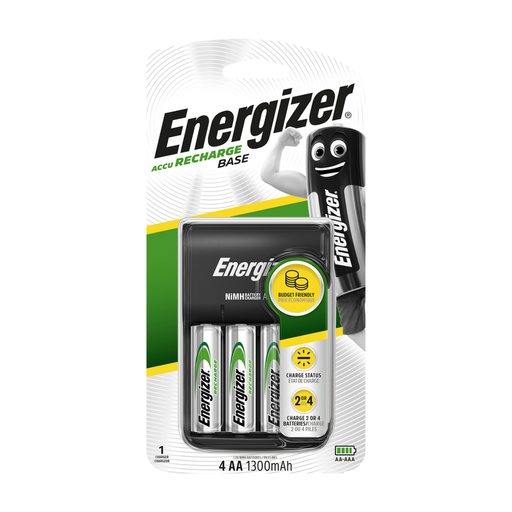
This USB charger is relevant if you already plan to use rechargeable AA cells and have a suitable USB power source. Check your desk clock's instructions before choosing NiMH cells for it.
 No image available
Energizer USB Battery Charger with 4 × AA 1300 mAh rechargeable cells
A USB-connected option for preparing rechargeable AA cells when you have a compatible power source available.
The named bundle includes four rechargeable AA cells rated at 1300 mAh each. Before buying, check the charger's USB input requirements and minimum cell count if you need to charge a single spare.
View on Joybuy
Frequently asked questions
Is a rechargeable AA charger worth buying just for a desk clock?
Not necessarily: check the clock's instructions before buying rechargeable cells. Energizer advises against NiMH rechargeables in clocks, while Duracell says its rechargeable round cells can be used where alkaline cells are used unless the device maker says otherwise. If this is your only AA device, weigh the charging routine against using suitable disposable cells.
Will a USB AA charger free up a wall socket?
It can if you have a compatible USB power source that does not require the socket you are trying to free up. Panasonic's BQ-CC80, for instance, uses DC 5 V USB input, but its USB power adapter is not included. Check the requirements of the model you choose.
Can I charge just one spare AA cell?
Only if the charger supports single-cell charging. Panasonic's USB-input BQ-CC80 requires two cells of the same size together, whereas its mains-powered BQ-CC55 has independent slots for one to four compatible cells. Check the slot rules for any other model before buying.
Where should used AA cells and an unwanted charger go in the UK?
Use separate collection routes rather than putting them in household rubbish. UK government guidance points consumers towards battery collection points for portable cells and appropriate electrical-waste collection for an unwanted charger.


